[PAID] Pogue Bodyguard Full Release [VORP & RSG]

:loudspeaker: Pogue Bodyguard Full Release is Here! :shield:

The wait is over! The full version of the Pogue Bodyguard system is now live, bringing you the ultimate protection and control for your RedM experience. Here’s what makes this release a game-changer:



:boom: :boom: :boom: SHOWCASE :boom: :boom: :boom:


:sparkles: Key Features

  • All-New Command: Say goodbye to multiple commands! Simply use /bmenu to summon, manage, and control your bodyguards with ease.
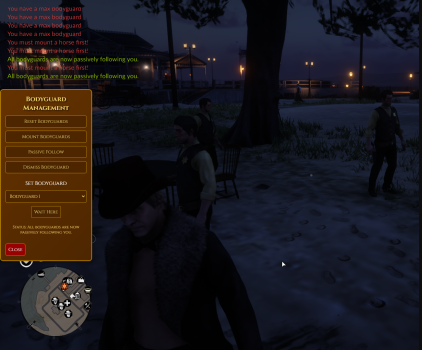
  • Streamlined Management: The new /bmenu command gives you access to a simple and intuitive interface to position, mount, reset, and command your bodyguards.
  • NPC-Based Summoning: Bodyguards are now summoned via an NPC at a predefined location. You can move this NPC to any position that suits your needs, making it even more convenient to access your bodyguards.

:muscle: Smarter Bodyguards, Enhanced Gameplay

  • Dynamic Following: Bodyguards will follow you seamlessly whether you’re on foot or horseback.
  • Combat Ready:
    • Your bodyguards will fight alongside you, whether you’re taking on NPC enemies or fending off predators.
    • Simply aim at an NPC, and your bodyguards will spring into action.
  • Advanced Positioning:
    • Assign bodyguards to specific locations for tactical advantages. They’ll remain in passive mode until reactivated.
    • Use /bmenu to adjust their positions anytime.
  • Horseback Integration via Menu: When you mount your horse, you can use the /bmenu interface to make your bodyguards mount theirs too.

:bug: Fixes & Improvements

  • Full Stability: Major bugs from early access have been squashed for a smoother, more reliable experience.
  • Steam ID Limits: You can now configure how many bodyguards each player can summon based on their Steam ID.

:boom: Ready to Dominate?

Your bodyguards are smarter, stronger, and fully at your command! With the full release, this system will take your gameplay to the next level.


:tools: Included in This Release

  • Full UI Menu for Management:
    You can now control everything with an intuitive UI accessible via /bmenu. This includes positioning, mounting, resetting, and commanding bodyguards without relying on multiple commands.
  • NPC-Based Summoning:
    Your bodyguards can now be summoned by interacting with an NPC at a predefined location. You can even move this NPC to a new position to better fit your needs.
  • Enhanced Protection:
    Bodyguards now actively protect you against other players, targeting anyone you aim at or those who attack you.

For questions, feedback, or suggestions, don’t hesitate to reach out to us. Your input helps us make Pogue Bodyguard the best it can be. :raised_hands:

Pogue Bodyguard is now at its full potential. Try it today!

:shopping_cart: Get your copy on Tebex: Pogue Bodyguard Script


:fire: Check Out My Other Scripts!

Looking for other high-quality scripts to enhance your server? Check these out:

:arrow_right: Pogue Police with MDT & Radial Menu (VORP): View it on the CFX Forum

:arrow_right: Pogue BloodBet [VORP] RedM to MMORPG: View it on the CFX Forum

:arrow_right: Pogue Witness with Dispatch [VorpCore]: View it on the CFX Forum

:arrow_right: Pogue Telegram (VORPCore Framework): View it on the CFX Forum

:arrow_right: Pogue Battleground [VorpCore]: View it on the CFX Forum

:arrow_right: Pogue Saloon Job [VorpCore]: View it on the CFX Forum

:arrow_right: Pogue AFK System — AFK Verification for RedM: View it on the CFX Forum

:arrow_right: Pogue Stockmarket Version 2 VorpCore & RSG: View it on the CFX Forum

:arrow_right: Pogue Paperworks (VORPCore Framework): View it on the CFX Forum

:arrow_right: Pogue Stockmarket For RedM VorpCORE & RSG: View it on the CFX Forum

:arrow_right: Pogue Liar’s Deck Game VorpCORE & RSG: View it on the CFX Forum

:arrow_right: Pogue Boss Menu Script (VORPCore Framework): View it on the CFX Forum

:arrow_right: Pogue Realistic Notepad Script (VORPCore Framework): View it on the CFX Forum

:arrow_right: Pogue Excavation (Digging) Script (VORPCore Framework): View it on the CFX Forum

:arrow_right: Pogue Redipedia [STANDALONE]: View it on the CFX Forum

:arrow_right: Pogue High Ping Kick [STANDALONE]: View it on the CFX Forum

:arrow_right: Pogue Safe Zone (VORP & RSG Core): View it on the CFX Forum


:globe_with_meridians: Join the Community & Get Support

:pushpin: Discord: Join our Discord

:clipboard: Script Details

Property Information
Code is accessible No
Subscription-based No
Lines (approximately) 1300+
Requirements VORP & RSG
Support Yes

Pogue Bodyguard Update: New Features and Bug Fixes!

Pogue Bodyguard version 1.1 update now Live! We’re thrilled to introduce a small but impactful update to the Pogue Bodyguard system! This update focuses on improving usability, fixing minor bugs, and adding highly-requested features to enhance your RedM experience. —

What’s New

  • Passive Follow Mode:
    Your bodyguards can now follow you without engaging in combat. Perfect for immersive roleplay or non-combat scenarios!

  • Dismiss All Bodyguards:
    A new feature lets you dismiss all active bodyguards when they’re no longer needed, keeping things organized and efficient.

  • UI Enhancements:
    The /bmenu interface has been updated with new options for better control:

    • Set bodyguards to passive follow mode
    • Dismiss bodyguards with a single click
    • Improved layout for ease of use
  • Language Localization:
    The system now supports full language customization, allowing you to tailor all notifications and menu text to your preferred language.


Bug Fixes

  • Resolved minor issues to improve system stability and reliability.
  • Addressed UI inconsistencies for a smoother user experience.

Update Now!

The latest version is now available for download. Log in to your Keymaster account to update and take advantage of these exciting improvements. —

Summary of Additions

  • Passive Follow Mode:
    Bodyguards now follow without engaging in combat unless explicitly commanded.
  • Dismiss Feature:
    Easily dismiss all bodyguards with a simple UI option.
  • UI Improvements:
    New features integrated seamlessly into the /bmenu interface for better control.
  • Language Customization:
    Fully localizable menu and notifications for global accessibility.

— Thank you for your continued support and feedback! We’re always working to make the Pogue Bodyguard system better for you. Try the updated Pogue Bodyguard today!

1 Like

:rotating_light: Pogue Bodyguard v1.2.0 Update :rotating_light:

We’re excited to announce the v1.2.0 update for Pogue Bodyguard! :tada:

:new: What’s New?

  • Each Steam ID can now have custom bodyguard models and unique horse models! :horse::shield:
  • Tailor your bodyguard and horse setup for individual players with ease.

:bulb: How it Works:

Admins can define specific bodyguard and horse models for players in the configuration file. This update brings a new level of personalization to enhance your roleplay experience!

:busts_in_silhouette: Example Configuration:

Config.AllowedSteamIDs = {
    ["steam:111111111111111"] = {
        limit = 5,  
        npcModel = "CS_valdeputy_01",  
        horseModel = "a_c_horse_turkoman_black"  
    },
    ["steam:222222222222222"] = {
        limit = 3,
        npcModel = "CS_micahbell",
        horseModel = "a_c_horse_thoroughbred_bloodbay"
    }
}

:dart: Benefits:

  • Assign unique bodyguards and horses per player.
  • Adds immersive customization to your server!

:key: Keymaster Update:

Please update the Pogue Bodyguard resource from your Keymaster account to access the latest features and improvements. :rocket:

:shield: Pogue Bodyguard v1.3.0 Update

:fire: 1. Account-Based Bodyguard Profiles (per Steam ID)

Bodyguard settings are now fully account-specific via Config.AllowedSteamIDs:

  • Separate settings per Steam ID:
    • limit – max bodyguards for that account
    • npcModel – bodyguard ped model
    • horseModel – horse model
    • weapons – weapon list with ammo for each weapon
    • health – max health override
    • canBeDamaged – can the bodyguard take damage?
    • invincible – full invincibility toggle
    • accuracy – shooting accuracy (0–100, used by SetPedAccuracy)

If a field is not defined for a Steam ID, the system automatically falls back to global defaults.


:dart: 2. Global Stat Defaults & Combat Behaviour

New and refined global config values:

  • Config.BodyguardHealth – default max health
  • Config.CanBeDamaged – default damage toggle
  • Config.BodyguardInvincible – default invincibility
  • Config.BodyguardAccuracy – global default accuracy (0–100)
  • Config.DefaultBodyguardWeapons – fallback weapon loadout if an account has no custom weapons list

On the client side, the spawn logic now:

  • Sets health & max health from config / account
  • Applies damage & invincibility flags
  • Uses SetPedAccuracy(ped, accuracy) with per-account or global values
  • Gives weapons with configured ammo values

This allows:

  • “Elite” guards with high HP & accuracy for specific ACCs
  • More casual / weaker guards for others using the same system.

:keyboard: 3. Command Customization & Toggles

Bodyguard commands are now configurable from config.lua:

Bodyguard Menu Command

  • Config.BodyguardMenuCommand = "bmenu"

You can now rename the menu command easily:

  • /bmenu/bodyguardmenu, /guardmenu, etc.
    Just change the value in the config.

Call Bodyguard Command

  • Config.CallBodyguardCommandEnabled = true
  • Config.CallBodyguardCommand = "callb"

Features:

  • Turn the summon command on/off from config:
    • true → command is registered (/callb or your custom name)
    • false → command is disabled
  • Rename the call command without touching code:
    • Example: Config.CallBodyguardCommand = "summonb"/summonb

Pogue Bodyguard v1.4.0 – Update Logs

:rotating_light: Overview

Bodyguards are now smarter, cleaner, and far more immersive – especially when it comes to horses and follow behavior.


:horse: Dynamic Horse System

  • If you are on a horse, each bodyguard will:
    • Automatically look for the nearest free horse around them.
    • If no suitable horse is found nearby, a new horse is spawned for that bodyguard.
    • They mount up and follow you on horseback.
  • When you dismount, your bodyguards also dismount and continue on foot.

:footprints: Smarter Follow Behavior

  • The old circular / orbit formation system has been removed.
  • Bodyguards now use a more natural and realistic follow style:
    • They trail behind you instead of spinning around you.
    • Movement looks less “scripted” and more like real NPC followers.

:satellite_orbital: Owner-Only Blip System

  • Every bodyguard now has a map blip.
  • Only the owner of the bodyguards can see these blips.
  • This makes it much easier to:
    • Locate your guards in crowded areas.
    • Find a lost or stuck bodyguard on the map.

:broom: Automatic Cleanup on Disconnect

  • When a player leaves the server, all bodyguards registered to that player are:
    • Automatically cleaned up and removed from the world.
  • No more stray or “orphaned” bodyguards left standing around after disconnects.

Pogue Bodyguard v1.5.0 — Update Notes

:white_check_mark: Job-Based Protection (Player + Bodyguards)

We’ve added a full Job Protection system that prevents bodyguards from attacking protected roles — and it now applies to both:

  • Protected Players (based on their job)
  • Protected Players’ Bodyguards (same protection rules as the owner)

If a player is marked as protected (via config), their bodyguard NPCs are treated as protected too.
This prevents cases where other players’ bodyguards accidentally target law roles or important factions due to AI combat logic.


:lock: Global Protected Jobs

You can define a global protected job list in the config:

  • Bodyguards will never attack players with these jobs (even during combat).
  • The same protection automatically applies to the player’s bodyguards as well.

:brain: Off-Duty Job Support

Optional setting to treat off-duty jobs as protected too:

  • Example: offvalsheriff is treated like valsheriff

:shield: Unknown Job Safety (Optional)

You can decide what happens when a player’s job is not known yet (during sync delay):

  • If enabled, bodyguards will also avoid attacking players with unknown jobs until job-sync arrives.

This is recommended for safer servers to prevent accidental attacks while job info is still loading.


:star: Per-SteamID Overrides (Merge / Override)

Each Steam ID can have its own protection rules:

  • merge: global protected jobs + extra jobs for that account
  • override: only use that Steam ID’s job list (ignore the global list)
  • Optional per-account policy for unknown jobs as well

:repeat: Job Sync System (Statebag Based)

Clients periodically sync their job/grade to the server, and job info is replicated through statebags so all clients can correctly apply protection logic.

This ensures:

  • Accurate job detection across clients
  • Consistent protection behavior in combat
  • More stable AI behavior (less random targeting)

:white_check_mark: Extra Safety: Combat Clamp

Even if a bodyguard somehow enters combat with a protected target, the system hard-breaks combat instantly and forces the guard back into follow mode.


:handshake: New Fix: Bodyguards Won’t Fight Each Other (Per-Owner Relationship Groups)

Since bodyguards are now created under separate owner IDs, there was a risk that different players’ bodyguards could see each other as enemies.

In v1.5.0 we prevent this by using per-owner relationship groups and a friendly-lock system:

  • Each player gets their own unique relationship group (based on server ID / owner key)
  • Their bodyguards are assigned to that group
  • Friendly fire is hard-disabled (AI can’t “accidentally” switch targets)
  • Relationship rules are applied to reduce random guard-vs-guard aggression

Result:
:white_check_mark: Your bodyguards stay friendly to you and your group
:white_check_mark: Other players’ bodyguards won’t randomly start fighting your bodyguards
:white_check_mark: Much more stable AI behavior in busy towns / law areas