Hello FiveM deployed some changes yesterday to properly integrate with Steam as its own app (https://steamdb.info/app/2676230) instead of using the old hacky solution.
As a result of that for the integration to work, Steam needs to not be running as Admin. You can check if it currently is running as admin like this:
- Make sure Steam is running
- Then open Task Manager and go to the “Details” tab
- Right click on the columns (Name, PID, Status, etc) and select “Select columns”
- Scroll down until you see “Elevated” and enable it then press “Ok”
- Scroll down until you find Steam and see what “Elevated” is (Yes or No)
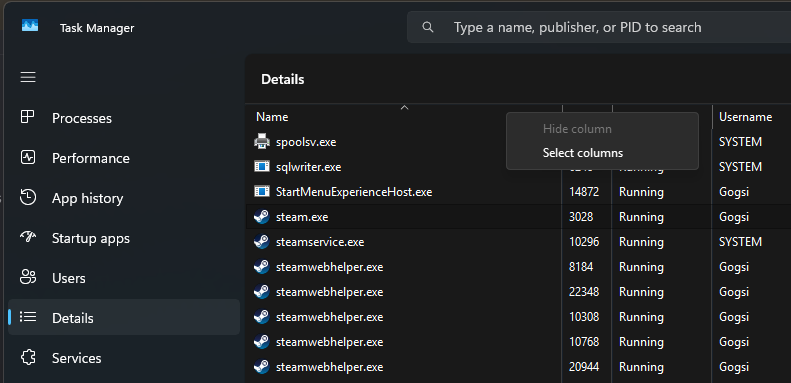
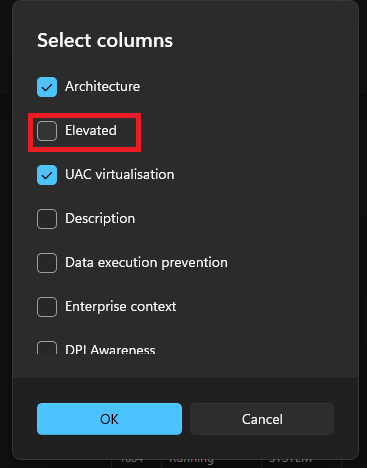
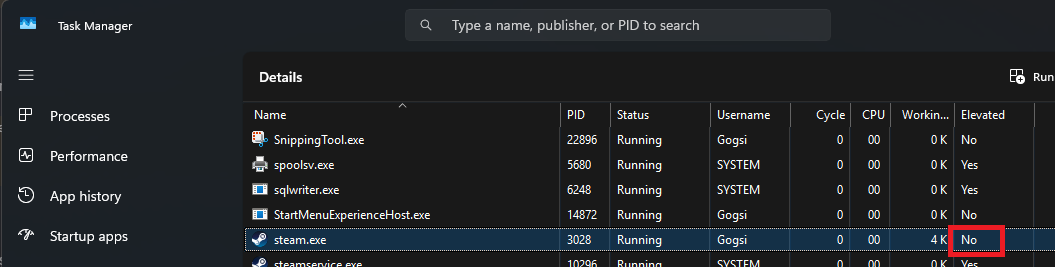
If Steam is marked as “Elevated: Yes” then it’s running as admin, which you will need to disable. Go to your Steam installation folder (probably C:\Program Files (x86)\Steam right click on steam.exe, click Properties, then select the Compatibility tab and uncheck “Run this program as an administrator”
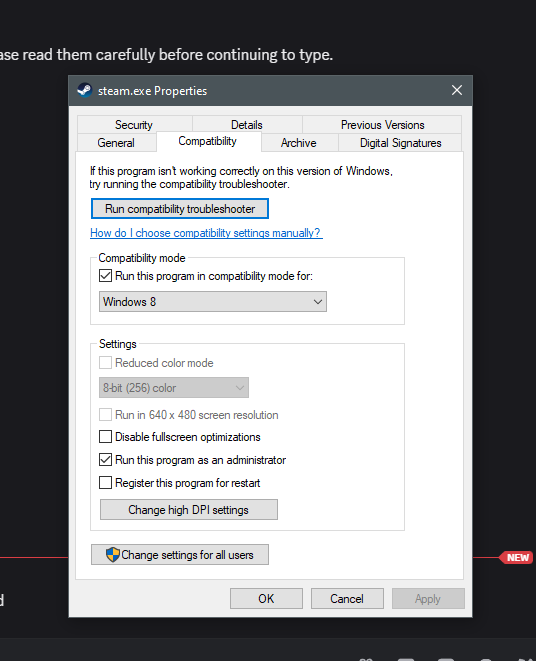
Press OK, restart Steam and FiveM and the overlay and authentication should work again!