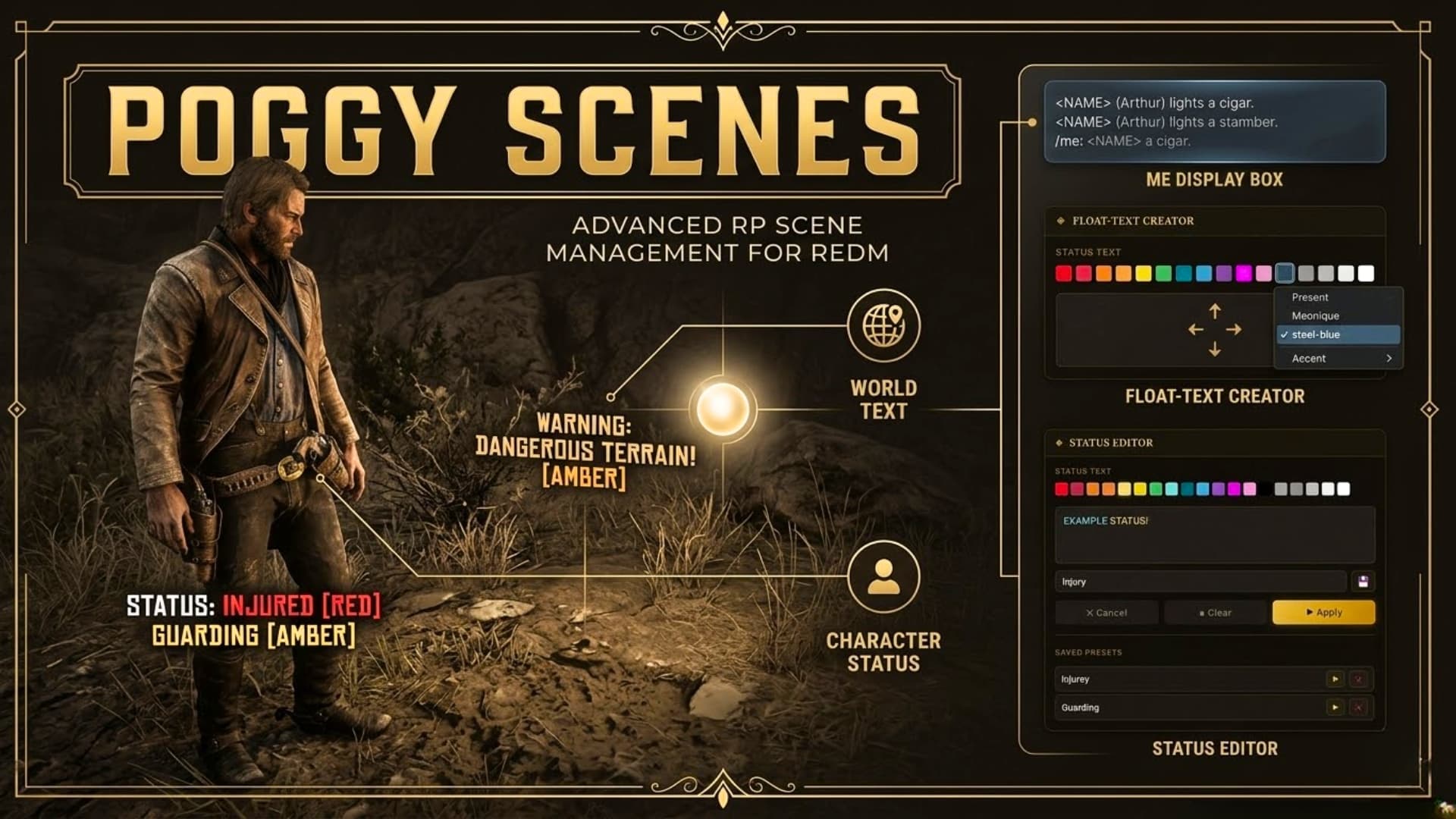
A feature-rich roleplay utility for RedM that brings together world-anchored scene text, character status labels, overhead /me action text, and a persistent nearby-message box — all wrapped in a fully custom NUI editor with colour formatting, font size control, and saved presets.
Features
 Scene Placement
Place floating lines of richly formatted text at any position in the world. Scenes are server-persistent — they survive reconnects and resource restarts and are visible to every player within range.
The editor is a two-phase NUI panel:
- Phase 1 — Text Editor: Type your scene text with live colour swatches (19 in-game RDR2 colour codes) and a font size selector. Mix colours and sizes on the same line. Text is formatted using native RDR2 markup (
<font size>+ tilde colour codes) and displays exactly as authored in the game engine. - Phase 2 — Position Editor: Fine-tune X/Y/Z placement with mouse-wheel scroll, stepper buttons, or direct number input. A live 3D preview shows the text in the world as you move it.
 Status Labels
Attach a persistent coloured status tag above your character — injury states, moods, RP flags, anything you like. Visible to all nearby players at all times.
/statusalone opens the full NUI editor with colour formatting./status some textis a quick-fire shortcut with no UI.- Save frequently-used statuses as named presets and recall them instantly.
/cstatusclears your status.
 On character /me & /do
/me and /do messages float on the sending player’s body with a subtle dark background pill. Multiple messages stack upward so nothing overlaps. Each entry auto-expires after a configurable duration (default 10 seconds).
 ME Display Box
A semi-transparent message box at the top-centre of the screen collects nearby /me messages so you never miss a emote even when the overhead text has faded.
- Auto mode — fades after a configurable idle timeout.
- Persist mode — stays visible as long as there are messages.
- Drag to reposition —
/mebox movelets you drag the box anywhere on screen; position is saved permanently. - Three widths — small / normal / large via
/mebox small|normal|large. - Messages older than 5 minutes dissipate permanently on their own.
- On reopen the box scrolls to the newest messages; older history is still accessible by scrolling up.
- Per-job name colours — configure a hex colour per job so Doctors, Law, Govt etc. are colour-coded at a glance.
 Editor UI Themes
Six built-in colour schemes for the Scene and Status editor panels:
| Theme | Look |
|---|---|
amber-frontier |
Old West sepia gold (default) |
steel-blue |
Modern dark navy & steel blue |
ivory-noir |
Pure black & white |
lavender-dusk |
Soft pastel lavender |
crimson-dusk |
Deep dramatic red |
emerald-ridge |
Earthy forest green |
Set with a single line in config.lua — no restart required, applies on character load.
Commands
| Command | Description |
|---|---|
/scene |
Open the Scene Editor |
/me <text> |
In-character action (overhead + ME box) |
/do <text> |
OOC description (overhead) |
/status [text] |
Set/edit status label |
/cstatus |
Clear status label |
/id |
Show your server ID above your character |
/cash |
Show your cash above your character |
| `/mebox auto | persist |
All command names are fully configurable.
Configuration Highlights
Everything is controlled from a single config.lua:
- Scene visibility radius
- Per-job scene removal permissions (staff can remove any scene)
- Job-lock (restrict
/sceneto specific jobs) - ME Box distance, timeout, max lines, scroll history, message dissipation time
- Per-job name colour map for the ME Box
- 19 RDR2 in-game text colour swatches (customisable hex + display name)
- UI panel theme selection
- Discord webhook for scene placement logging
Requirements
MY OTHER SCRIPTS
- Poggy Scenes
- Poggy Trash Bins
- Poggy’s Balloon
- Poggy’s Supply Drops
- Witnesses
- The Multijob Substitute [FREE]
- Poggy’s Admin Blips [FREE]
- Character Storage [FREE]
- Crafting UI Overhaul [FREE]
- Rosewood Ridge RP [OUR SERVER]
Download

Preview
| Code is accessible | Client and Config files open |
| Subscription-based | No |
| Lines (approximately) | ~2,500 |
| Requirements | VORP Core, oxmysql |
| Support | Yes |