wasvendel_tag
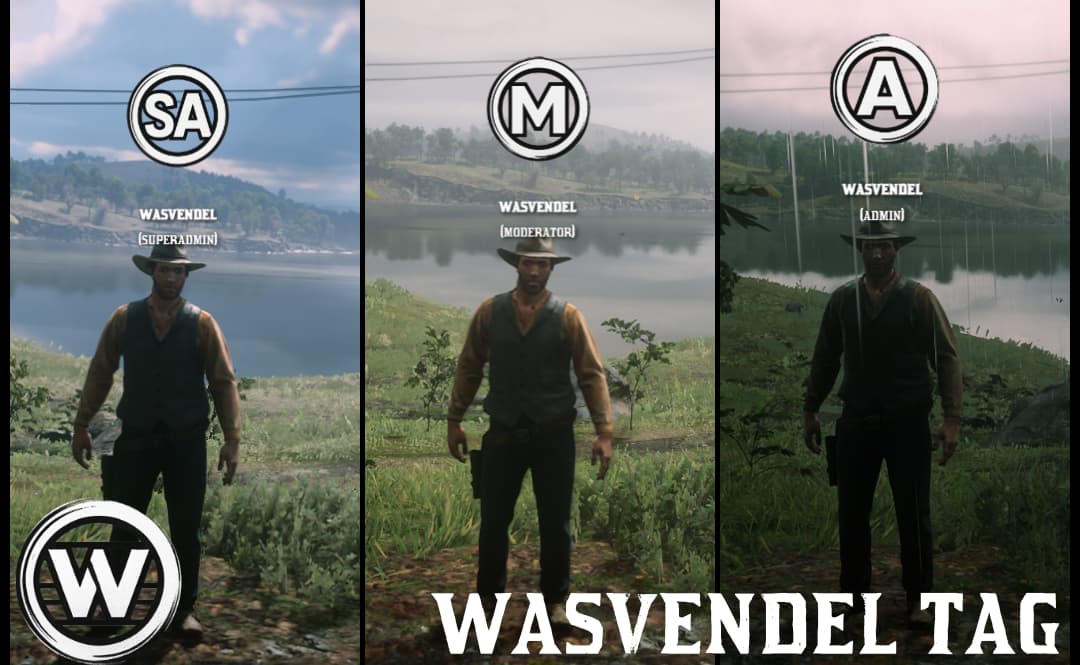
Admin tag system for VORP and RSG frameworks. Tags appear in 3D above the character’s head with automatic distance-based scaling.
Key Features
- 3D Display – Tags appear above the character’s head in 3D space
- Automatic Scaling – The farther you are, the smaller the tag appears
- Steam Name and Rank – Automatically displays the player’s Steam name and rank
- Rank-Based Access – Only users with ranks defined in the config can enable their tag
- Visible to Everyone – When an admin enables their tag, everyone can see it
Setting Tags for Ranks
In the config.lua file, define tags based on ranks.
Images
- Place tag images in the ui/img/ folder
- Supported formats: PNG, JPG, JPEG
- Recommended size: 150x150 pixels or larger (with transparent background)
- File names must match the ones specified in the config
Functionality
- Rank Check: The script automatically detects the player’s rank (VORP/RSG)
- Tag Loading: If the rank is listed in Config.Tags, the tag is loaded
- Activation: Admins use the /tag command to enable their tag
- Display: The tag appears in 3D above the character’s head, visible to everyone
- Scaling: The tag automatically scales down with distance
Locked files:
The server and client files are locked via CFX Escrow, while the config.lua file remains fully open and editable.
Dependencies:
- VORP or RSG
 BUY ON TEBEX
  DISCORD (SUPPORT + FREE SCRIPTS)
 SHOWCASE
Check my other scripts:
- [PAID] [VORP/RSG] Admin menu
- [PAID] [VORP/RSG] Admin tag
- [PAID] [VORP/REDEM:RP] Banking
- [PAID] [VORP/RSG] Blackmarket v2
- [PAID] [VORP/RSG] Birdmail 2.0
- [PAID] [VORP/RSG] Blipmanager
- [PAID] [VORP] Advent calendar
- [PAID] [VORP] Crafting
- [PAID] [VORP/RSG] Dispatch 2.0
- [PAID] [STANDALONE] Emote menu
- [PAID] [VORP/RSG] Luckycase 2.0
- [PAID] [VORP/RSG+CUSTOM FRAMEWORK OPTION] MDT + Bountyboard
- [PAID] [VORP/RSG] Sellshop v2
- [PAID] [VORP/RSG] Store v2
- [PAID] [VORP/RSG] Ticket System
- [PAID] [VORP/RSG] DM zone
| Code is accessible | No |
| Subscription-based | No |
| Lines (approximately) | 500+ |
| Requirements | VORP or RSG |
| Support | Yes |