Aesir Compass - The Native Scaleform Navigation

 BUY NOW ON TEBEX
Introduction
Navigation shouldn’t cost you FPS.
Most compass scripts use HTML/CSS (NUI) to render the bar and cardinal points. This often leads to “jittery” rotation or high CPU usage because the browser has to repaint the DOM constantly as you look around.
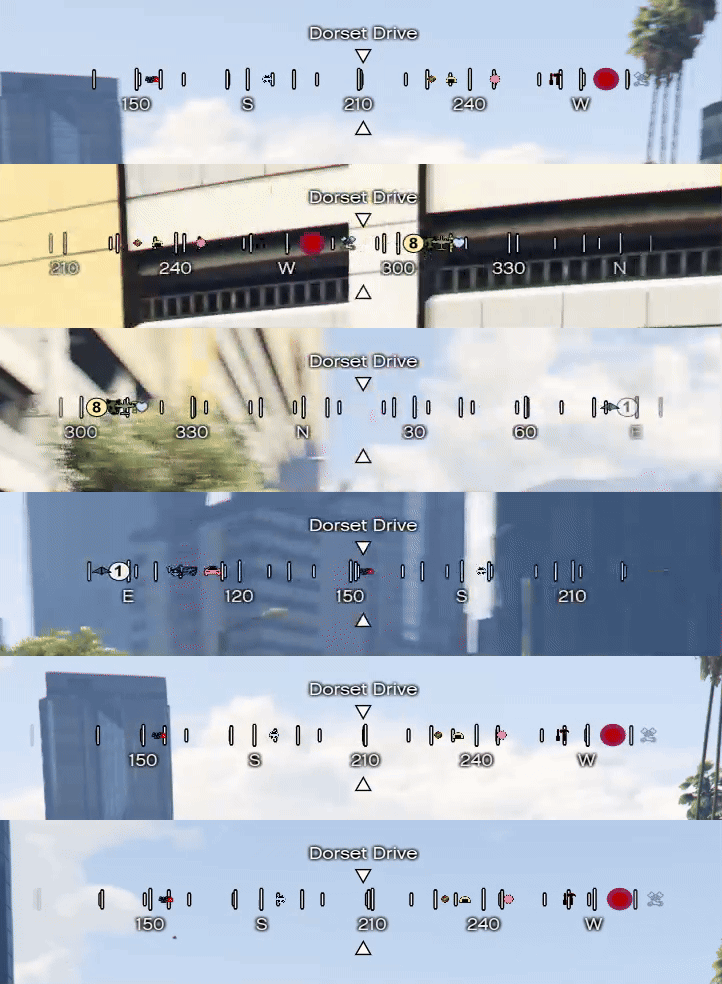
Aesir_Compass is different. It is built entirely on GTA V’s Native Graphics Engine (Scaleform/GFX).
It renders directly on the GPU canvas, providing 100% smooth rotation synchronized perfectly with the game camera, with negligible impact on performance.
Taken from Eir HUD this compass is a standalone version of the same component used in it.
Take a look at Eir HUD here!
Key Features
 Native Rendering: Zero-latency rotation. No “web browser” overhead.
 Dynamic Blips: Automatically displays blips on the compass bar (waypoints, enemies, teammates) if configured.
 Street & Zone Names: Clear, crisp text rendering for current location and crossing streets.
 Dual Modes: Supports both Camera Heading (where you look) and Entity Heading (where your vehicle points).
 Fully Customizable: Change colors, sizes, positions, and visible elements easily via config.
 Standalone: Works with ESX, QBCore, vRP, or no framework at all.
Performance
Because it uses native natives instead of a heavy web interface, the resource usage is extremely low even during fast rotation.
- Resmon: 0.02ms - 0.06ms (Values may vary based on client hardware).
- Memory: Minimal RAM usage compared to NUI alternatives.
Configuration Snippet
The configuration is simple and allows you to toggle components effortlessly:
Config = {
    PerformancesMode = false,        -- set to true to make the Compass run on low fps mode (will be less smooth)
    showParallax = true,            -- Enables layered parallax movement based on camera rotation
    showDegrees = true,             -- Displays numeric degree values along the compass
    showCardinals = true,           -- Displays cardinal directions (N, E, S, W and intermediates)
    showBlips = true,               -- Projects radar/map blips onto the compass
    maxBlipDistance = 500.0,        -- Maximum world distance for blips to appear
    unusedBlips = {                 -- By default all the "Red squared" blips are in this list feel free to add your own. The more the better.
                                    -- removed from here for readability.
    },
    rotationType = 0,                  -- Rotation source: = 0 -> any rendering camera, 1 -> ped heading
    spacing = 30,                      -- Distance between tick marks
    degreeStep = 15,                   -- Degree interval between numeric labels
    pixelsPerDegree = 2.5,             -- Horizontal scale defining visible degree range
    maskWidth = 450,                   -- Pixel width of the visible compass mask
    mainTickHeight = 15,               -- Height in pixels of major tick marks
    subTickHeight = 8,                 -- Height in pixels of secondary tick marks
    -- The script comes with the ScaleformUI Color library (SColor) included for easy color management.
    tickColor = SColor.HUD_White,      -- Color used for all tick marks
    degreeColor = SColor.HUD_White,    -- Color used for numeric degree labels
    directionColor = SColor.HUD_White, -- Color used for cardinal direction letters
    parallaxBackground = 0.4,          -- Parallax strength for background layer
    parallaxForeground = 0.6,          -- Parallax strength for foreground layer
    fadeDistance = 50,                 -- Pixel distance for edge fade in/out
    fontSize = 13,                     -- Font size for text elements
    fontFamily = "$Font2"              -- Font used for compass text
}
Gallery
Purchase
Get the smoothest navigation experience for your server.
Click here to buy on Tebex
Protected by FiveM Asset Escrow System.
| Code is accessible | No (only open source parts) |
| Subscription-based | No |
| Lines (approximately) | ~1000 |
| Requirements | > 80QI |
| Support | Yes |
Take a look at my other scripts
- ScaleformUI [Free]- ScaleformUI - A lightweight, fast and fun API
- Bubble Emotes [Paid] - [PAID] Bubble Emotes – Express Yourself Visually! [STANDALONE] [RP]
- ScaleDraw [Free] - [FREE][ESX,QB,OX,WHATEV..] ScaleDraw [STANDALONE]
- Brynhildr Inventory (Valkyr series) [Paid] - [RELEASE] [PAID] [STANDALONE] 🚀 Brynhildr 3D Inventory
- Eir HUD (Valkyr series) [Paid] - [Paid] [ESX-QB-QBOX-STANDALONE] Eir HUD - Valkyr Series
- Rounded Minimap [Paid] - [PAID] [Standalone] Rounded Minimap [ESX] [QB] [ALL Frameworks to be tagged go here]

 I’ll be grabbing for sure
 I think this is very useful and not just a basic compass