Aesir Utils Library - The Ultimate Anchoring & Positioning Tool
 Stop Hardcoding Coordinates. Start using Native Math.
Every FiveM developer has faced this problem: you design a perfect HUD on your 1080p screen, but as soon as a player with a 21:9 Ultrawide monitor or a custom Safe Zone setting joins, your UI is stretched, cut off, or floating in the wrong place.
Aesir Utils Library solves this permanently.
The ultimate standalone resource for precise HUD anchoring. Synthesizing years of research into GTA V’s native Scaleform engine, this script offers the lightweight solution developers need to master screen positioning and coordinate conversion.
 Key Features
- Ultrawide Native Support: Automatically detects and adjusts for 21:9 and 32:9 screens. No more stretched rectangles.
- Safezone Compliance: Your UI will respect the user’s “Safe Zone” setting in GTA Options, just like the native HUD.
- Resolution Independent: Write your code once using normalized values (0.0-1.0) or pixels, and it works on 720p, 1080p, 1440p, and 4K.
- Comprehensive Converters: Easily convert between Screen Coords, Pixel Coords, and Scaleform (1280x720) Coords.
 The “Magic Number” Problem (Why your current script is broken)
If you have been developing for FiveM for a while, you have definitely seen (or used) this function to get the Minimap position:
-- The "Old Way" found in 90% of HUD scripts
function GetMinimapAnchor()
    -- ...
    Minimap.height = yscale * (res_y / 5.674) -- ⚠️ MAGIC NUMBER
    Minimap.width = xscale * (res_x / (4 * aspect_ratio)) -- ⚠️ GUESSWORK
    -- ...
end
Why is this code “bad”?
- Magic Numbers: Where does
5.674come from? It’s a hardcoded value that works okay on 1080p screens but breaks mathematically on 4K, 720p, or custom resolutions. - No Ultrawide Logic: It treats the screen linearly. On a 21:9 monitor, this function stretches the UI or floats it in the middle of the screen because it doesn’t know how to “clamp” the 16:9 HUD space like the game engine does.
- Fake Safezones: The math
(math.abs(safezone - 1.0)) * 10is a rough approximation. It doesn’t reflect the actual Safe Zone mechanics of the RAGE Engine.
 The Aesir Solution
Aesir Utils Library does not guess. This open source script has nothing to hide and shows exactly how Math can be fun and usefu when dealing with HUD positioning!
| Feature | The “Old” Function | Aesir Utils Library |
|---|---|---|
| Positioning Math | Hardcoded dividers (/ 5.674) |
Native Matrix Calculation |
| Ultrawide Monitors | Stretched / Floating UI | Perfectly Anchored & Clamped |
| Safezones | Rough Approximation | Engine-Accurate Query |
| Versatility | Minimap Only | Any Element, Any Alignment |
 Installation
- Download the resource.
- Add
ensure aesir_utilsto yourserver.cfg. - Use the exports in your own scripts!
The script is open source, and protected under CC BY-NC-SA 4.0, use it as you want! As long as everything is done the way it should be and the author is credited 
 Developer Guide & Examples
1. The Core Function: GetAnchorScreenCoords
This is the main tool you will use. It calculates the exact absolute screen coordinates for an element, handling all the complex math (Aspect Ratio, Safezones, Alignment) for you.
Example Usage:
You want to place a status bar on the Bottom Right, with a small margin.
local UI = exports['aesir_utils']

-- Align: "R" (Right), "B" (Bottom)
-- Offset X, Y: 0.01 (Small margin)
-- Width, Height: 0.2, 0.05
local anchor = UI:GetAnchorScreenCoords("R", "B", 0.01, 0.01, 0.2, 0.05)

-- Now you have the calculated absolute coordinates to draw your UI
DrawRect(anchor.CenterX, anchor.CenterY, anchor.Width, anchor.Height, 255, 0, 0, 255)

-- Or for NUI, pass anchor.LeftX and anchor.TopY to your Javascript
SendNUIMessage({
    type = "updatePosition",
    left = anchor.LeftX * 100 + "%",
    top = anchor.TopY * 100 + "%"
})
Gallery
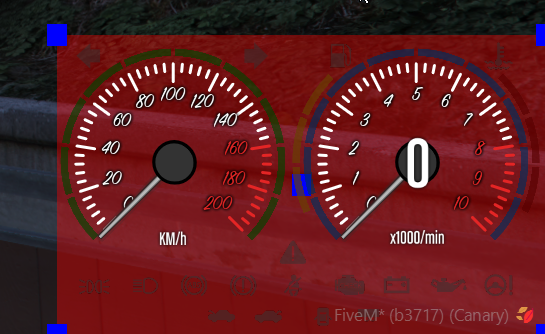
The screenshot below shows a full DrawRect around the scaleform along with smaller Rects to show the main returned coordinates
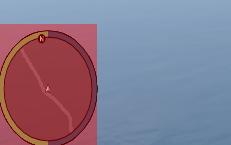
It works at any resolution and aspect ratios combination
For example this one was taken on a 800 x 600 resolution with a 5:3 aspect ratio.
2. Positioning with Pixels: GetAnchorResolutionCoords
If you prefer working with specific pixel values (e.g., “I want this 20px from the left”), use this.
-- Align: Left, Top
-- Offset: 20px, 20px
-- Size: 200px width, 50px height
local anchor = UI:GetAnchorResolutionCoords("L", "T", 20, 20, 200, 50)
 API Documentation
Core Anchoring
| Export | Description |
|---|---|
GetAnchorScreenCoords(alignX, alignY, x, y, w, h) |
Calculates absolute screen coords from normalized inputs (0.0-1.0). Returns an object with {LeftX, RightX, TopY, BottomY, CenterX, CenterY, Width, Height...}. |
GetAnchorResolutionCoords(alignX, alignY, x, y, w, h) |
Same as above, but accepts Pixel inputs relative to current resolution.  It still returns values in screen coords format (0.0 - 1.0) It still returns values in screen coords format (0.0 - 1.0) |
Coordinate Converters
Useful for converting mouse clicks or specific resolution logic.
Coordinate Converters
Useful for converting mouse clicks, specific resolution logic, or drawing on the Scaleform canvas.
Every function below returns a vector2
| Export | Description |
|---|---|
ConvertResolutionCoordsToScreenCoords(x, y) |
Pixels → Normalized (0.0-1.0) |
ConvertScreenCoordsToResolutionCoords(x, y) |
Normalized → Pixels |
ConvertResolutionCoordsToScaleformCoords(x, y) |
Pixels → Scaleform (1280x720) |
ConvertScaleformCoordsToResolutionCoords(x, y) |
Scaleform (1280x720) → Pixels |
ConvertScreenCoordsToScaleformCoords(x, y) |
Normalized → Scaleform (1280x720) |
ConvertScaleformCoordsToScreenCoords(x, y) |
Scaleform (1280x720) → Normalized |
Size Converters
Essential when calculating width/height for different rendering methods.
| Export | Description |
|---|---|
ConvertResolutionSizeToScreenSize(w, h) |
Pixel Size → Normalized Size |
ConvertResolutionSizeToScaleformSize(w, h) |
Pixel Size → Scaleform Size |
ConvertScreenSizeToScaleformSize(w, h) |
Normalized Size → Scaleform Size |
ConvertScaleformSizeToScreenSize(w, h) |
Scaleform Size → Normalized Size |
ConvertScaleformSizeToResolutionSize(w, h) |
Scaleform Size → Pixel Size |
Minimap Manipulation
Directly control the game’s radar component with native-safe logic.
| Export | Description |
|---|---|
MoveMinimapComponent(x_offset, y_offset, scale) |
Moves the minimap and bigmap by applying offsets to their default positions. Parameters: • x_offset, y_offset: Screen coordinates (0.0 - 1.0). Positive X moves right, positive Y moves down. Set both to 0.0 to restore original position.• scale: Size multiplier. 1.0 is default, <1.0 shrinks, >1.0 expands. Note: Natives used here represent the Safezone internally. This cannot be bypassed. Ensure your custom UI elements adapt to the Safezone (use GetMinSafeZone in utils) to match the minimap. Returns the updated GetAnchorScreenCoords table. |
 Download
Credits:
- Special thanks to @manups4e for the original Scaleform utils research.
- @GlitchDetector - Original minimap anchor maker and inspiration.
Check my other creations!
- ScaleformUI [Free]- ScaleformUI - A lightweight, fast and fun API
- Bubble Emotes [Paid] - [PAID] Bubble Emotes – Express Yourself Visually! [STANDALONE] [RP]
- Sigrun [Free] - [FREE] [STANDALONE] Sigrun - The Mission Creator Style Menu (Scaleform) - #5 by taoletsgo
- ScaleDraw [Free] - [FREE][ESX,QB,OX,WHATEV..] ScaleDraw [STANDALONE]
- Brynhildr Inventory (Valkyr series) [Paid] - [RELEASE] [PAID] [STANDALONE] 🚀 Brynhildr 3D Inventory
- Eir HUD (Valkyr series) [Paid] - [Paid] [ESX-QB-QBOX-STANDALONE] Eir HUD - Valkyr Series
- Aesir Compass [Paid] - [Paid] [Standalone] Aesir Compass
- Rounded Minimap [Paid] - [PAID] [Standalone] Rounded Minimap [ESX] [QB] [ALL Frameworks to be tagged go here]
- Aesir Vehicle Dashboard - [PAID] [STANDALONE] Aesir Vehicle Dashboard

 but my main goal was to always release things for free since the beginning of my FiveM experience
