Alright I see what I missed. Didn’t know it was needed to change the desktop resolution before exporting. That explains why it kept rendering 1080p videos despite it being set to 4K. Makes sense now, thank you so much.
1 Like
Idk how ya’ll made it work but I still get the +4E727 crash and access violation exception code when I try to export like with the old version that started this thread. I’ve tried both versions posted above; the one which uses the latest runtime and the one that got rebuilt for an older runtime.
I installed the latest voukoder app from their website, and the latest runtime which is “2015, 2017, 2019, and 2022” directly from microsoft. I also have 2005, 2008, 2010,2012,2013 installed.
Changes I made to the preset.json:
“options”: “_pixelFormat=yuv420p|_strategy=abr|b=80000000|preset=veryslow|profile=main|x264-params=bframes=2”,

it have some changes check screen now u edit ini in fivem folder and chek mby u forgot add directory for your videos
Smh my HDD had write protection so it didn’t work. Its working now ty 
Do any of you guys happen to know if it’s possible to balance quality/performance/rendering time with the presets? I’m currently using the one sent by CTNZ and it worked out well, but it takes ages to render given that I’m running the game at 4K at very low FPS, which heavily affects the rendering time. The motion blur and the quality are great, but it took me a good while to render a 10 second clip (Using 30 blur samples and 0.5 intensity). I could try dropping it to 1440p to get better performance, but I’d really like to get the best out of it.
Edit: Just wanted to clarify that I’m not using the veryslow setting.
Same here carnal, i suppose we must have a NASA pc to be able to export a 10 second video
Btw thanks @CTNZ that helped me a lot
So i’ve been watching this thread for a while, just now i finished rendering a video for an upcoming trailer i’m doing these guys on FIVEM.
Bellow i will leave the BEFORE and AFTER, one is recorded at 1080p with no EVE, the other is at 4K with EVE, so you can see results, the quality is quite significant.
Settings: I’m using CTNZ’s Settings, which looks like the perfect combination of just enough blurr and Rendering time on my machine.
Rendered Scale: 4K, i will give detail on what i achieved this bellow.
Render time: Around 1hr, for a 28s clip.
So, to get 4K, i used this video FiveM How to change screen resolution - YouTube to render the game at 4K, or change the resolution, which is pretty easy.
Then i changed my desktop resolution to 2560 x 1440p. For some strange reason, having the DESKTOP Resolution with FIVEM’s Resolution caused a crash upon render with EVE. Before i rendered i always used full screen, never borderless (press ALT + ENTER).
Link:
https://drive.google.com/file/d/1NAD6Voss-2UvQaKguTmcBTdEY_IX0q9A/view?usp=sharing (4K)
https://drive.google.com/file/d/1vTqo1rdm1ARdhUkCVzCfK0JkaY-H8ZXY/view?usp=sharing (1080p)
I would also encourage you to DOWNLOAD both files instead of viewing them, since the video only streams at a MAX 1080p.
Adding to the topic:
I’ve been fiddling around with the .ini files and figured out that it’s possible to produce similar (if not the same) motion blur effects while reducing the exporting time.
All you gotta do is max out the motion_blur_strength (set to 1) and decrease the motion_blur_samples. I exported two clips with different values: One with 48 samples 0.5 strength, another with 24 samples 1 strength; both 24 FPS.
I tried to follow the 180-degree rule and assumed the samples worked like a shutter speed. The first clip had so much blur that it looked like a totally different framerate. Yes, it was smooth but it didn’t look “cinematic”.
So I went with 24/24 and 1 strength, and that produced a really decent look, and also took less time to render. And I could even lower it more to look a bit more realistic.
Oh and by the way, I suggest y’all to try different codecs. I’ve started with Citinez’s preset too, but then switched to NVENC H264 with similar settings and it took less time to render a 20 second clip (not really sure about the exact time it took, but I know for a fact it was faster when it started exporting).
TL;DR: Quality over quantity, increase the motion blur strength and decrease the samples to reduce the exporting time. Play around with the codecs, try NVENC if you own an NVIDIA GPU.
Edit: Maybe you should match the framerate and the samples (or even set them to half) if you’re planning to render in 24/25/30 FPS, but that doesn’t mean you should do the same with 60 because that would take a long while. 60/30 might look good.
Edit 2: Here’s the little clip 24 FPS 24 Samples 1 Strength - YouTube
1 Like
i will Try your settings later on today, if i can increased rendering times with better visual fidelity, it will make work load run much smoother.
Saw the video and look amazing. Perhaps its worth doing a comparisson video on the motion blur and samples so people would get a rough idea what to expect…however that would totally take up quite some time.
anyone able to get the OpenIV remove limits thing to work? I added it to plugins but seems to not be starting
you mean the camera limits?
try this Release ExtendedCameraSettings 1.2.9 · CamxxCore/ExtendedCameraSettings · GitHub.
that is EXTENDED CAMERA but recently updated.
Another alternative could be No Rockstar Editor Restrictions - GTA5-Mods.com. However, you might need to add the FX ASI BUILD dummy because it’s an outdated mod.
Hello I have a problem with new EVE like when video it’s exported and need to be save I get this
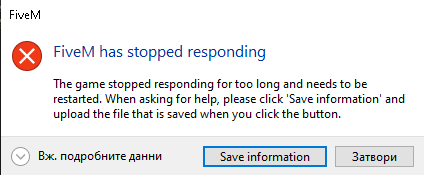
And video it’s not working any know how to fix this ?
can anyone make a video to teach how to install EVE in the fivem? I’m trying to install and I can not, crashes.
don’t know if I installed well
Scroll up and download the one sent by Akkariin ([How-to] Use Extended Video Export (EVE) | FiveM - #153 by Akkariin), then scroll up to the very first post and follow the instructions from the OP.
I’m having this problem, how do I solve it?
[Window Title]
FiveM
[Main Instruction]
a third-party game plugin (extendedvideoexport.asi+4E727) encountered an error
[Content]
FiveM crashed due to a third-party game plugin (extendedvideoexport.asi+4E727).
Please try removing the above file from the “plugins” folder in your FiveM installation and restarting the game.
[^] Ocultar Detalhes [Save information] [Fechar]
[Expanded Information]
Crash signature: extendedvideoexport.asi+4E727
Report ID: si-ef3a33026d9049f4847340f7a09d3cb9
You can press Ctrl-C to copy this message and paste it elsewhere.
Can you send those files? pls Or codes, or whatever it is
looks very similar to the issue what was causing me to crash, what’s your desktop res along with your fivem resolution?
1920x1080 sir
both at 1920x1080p?