Environment questions
**GTA V version: 1.0.0.56
**Up to date: Yes
**Legit or Pirate copy: Legit
** **Purchased where - Steam/Rockstar Launcher/Epic: Steam
**Windows version: 11
**Did you try to delete content_index.xml and try again? Yes
**System specifications: 12th Gen Intel(R) Core™ i7-12700F 2.10 GHz, Ram 16GB, NVIDIA GeForce RTX 3060 Ti
CitizenFX crash zip file (‘Save information’ on a crash):
CfxCrashDump_2023_09_05_16_55_21.zip (2.1 MB)
logs/CitizenFX_log files:
CitizenFX_log_2023-09-05T231544.log (4.9 MB)
**.dmp files/report IDs:
015cb063-0dd2-40c9-83fb-1e31b801561b.dmp (11.6 MB)
015cb063-0dd2-40c9-83fb-1e31b801561b.dmp.gamelog (15.5 KB)
If you can’t start the game at all
GTA V folder screenshot:
GTA V/update/x64/dlcpacks screenshot:
Filepath to FiveM folder:
FiveM client folder screenshot:
Which antivirus/firewall software are you using?
Did you try to disable/uninstall your Anti-virus?
Important parts
**What is the issue you’re having? Game crashes 5 seconds after loading into the server
What are you trying to do? Play game
What have you tried already to fix the issue? clearing cache, verify game files, reinstall FiveM, reset PC, update all drivers, disable/uninstall Anti-virus
Error screenshot (if any):
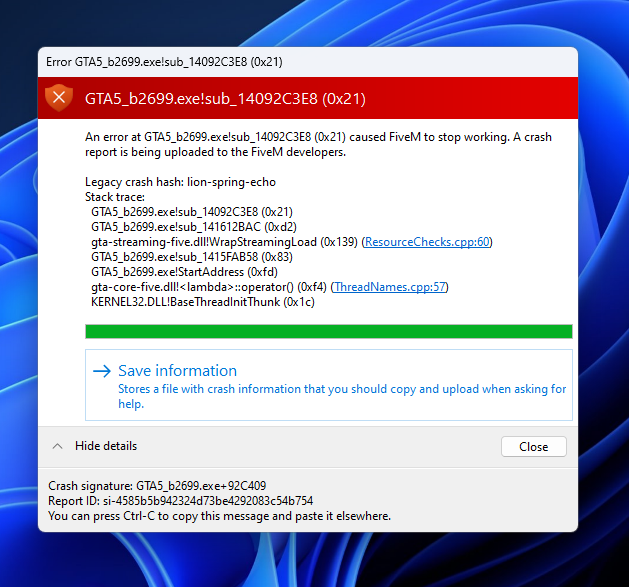
What did you do to get this issue? just load up the game after a server reinstall on zap hosting
What server did you get this issue on? Be specific and name some, ‘all of them’ by itself isn’t useful! Chi_Town
Additional comments
Game was woking just fine until I did a server reinstall on Zap Hosting and now have to new ESX framework.
