
[RELEASE] — Player Marketplace (NUI)
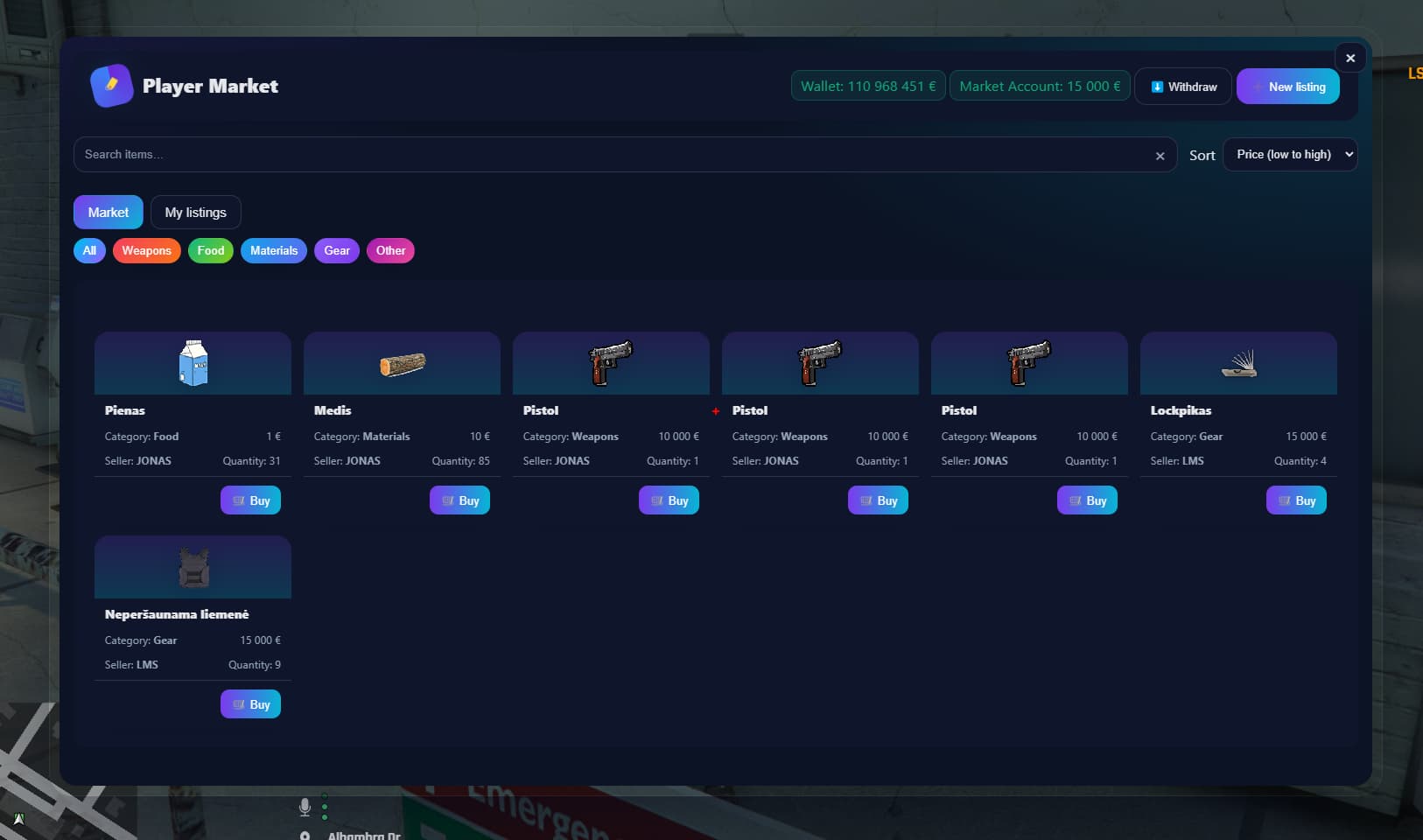
A modern, lightweight player-to-player marketplace with a tablet-style NUI, categories, search, and a polished seller profile. Works with ESX / QB / OX frameworks and the most popular inventory systems.
 Video: https://youtu.be/XVOtRb6i-eM
 Shop (Tebex): https://luamaster-scripts.tebex.io/
Key Features
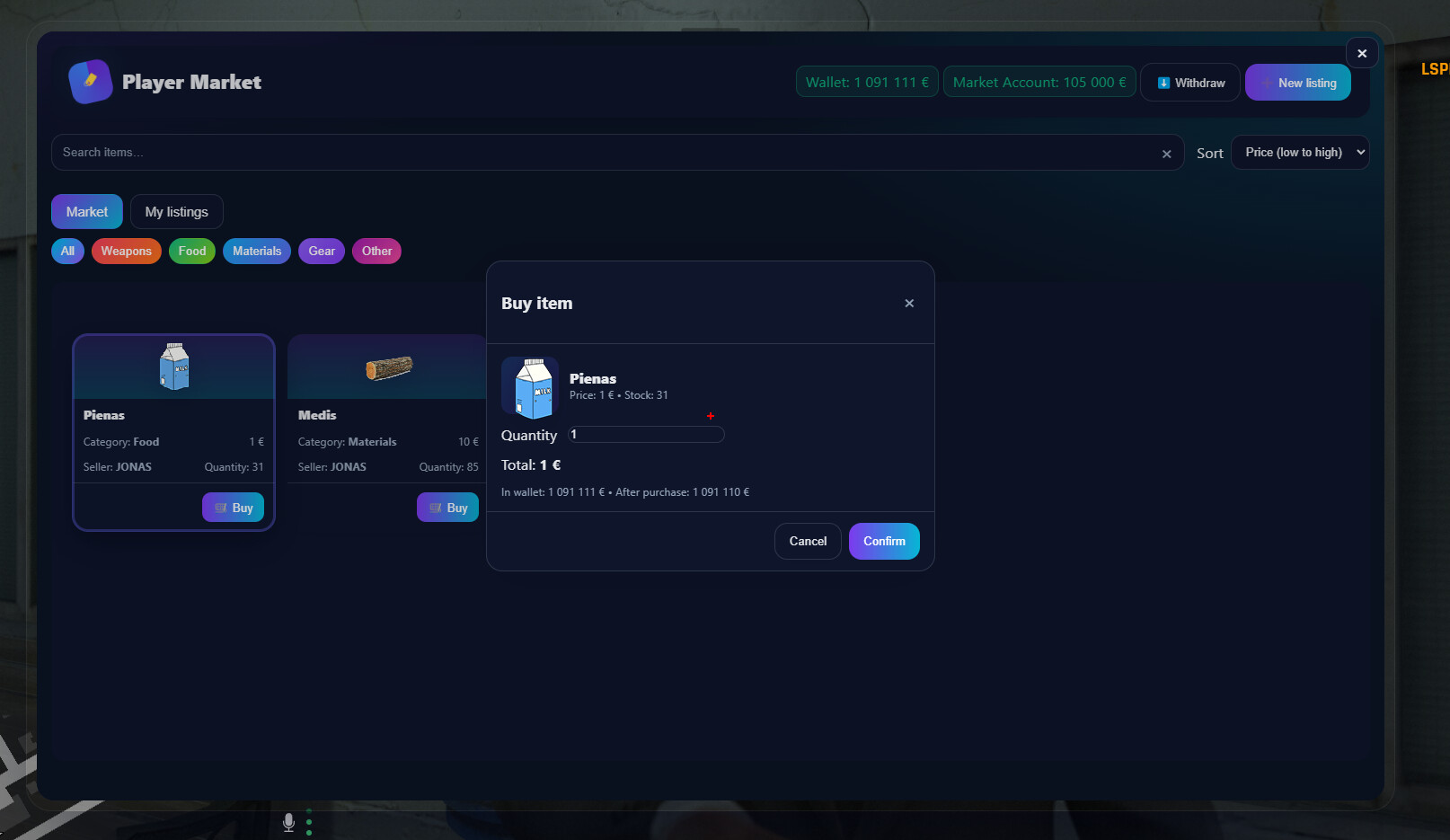
- Modern NUI “tablet”: search, price sorting, categories, clean card lists, instant toast notifications, wallet and market balance, one-click withdrawals. (UI lives in
web/index.html,web/app.js,web/style.css.) - Seller profile: players choose a public “Seller” name (validated 3–24 characters; separate profiles DB).
- NPC interaction + Target support:
ox_target→qb-target→qtargetwith a fallback [E] interaction viaox_lib. Also blips (per NPC or one global). Config viaConfig.MarketNPCsandConfig.Blip. - Price/quantity limits + whitelist/blacklist: global constraints; prevents selling “money” (based on
Config.CashItem). - Network/DB layer with auto-create:
lm_market_listings,lm_market_wallets,lm_market_profilestables create themselves (if enabled); includes acategorycolumn migration. - Multi-framework & multi-inventory support: automatic ESX/QB/OX detection; supports
ox_inventory,qs-inventory,ps-inventory,qb-inventory. Money via framework accounts or as an item (fallback). Dynamic item images per inventory. - Secure NUI callbacks: create listing, buy, delete, refresh inventory, withdraw funds, set seller name, and more.
Requirements
- ox_lib and oxmysql (declared in
fxmanifest.lua). - One of: ESX / QB / OX (auto-detected).
Installation
-
Upload the resource (e.g.,
resources/[nightfall]/nightfall_market). -
Make sure you have ox_lib and oxmysql. Add to
server.cfg:ensure ox_lib ensure oxmysql ensure nightfall_market -
On first run, DB tables will auto-create (if
Config.DB.autoCreate = true; requires a working MySQL connection). -
Tweak settings in
config.lua(NPC locations, blips, limits, whitelist/blacklist, etc.).
Note: NUI pages (
web/index.html,web/style.css,web/app.js) are linked viaui_pageandfilesinfxmanifest.lua.
In-Game Usage
-
Go to a Market NPC — you’ll get a target menu or [E] prompt (depending on which target resource you have).
-
In the UI you can:
- Browse listings, filter, sort, and buy.
- Create listings from your inventory: pick item, quantity, price, category. Enforced by
Config.LimitsandConfig.IsItemAllowed. - Manage funds: sales/purchases go to the market wallet; withdraw via the Withdraw action. Funds are debited/credited via your framework or as an item fallback.
- Set your seller name (visible on listings).
Config Excerpt
-- Money & limits
Config.CashItem = 'money'
Config.Limits = { priceMin = 1, priceMax = 1000000, qtyMin = 1, qtyMax = 1000 }

-- NPCs that open the market
Config.MarketNPCs = {
  { model = 's_m_m_highsec_01', coords = vec4(1835.432983, 3670.813232, 34.267456, 218.267715), scenario = 'WORLD_HUMAN_CLIPBOARD' },
}

-- Blips
Config.Blip = {
  enabled = true, perNPC = true, sprite = 434, color = 2, scale = 0.8, shortRange = true,
  label = nil, coords = vec3(-707.40, -914.25, 19.22)
}

-- Database
Config.DB = {
  table = 'lm_market_listings',
  walletTable = 'lm_market_wallets',
  profilesTable = 'lm_market_profiles',
  autoCreate = true
}

-- Allowed / blocked items
Config.BlackList = {}; Config.BlackList[Config.CashItem] = true
Config.WhiteList = nil -- if you want, set e.g.: { water=true, bread=true }
Config.CashOnly = true
Compatibility (automatic)
- Frameworks: OX / ESX / QB (detection + common adapters: ID, name, money).
- Inventories: ox / qs / ps / qb (quantities, add/remove, icon paths).
Technical Info
fx_version 'cerulean',lua54 'yes',ui_page 'web/index.html'. Dependencies:ox_lib,oxmysql.- Client NUI bridges (
RegisterNUICallback): open/close, buy, create/delete listings, refresh inventory, set seller name, withdraw. - Server: MySQL layer (MySQL.* or
exports.oxmysql), table creation/migrations, wallet, profiles, listing CRUD, transactions, and broadcasts to clients.
 Screenshots


Links
- Video: https://youtu.be/XVOtRb6i-eM
- Tebex Shop: https://luamaster-scripts.tebex.io/
More Scripts



| Code is accessible | Yes/No |
| Subscription-based | No |
| Lines (approximately) | ABOUT 600 |
| Requirements: ox_lib and oxmysql One of: ESX / QB / OX (auto-detected). | |
| Support | Yes |