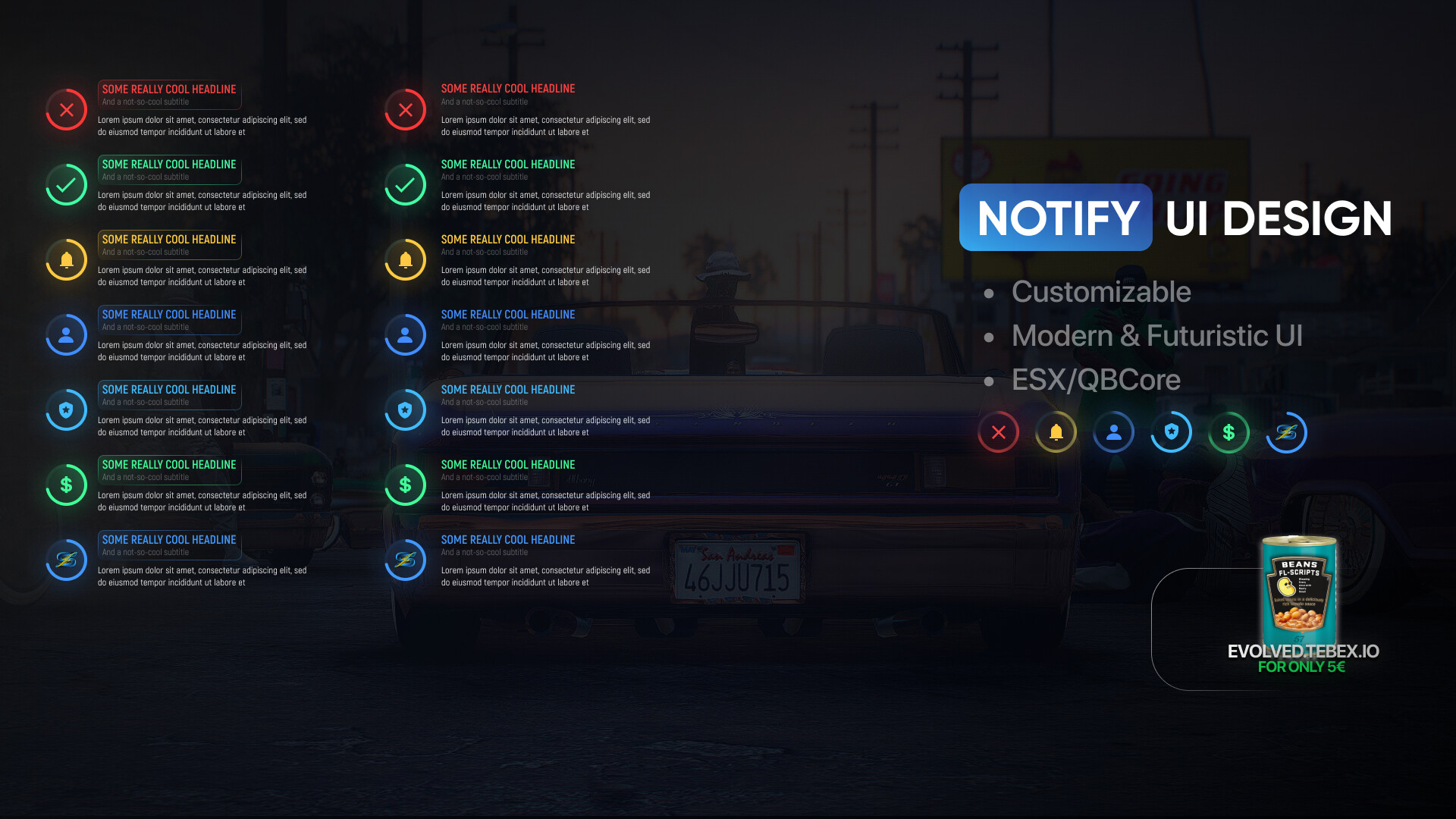
[FREE] FL-Notify

FL-Notify System Usage Guide

Welcome to the FL-Notify notification system. This guide will help you understand how to integrate and use FL-Notify within your server for displaying customizable notifications to players. FL-Notify provides a flexible way to show notifications with different styles, positions, and durations, enhancing the in-game experience.

How to Integrate FL-Notify

For Server Owners

To integrate FL-Notify into your FiveM server, you will utilize two main components: server events and client events. Here’s how you can use them:

Server Events

  • Triggering Notifications to Players: Use the server event fl:notify to send notifications to clients. This event can be called with specific parameters that determine the notification’s appearance and content.

Example Usage:


TriggerClientEvent("fl:notify", targetPlayer, "Notification Title", "Subtitle", "Content message", 5000, "type", "position")

Replace targetPlayer with the player ID to whom you want to send the notification. For broadcasting to all players, use -1 as the targetPlayer value.

Client Exports

  • Directly from Client Scripts: You can directly use the exported function Notify in client-side scripts to trigger notifications without going through the server.

Example Usage:


exports['FL-Notify']:Notify("Notification Title", "Subtitle", "Content message", 5000, "type", "position")

Replacement for qbcore

function QBCore.Functions.Notify(text, texttype, length)
    length = length or 5000
    texttype = texttype or 'info'
    
    local convert = {
        ["primary"] = 3, 
        ["police"] = 5, 
        ["ambulance"] = 4, 
        ["error"] = 1, 
        ["success"] = 2,
        ["money"] = 6,
        ["custom"] = 8 
    }
    
    local themeId = convert[texttype] or 3

    local textposition = 0 -- follow readme to know positions

    exports['FL-Notify']:Notify("Notification", "", text, length, themeId, textposition)
end

Notification Parameters

When triggering notifications, you’ll need to provide several parameters to customize the notification’s appearance and behavior:

  • Title: The main title of the notification.

  • Subtitle: A secondary title or subtitle.

  • Content: The main content or message of the notification.

  • Duration: How long the notification should be displayed (in milliseconds).

  • Type: The notification type (e.g., success, error) that may affect its appearance.

  • Position: Where on the screen the notification will appear (e.g., top-right, bottom-left).

For Developers

If you’re integrating FL-Notify into custom scripts or mods, you’ll primarily interact with the fl:notify server event and the Notify client export as described above.

Conclusion

FL-Notify offers a robust solution for displaying notifications within the FiveM environment, providing server owners and developers with the tools needed to enhance player communication and engagement. By following the guidelines outlined in this document, you can seamlessly integrate FL-Notify into your FiveM server or custom scripts.

For further customization options or support, please refer to the official FL-Notify documentation or dm me.

Download

Code is accessible yes
Subscription-based No
Lines (approximately) 150
Requirements no
Support no
16 Likes

best free notfy ui i seen yet

1 Like

Its cool on the photo but js give me some error on line 2 i just started script and i used export on the client side
exports[‘FL-Notify’]:Notify(“Notification Title”, “Subtitle”, “Content message”, 5000, “success”, “bottom-left”) i was trying to test it
reading unsift thats the error

Make sure youre using types and positions that we support

i sended you export i used to test notify you exactly see position and type

Positions cannot be strings. Use 0-5 for types and 0-5 for positions. as example instead of bottom-left it has to be a number I think it was 2 and success I think was 1

looks good.

1 Like

Thanks bro :slight_smile: <3

Very cool design thank you

1 Like

I want to add a main notification for es_extended + qbcore

go for it :slight_smile: es_extended and qbcore are opened and so is esx core

Its surely somewhere on the clientsided part

QBcore example:

ESX example:

2 Likes

Vms is not my notify system brother. It was just as an example you gotta use my eventd

You could Provide an Example in the ReadMe file :
For the Notification Function to utilize your Fl-Notify which replaces every instance of the qbcore or esx notifications wherever its used ?

please read the readme. dont use positions as string provide a number.

good idea, i never thought there are server owners that cant do that lol

Steps To Install for QBCORE:
Go To qb-core/client/functions.lua

Find The Following Code: This Is Located Around Line 88
QBCore.Functions.Notify

Delete From Around Line 88 To Around 111 Where The End Of That Function Is :slight_smile:

Paste The Following Code In To Replace That Code!

function QBCore.Functions.Notify(text, textype, length)
    if textype == "primary" then textype = "inform" end
    if type(text) == "table" then
        local ttext = text.text or 'Placeholder'
        local caption = text.caption or 'Placeholder'
        local ttype = textype or 'inform'
        local length = length or 3000
 
exports['FL-Notify']:Notify("Notification Title", "Subtitle", "Content message", 5000, "type", "position")

    else
        local ttype = textype or 'inform'
        local ttext = text.text or 'Placeholder'
        local length = length or 5000
        exports['FL-Notify']:Notify("Notification Title", "Subtitle", "ttext ", length , "type", "position")

    end
end

Information: TYPE AND POSITIONS HAVE TO BE A NUMBER READ THE JS CODE

ESX:

Replace ESX Notifications

  1. Open @es_extended/client/functions.lua.

  2. Search for function ESX.ShowNotification.

  3. Replace the function with this one below.

RegisterNetEvent("esx:showNotification")
AddEventHandler("esx:showNotification", function(msg, notifyType, length)
    --ESX.ShowNotification(msg, notifyType, length)
exports['FL-Notify']:Notify("Notification Title", "Subtitle", "msg", length, "type", "position")

end)

Information: TYPE AND POSITIONS HAVE TO BE A NUMBER READ THE JS CODE

Ive already filled some arguments provided by esx and qbcore. you have to fill the rest like position, type and title and subtitle

4 Likes

Bro ive provided you an example it doesnt mean you have to copy it. If you cant integrate it please let it be I dont have the time to provide everyone support in this stage of my life rn.

Ive said a million times you have to fill the rest like position, type and title and subtitle

NO STRINGS BUT NUMBERS.
