What is the issue you’re having?
FiveM crashes with adhesive.dll+B2D29F while sitting IDLE on the server list. No server connection is ever attempted — the crash fires roughly 140 seconds after “Done running INIT_CORE init functions!” with zero user interaction. All CitizenFX logs show 0 OnConnectionProgress events.
The exception is 0xC0000005 (read access violation, Param[0]=0). Across 6 minidumps the faulting address always ends in DB7 — the heap base varies with ASLR, but the offset is constant, which points to the same struct field on the same code path every time (stale/freed pointer, deterministic).
Already ruled out:
- Full GTA V reinstall (Steam, 120 GB) + complete FiveM wipe and reinstall — crash persists
- Deleted %appdata%\CitizenFX profile, adhesive.dll and content_index.xml (forced re-download)
- Steam overlay: crash reproduces with Steam FULLY CLOSED, no injectors in the module list (266 modules, only Defender’s MpOAV.dll present)
- Defender exclusions confirmed for the FiveM folder and GTA5.exe; no third-party AV
- Cache, server-cache and server-cache-priv wiped
- PoolSizesIncrease is empty in CitizenFX.ini
- Audio mods reverted; Steam integrity verification passed
Faulting addresses (6 dumps):
0x0000014E9E4C0DB7
0x000001791BBADDB7
0x000001E09D59CDB7
0x0000025EA362ADB7
0x0000016C9970EDB7
0x000001300B281DB7
Possibly relevant: ROS reports “install”: true for GTA V with installLocation “C:\Program Files\Rockstar Games\Games\Grand Theft Auto V” — that folder does not exist — and totalBytes 56066032. The real install is the Steam one (120 GB, verified).
System: 80 GB RAM, GTX 1070 Ti (driver 32.0.15.8266), 3 healthy SSDs, 109 GB free, Windows 11 build 26200. Started 2026-08-20 with no hardware or software changes.
What have you tried already to fix the issue?
- Verified GTA V file integrity through Steam (passed, no corrupted files)
- Full GTA V reinstall from scratch (120 GB, Steam) — crash persists
- Deleted the entire %localappdata%\FiveM folder and reinstalled FiveM — crash persists
- Deleted %appdata%\CitizenFX profile (fresh login) — no change
- Deleted adhesive.dll and content_index.xml to force a clean re-download — no change
- Wiped cache, server-cache and server-cache-priv
- Disabled Steam overlay (EnableGameOverlay=0 and OverlayAppEnable=0 for appid 271590), then tested with Steam FULLY CLOSED — crash still reproduces, and the module list confirms no overlay injected
- Closed all overlay/injector software: Discord, Razer Synapse, Corsair iCUE, NVIDIA overlay
- Added Windows Defender exclusions for the FiveM folder, FiveM.exe and GTA5.exe (confirmed present via Get-MpPreference); no third-party antivirus installed
- Removed audio mods and restored original game files
- Checked CitizenFX.ini: PoolSizesIncrease is empty (the values seen in-client come from the server)
- Verified disk health: 3 SSDs, all reporting Healthy, 109 GB free on C:
- Verified RAM: 80 GB, no memory pressure (dumps show 26% memory load, ~60 GB free)
- GPU driver is from June 2026, last Windows updates Aug 12-13 — problem started Aug 20 with no driver, hardware or software changes
- Ran DNS flush and network stack reset (irrelevant, as the crash happens with no server connection)
None of the above changed the crash signature or the ~140s timing.
What server did you get this issue on?
None — the crash is not tied to any server. It reproduces with the client sitting IDLE on the server list, without ever clicking connect. All CitizenFX logs confirm this: 0 OnConnectionProgress events across every session. Before it started crashing while idle, it also crashed when connecting to any server (tested on multiple, including a heavy RP server with 302 resources and a lightweight PvP server), which rules out server-specific resources.
Error screenshot(s)
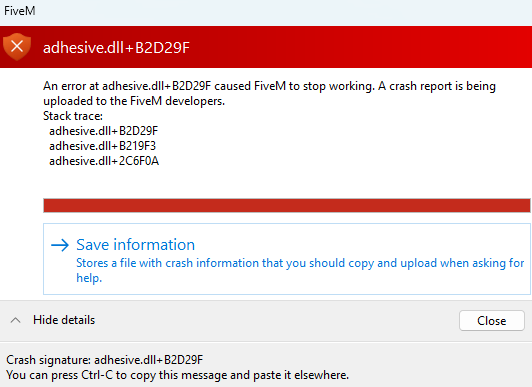
Windows version
Windows 11 Home, build 26200 (10.0.26200)
System specifications
CPU: AMD Ryzen 9 3900X (12 cores / 24 threads)
GPU: NVIDIA GeForce GTX 1070 Ti — driver 32.0.15.8266 (June 2026)
RAM: 80 GB DDR4 @ 3000 MHz (2x 32 GB + 2x 8 GB, mixed kit)
Motherboard: Gigabyte X470 AORUS GAMING 5 WIFI
OS: Windows 11 Home, build 26200
Storage: 3 SSDs, all reporting Healthy — Samsung 860 EVO 500 GB, ACCLAMATOR 960 GB, Patriot Burst 480 GB. 109 GB free on C:
GTA V: Steam, build 3258, freshly reinstalled and integrity-verified
FiveM: freshly installed 2026-08-21
Connection: Wi-Fi (irrelevant — crash happens with no server connection)
Antivirus software
Windows Defender only — no third-party antivirus installed. Exclusions were added and verified via Get-MpPreference: C:\Users\marci\AppData\Local\FiveM – C:\Users\marci\AppData\Local\FiveM\FiveM.exe. C:\Program Files (x86)\Steam\steamapps\common\Grand Theft Auto V\GTA5.exe. Note: Tamper Protection is enabled (IsTamperProtected: True), and MpOAV.dll is still present in the crash dump’s module list despite the exclusions — real-time scanning still attaches to the process. Threat history is clean: the only entry is a PUABundler detection from November 2025, unrelated to this issue.
CitizenFX crash zip file (‘Save information’ on a crash)
CfxCrashDump_2026_08_21_09_11_42.zip (1.7 MB)
Log files
CitizenFX_log_2026-08-21T090853.log (74 KB)
Additional comments
The most unusual aspect of this crash is that it happens with the client completely IDLE — no server connection is ever attempted. Every CitizenFX log shows 0 OnConnectionProgress events, and the crash consistently fires ~140 seconds after “Done running INIT_CORE init functions!” with zero user interaction. Most adhesive.dll reports I found involve connecting to a server; this one does not.
The faulting pointer is what I think matters most for debugging. Across 6 separate minidumps, the invalid read address always ends in DB7 — the heap base changes every run due to ASLR, but the offset within the structure is identical every time:
0x0000014E9E4C0DB7
0x000001791BBADDB7
0x000001E09D59CDB7
0x0000025EA362ADB7
0x0000016C9970EDB7
0x000001300B281DB7
A constant offset with a varying base points to the same struct field being read on the same code path — a stale or freed pointer, deterministic rather than random memory corruption. Hardware-level memory instability would produce scattered addresses, not a fixed offset.
Timeline: this started on 2026-08-20 with no hardware changes, no driver updates (GPU driver is from June 2026) and no Windows updates since Aug 12-13. The only thing I changed that day was swapping some GTA V audio files, which I have since fully reverted and verified through Steam — including a complete 120 GB reinstall of the game.
One anomaly I noticed while troubleshooting, which may or may not be related: the Rockstar launcher (via ROS) consistently reports GTA V as “install”: true with installLocation “C:\Program Files\Rockstar Games\Games\Grand Theft Auto V” and totalBytes 56066032. That folder does not exist on this machine — my only install is the Steam one (120 GB, verified). This phantom entry survives reinstalls, which suggests it is server-side state tied to my Rockstar account (id 148426343). Since adhesive.dll handles licensing/entitlement validation, I am wondering whether it could be reading from an inconsistent entitlement structure.
Happy to run any diagnostic build, provide additional dumps, or test a patched adhesive.dll if that would help narrow it down.
I understand adhesive.dll is a closed component and that this may not be a quick one to look into, so I appreciate any time spent on it. I tried to gather as much detail as I could before posting to save you the back-and-forth. Thanks a lot for the attention, and for all the work you put into FiveM.
