What is the issue you’re having?
FiveM consistently crashes about 50-75 seconds after fully loading, while sitting idle at the main menu. Before I’ve even browsed for or joined a server. It’s happened everytime since download with the identical crash signature (adhesive.dll+B59672), so it’s reliably reproducible, not random. I’ve done extensive troubleshooting (listed below) without success
What have you tried already to fix the issue?
Deleted caches.xml from FiveM appdata
Deleted entire FiveM data folder to force full rebuild
Deleted temp files, %temp%, and FiveM preconfig files
Checked C:\Windows\System32 for conflicting v8.dll / v8_libbase.dll / v8_libplatform.dll — none found
Tested on both Canary and Beta release channels — same crash on both
Disabled NVIDIA in-game overlay
Disabled Xbox Game Bar
Confirmed no screensaver/display-timeout conflict (crash happens even actively sitting at menu)
Confirmed MSI Afterburner / RTSS not installed on system
Temporarily disabled Malwarebytes real-time protection — crash still occurred
Verified/repaired GTA V (Legacy) install via Rockstar Games Launcher
Fully uninstalled and reinstalled GTA V (Legacy)
Confirmed only one GTA V title (Legacy, build 1.0.3258.0) tracked in Rockstar Games Launcher — no conflicting Enhanced install detected there
Started a new user on PC and load from there
What server did you get this issue on?
I dont even have time to browse
Error screenshot(s)
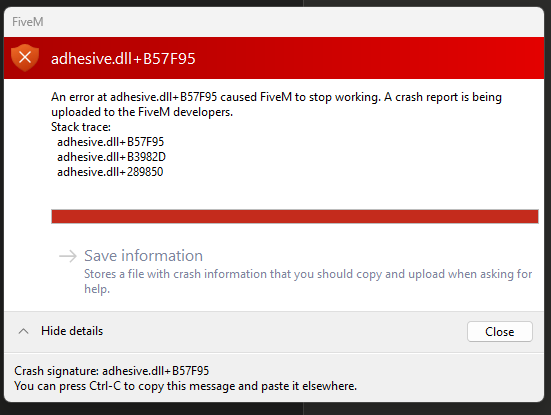
Windows version
Windows 11 Home, Version 10.0.26200 (Build 26200)
System specifications
OS: Windows 11 Home, Version 10.0.26200 (Build 26200)
System: MSI MS-7D98, Motherboard: MSI PRO B760-VC WIFI
CPU: 13th Gen Intel Core i7-13700F, 16 cores / 24 logical processors
GPU: NVIDIA GeForce RTX 4060 (device ID 10de:2882)
RAM: 16.0 GB installed (15.8 GB usable)
BIOS: American Megatrends International, v B.10, dated 3/26/2026
Antivirus software
Windows Defender, Malwarebytes
CitizenFX crash zip file (‘Save information’ on a crash)
CfxCrashDump_2026_08_03_20_53_07.zip (1.73 MB)
Log files
CitizenFX_log_2026-08-03T205038.log (74 KB)
Additional comments
Crash consistently occurs ~52 seconds after FiveM finishes core initialization, while idle at the main menu (before browsing/joining any server)
Edit- For some this issue this crash is can be caused by Vanguard, the anti-cheat for Valorant and League of Legends. I have never had any of those games installed and double check for any other anticheat running in the background.
