What is the issue you’re having?
Hiyya!
I’ve been trying to use RedM to play Red Dead Online with friends after having taken about a year-long hiatus. I re-downloaded the app last week, and it has consistently given me a ERR_GFX_D3D_DEFERRED_MEM error about 10 seconds after opening the app.
This error did not occur when I played last year. Red Dead Online also works fine on its own, RedM seems to be the issue not RDO.
What have you tried already to fix the issue?
I’ve tried to clear my RedM cache, I’ve updated my GPU and Windows software. I’ve tried switching RedM to Beta. I’ve tried every resolution in this thread with no luck: How to resolve RAGE ERROR: ERR_GFX_STATE
What server did you get this issue on?
RedM Client
Error screenshot(s)
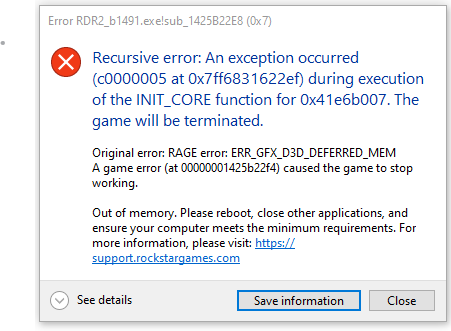
Windows version
Windows 10, OS Build: 19045.6093
System specifications
Microsoft Windows 10 Home
AMD Ryzen 5 1400 Quad-Core Processor, 3200 Mhz, 4 Core(s), 8 Logical Processor(s)
24 RAM
NVIDIA GeForce GTX 1050
Antivirus software
Microsoft Defender default
CitizenFX crash zip file (‘Save information’ on a crash)
CfxCrashDump_2025_07_15_02_10_56.zip (2.1 MB)
