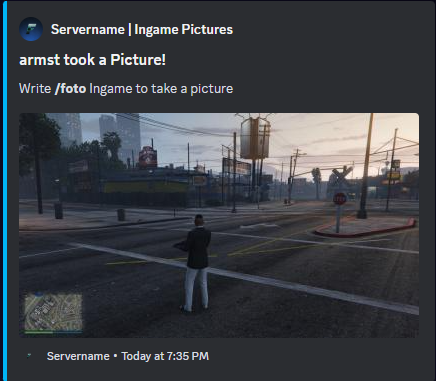
The FiveM In-Game Discord Screenshot Script offers an innovative way to effortlessly share in-game moments within FiveM on Discord. This powerful script is designed to empower players to capture high-quality screenshots, not only showcasing the visual aspects of the game but also reflecting individual graphics settings and details.


Key Features:
- Effortless Capture System: With a simple in-game chat command, the screen freezes, and a high-quality screenshot is automatically generated.
- Automatic Discord Integration: Screenshots are automatically uploaded to Discord and presented as embedded messages, facilitating seamless sharing on Discord servers.
- Comprehensive Graphics Settings: Each captured screenshot includes detailed information about the player’s individual graphics settings, including resolution, graphics quality, textures, and other visual adjustments.
- Easy Configuration: The script is user-friendly and straightforward to install, requiring no complicated setups or processes.
Benefits:
- Player Interaction: Enhances interaction and sharing of gaming experiences on Discord, strengthening community bonds and fostering discussions within the server’s gaming community.
- Ease of Use: The memorable in-game command allows for quick and straightforward screenshot capture and sharing on Discord.
| Code is accessible | No |
| Subscription-based | No |
| Lines (approximately) | 90 |
| Requirements | Screenshot-basic |
| Support | Yes |
Maybe you are Also interested in other Scripts made by me