V Inventory — Premium RedM Inventory System $15.00
Direct drop in replacement no changes needed except for setting back up the config to your liking and adding in your items folder!
All the same things you would find from cas - inventory except for the custom storage bags built in. For a fraction of the price! Originally made for my survival redm server decided to share with the community! This is vorp_inventory on steroids pretty much. Organizable inventory that are persistant Hotbar and built in quick craft and medical system. Built from the ground up to replicate vorp_inventory so its fully compatible with all future vorp updates! giving something the normal vorp_inventory has yet to implement! More scripts coming soon!
-
New Beginnings · Packages - Click Here to Buy! All future updates and themes free with purchase.
-
Support Discord Discord

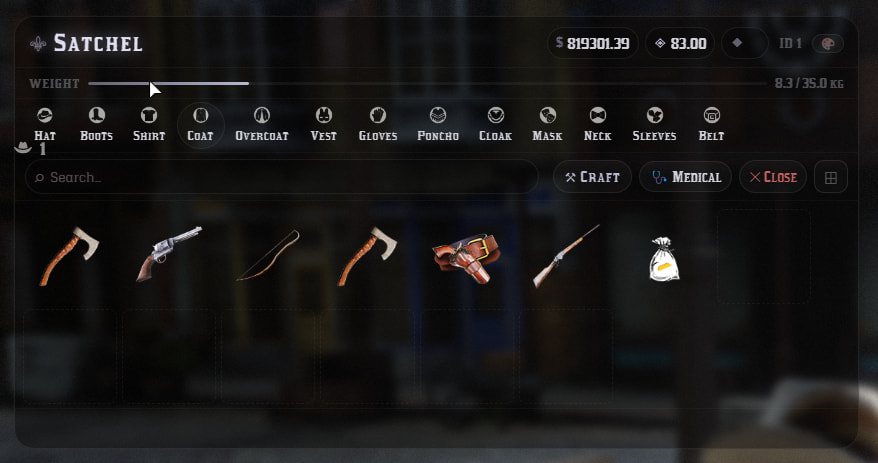
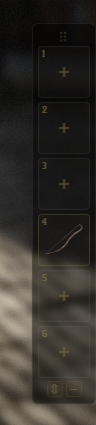
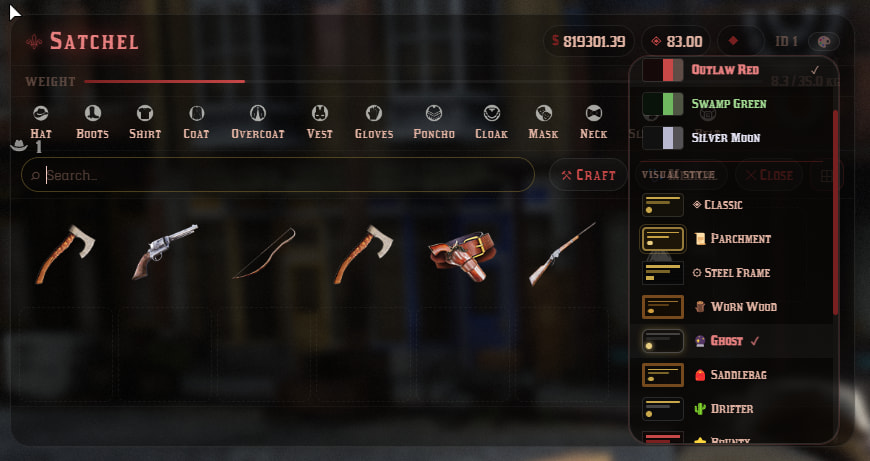
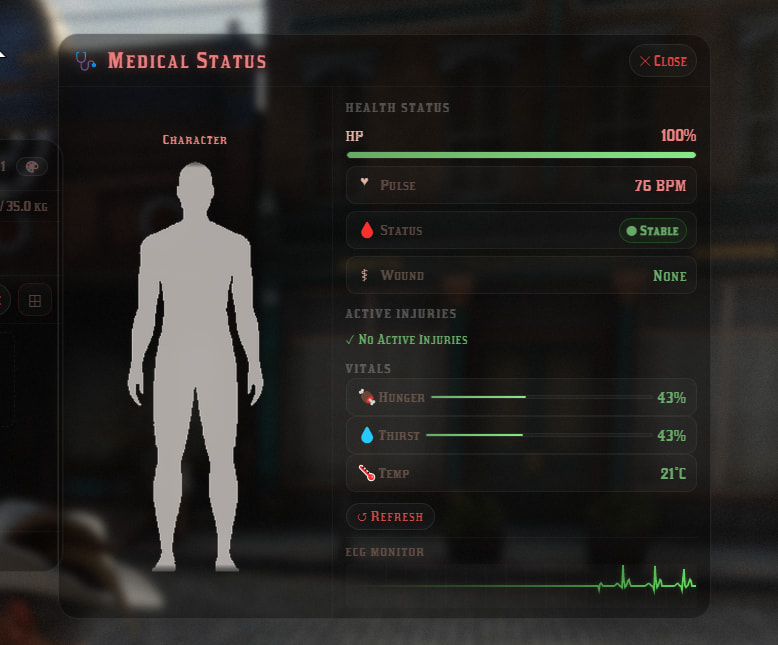

A fully custom, feature-rich inventory system built from the ground up for VORP Core RedM servers. From a fully themeable UI with 13 unique visual styles to a live medical panel, drag-to-ground item dropping, a configurable hotbar, and a built-in bleed system — this is the last inventory you will ever need. More updates, themes and features coming soon! DROP IN REPLACEMENT FOR VORP_INVENTORY ONLY THING YOU NEED TO COPY OVER IS YOUR ITEMS FOLDER.
 UI Themes & Skins
-
 13 distinct visual looks — Classic, Parchment, Steel Frame, Worn Wood, Ghost, Saddlebag, Drifter, Bounty, Field Notes, Gazette (light newsprint), Dispatch (green phosphor CRT), Blood Moon (crimson gothic), and Campfire (warm ember)
 -
5 colour palettes — Frontier Gold, Night Rider, Outlaw Red, Swamp Green, Silver Moon — each fully recolours borders, text, bars, and buttons
-
Every theme applies to all panels — main inventory, secondary (chests, horses), crafting panel, medical panel, quantity dialog, and context menu all match
-
Ghost hotbar — always-on transparent hotbar that sits over the game world at all times, fully styled to match your chosen theme
 Drag & Drop
-
Drag to swap — grab any item and drop it onto another slot to instantly swap positions
-
Drag to ground — drag an item outside the inventory panel and release to drop it in the world — the same quantity prompt as right-click drop fires automatically
-
Cross-inventory drag — drag items directly between your satchel and a chest, horse, or loot container in one motion
-
Visual ground hint — a subtle full-screen overlay shows “DROP ON GROUND” with a gold border when your cursor leaves all panels, so you always know where releasing will drop
 Medical Panel
-
Per-region injury tracking — head, chest, stomach, both arms, both legs tracked separately with severity levels
-
Live ECG heartbeat — animated pulse line that reacts to player health in real time
-
Damage type detection — shows whether damage came from bullets, blades, falls, fire, explosives, or animals
-
Active injury list — scrollable list of all current wounds with location and severity
-
Vitals integration — hunger, thirst, temperature, poison, and stamina shown as colour-coded mini bars that warn and crit at configurable thresholds
-
Works with 15 HUD/metabolism systems — auto-detects bcc-playerneeds, vorp_needs, bcc-corehud, fx-hud, mega_metabolism, POS-Metabolism, bln_hud, SS-Metabolism, fred_metabolism v2, outsider_needs, cas-metabolism, vorp_temperature, and more — or pin it to any resource via a single config line
 Crafting
-
Full crafting panel — ingredient lists, output preview, crafting confirmation
-
Quick craft bar — a compact strip of currently craftable recipe icons sits below the item grid so you can craft without opening the full panel
-
Recipes fully configurable in
config/recipes.lua
 Hotbar
-
Ghost style — always visible over the game world, semi-transparent so it never blocks gameplay
-
Draggable position — click and drag the grip handle to place the hotbar anywhere on screen; position saves and restores between sessions
-
Hide / show — collapse to just the handle with one click when not in use
-
Horizontal or vertical — toggle between a traditional horizontal strip and a vertical sidebar layout; orientation saves between sessions
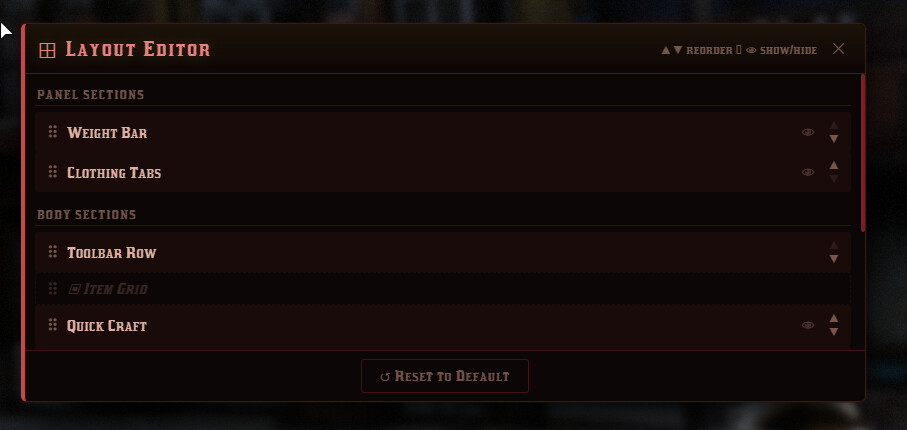
⊞ Layout Editor
-
Reorder every section — move the weight bar, clothing tabs, toolbar row, item description bar, and quick craft bar up or down within the panel
-
Show / hide sections — collapse any section with the eye toggle; hidden state saves between sessions
-
Toolbar button order — reorder the Craft and Medical buttons; hide either one completely if unused on your server
-
Reset to Default — one-click restore of the factory layout
-
No config file edits or server restarts needed — all live in-game via the ⊞ button
 Clothing & Tabs
-
Clothing-only tab strip — Hat, Boots, Shirt, Coat, Overcoat, Vest, Gloves, Poncho, Cloak, Mask, Neckwear, Sleeves, Belt — clean and uncluttered
-
All clothing tabs visible and scrollable in a single row — no extra navigation needed
 Secondary Inventory (Chests, Horses, Loot)
-
Fully themed — matches your active skin and look exactly — same borders, colours, header treatment, and item slots
-
Capacity bar — a live fill bar shows items used vs. total capacity with warn/full colour states, mirroring the main weight bar
-
Dynamic title support — shows the name of the container (horse name, chest label, etc.)
 Quantity Dialog
-
Fully themed — matches whichever skin and look is active; gold confirm button, red cancel button, dark input field
-
Fires on drag-to-ground, drag-to-transfer, and right-click drop — consistent everywhere
 Configuration
-
All features toggleable in
config/config.lua— no core edits needed for basic setup -
Vitals source config — set your HUD resource name and export method names once; the inventory handles everything else
-
Per-item configs for weight, type, useable actions, and metadata
-
Language file support via
languages/language.lua
 What You Receive
-
 Free lifetime updates
 Requirements
-
Framework: VORP Core
-
Game: RedM (Red Dead Redemption 2)
-
Server build: Latest recommended RedM server artifact
-
Optional integrations: Any of the 15 supported HUD/metabolism resources for vitals display (fully auto-detected — no required dependency)
 FAQ
FAQ
Is this escrow locked?
Yes — Configs are all readable and editable.
Does it work with my HUD/metabolism resource?
The vitals system auto-detects all 15 major metabolism and HUD resources including bcc-playerneeds, bcc-corehud, fx-hud, mega_metabolism, outsider_needs, and more. If yours isn’t on the list, a single config line pins it to any resource and export name.
Can I add more item tabs?
Yes — item group tabs are configured in config/groups.lua. Add, remove, or rename any tab without touching core files.
What if I need help setting it up?
Join the Discord — setup support is provided in a dedicated channel. Most installs are up and running within minutes.
Can I use this on multiple servers?
One purchase covers one server. Contact us on Discord for multi-server licensing.
Refunds?
All sales are final due to the digital nature of the product. Open a ticket on Discord before requesting a refund — we resolve virtually every issue directly.
Code is accessible: No
Subscription-based: No
Lines (approximately): 5,000
Requirements: VORP Core, RedM Server (latest artifact)
Support: Yes