Hi, i have that in the console, i have the newest version, 3.1.3, idk what more to do please i need help

1 Like
Hi,
Do you have any exec permissions line in you server.cfg?
1 Like
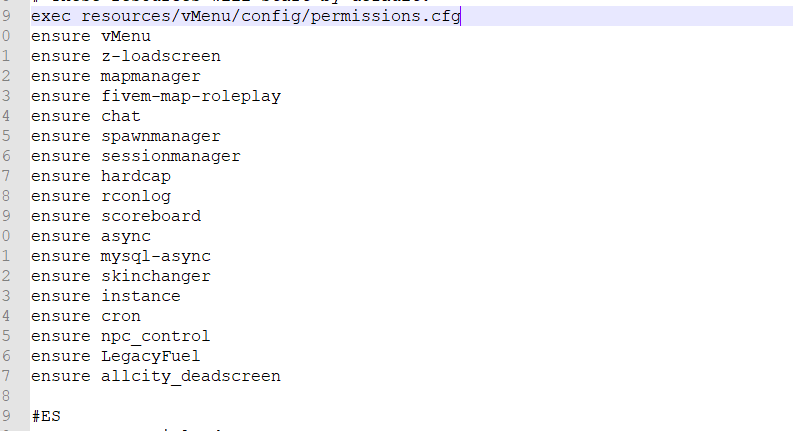
Could you please share your hosting name, provide if permissions.cfg is in right folder and check chmods of this folder, file? It should be 755
1 Like
now i have other problem, like all the people has admin, like my friend can use command like /stop or /start, but he is not on config.cfg
1 Like
Probably you’ve allowed them to do it. Check config, and look for group permissions 
3 Likes
I just created a new server with nothing and I have permissions to do all, I really need help, I will send you a video.
1 Like
1 Like
look messages
1 Like
Drop the permissions.cfg file in the same folder as your server.cfg
Then at your server.cfg put exec permissions.cfg but make sure its after you start vmenu.
For example,
start vMenu
exec permissions.cfg
Or anywhere after you start vmenu.
You have you permissions.cfg executed before vMenu, so vMenu dosent detect it.
11 Likes
It’s not because of this that everyone has an admin, see this: Everybody is admin
polak?
1 Like
You can try to reinstall it if you are getting very frustrated and just follow this from start to finish. I believe you messed up the permissions file some how or you just didn’t install it correctly.
2 Likes
ta, masz może discorda? może pomożesz?
1 Like
This topic was automatically closed 30 days after the last reply. New replies are no longer allowed.