Screenshot :
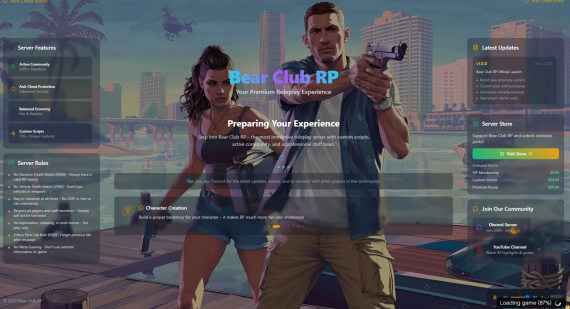
This comprehensive loading screen solution provides an immersive and engaging experience for players from the moment they connect. Built with modern web technologies and designed for maximum customization and performance.
 Key Features
 Dynamic Backgrounds
- Video Carousel: Rotate multiple background videos seamlessly
- Image Carousel: Slideshow of custom images
- Single Video: Traditional video background
- Gradient: Clean, modern gradient backgrounds
 Audio System
- Background Music: Custom audio with volume controls
- Spacebar Controls: Players can play/pause music easily
- Auto-play Support: Configurable audio behavior
 Real-time Progress
- Live Progress Tracking: Syncs with actual FiveM loading state
- Animated Progress Bar: Smooth, modern progress visualization
- Loading Steps: Clear status messages for each loading phase
 Modern UI Design
- Sleek Interface: Dark theme with subtle animations
- Particle Effects: Optional animated background elements
- Responsive Design: Works on all screen sizes
- Custom Cursor: Themed cursor with glow effects
 Server Information Display
- Server Stats: Current/max players, uptime, ping, location
- Feature Highlights: Showcase your server’s unique features
- Server Rules: Clear, organized rule presentation
- Loading Tips: Rotating tips to keep players engaged
 Advanced Features
- Changelog Display: Show recent server updates
- Tebex Store Integration: Direct links to your server store
- Social Media Links: Discord, YouTube, Twitter integration
- Player of the Month: Highlight community members
 Installation
- Download the resource package
- Extract to your
resourcesfolder - Edit
config.jsonwith your server information - Add your media files to the
assets/folder - Add
ensure [resource-name]to yourserver.cfg - Restart your server
 Configuration
Everything is configured through a single config.json file:
{
  "server": {
    "name": "Your Server Name",
    "tagline": "Your Server Tagline",
    "description": "Your server description..."
  },
  "theme": {
    "background": {
      "type": "videoCarousel",
      "videoCarousel": {
        "videos": ["./assets/video1.mp4", "./assets/video2.mp4"],
        "interval": 5000
      }
    }
  },
  "audio": {
    "enabled": true,
    "backgroundMusic": {
      "url": "./assets/music.mp3",
      "volume": 0.3
    }
  }
}
 File Structure
moon-loadinscreen/
├── config.json              # Main configuration
├── assets/
│   ├── video1.mp4           # Background videos
│   ├── video2.mp4
│   └── music.mp3            # Background music
├── fxmanifest.lua          # FiveM resource manifest
└── dist/                   # Built files
 Features Breakdown
 No coding required - Just edit JSON configuration
- Browser testing mode - Preview without FiveM
- Optimized performance - Lightweight and efficient
- Cross-platform compatibility - Works on all devices
- Regular updates - Ongoing feature additions
 Purchase & Support
 Purchase: Moon Scripts Store
 Support: Installation Guide Video
 Changelog
- v1.0.0 - Initial release with video carousel, audio support, and full customization
Give your players the premium loading experience they deserve! 
| Code is accessible | No |
| Subscription-based | No |
| Lines (approximately) | 500+ |
| Requirements | None |
| Support | Yes |