IF YOU DO NOT FILL THIS OUT, YOUR TOPIC WILL BE UNLISTED AND CLOSED
To receive support, please fill out the following template, and remove this top text.
Environment questions
GTA V version: Newest Up to date: Yes Legit or Pirate copy: Legit Purchased where - Steam/Rockstar Launcher/Epic: Steam Windows version: 10 Home Did you try to delete content_index.xml and try again? Yes System specifications: i7 13700k | RTX 3080 CitizenFX crash zip file (‘Save information’ on a crash): CfxCrashDump_2023_05_07_14_02_07.zip (1.6 MB) logs/CitizenFX_log files: CitizenFX_log_2023-05-07T135239.log (463.5 KB) .dmp files/report IDs:10c3e7c7-3865-4b02-9890-864e35c2c29e.dmp (10.4 MB)
If you can’t start the game at all
GTA V folder screenshot: GTA V/update/x64/dlcpacks screenshot: Filepath to FiveM folder: FiveM client folder screenshot: Which antivirus/firewall software are you using? Did you try to disable/uninstall your Anti-virus?
Important parts
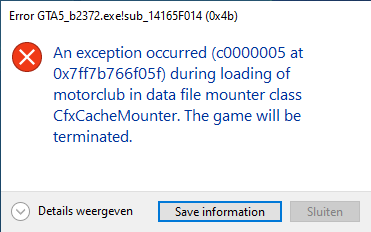
What is the issue you’re having? When I try to edit my clip in the Rockstar Editor my game crashes. I can open up the Rockstar Editor via FiveM, I can select the clip, but when I want to edit the clip and it’s loading, it loads for 10 seconds and after that the game crashes.
What are you trying to do? I am trying to edit videos I took on a server in Rockstar Editor.
What have you tried already to fix the issue? I tried to delete cache files, logs files and tried several things but nothing helped, I even tried to uninstall FiveM completely and re-install it but that didn’t help neither.
What did you do to get this issue? I don’t know it came out of nowhere, it always used to work and some day I just randomly got this error and It doesn’t go away. Last time the Rockstar Editor worked was 04-28 and the time I got this error for the first time was 05-01.
What server did you get this issue on? Be specific and name some, ‘all of them’ by itself isn’t useful!
I got this error on the Tedeapolis Roleplay (NL) server (where I recorded the videos of my cars).
Hello, this is a friendly reminder because this is your first time creating a topic (or it has been a while since your last topic) in this category.
Please note that most of the support is provided by the Cfx.re community on a voluntary basis. We ask you to be patient; there is no guarantee we have a solution to your problem(s). To avoid unnecessary/duplicate topics, please browse the forums before creating a topic.
To improve your chances of your issue(s) being solved, please provide as much information as possible about the issue(s) you are having. Also —whenever possible— please use the template given to you when creating a topic.
If you have any maps from Tbex that are escrowed, I think this causes the editor to bug out, although I’m not entirely sure I’d this is still the case, it may have been fixed already.
I do have NVE installed and that has some custom gas stations, ATM’s and custom roads, do you think that’s the reason it crashes? Or does it have to do with the server itself?
I don’t think that would be the reason. But the error mentions something about a motorclub. Can you try disabling that resource, deleting your server cache and updating your server artifacts?
ahh alright, can you please tell me where I can disable the resource and delete the server cache? I don’t want to delete the wrong things.
I also don’t know how to update server artifacts can you tell me how that works please?
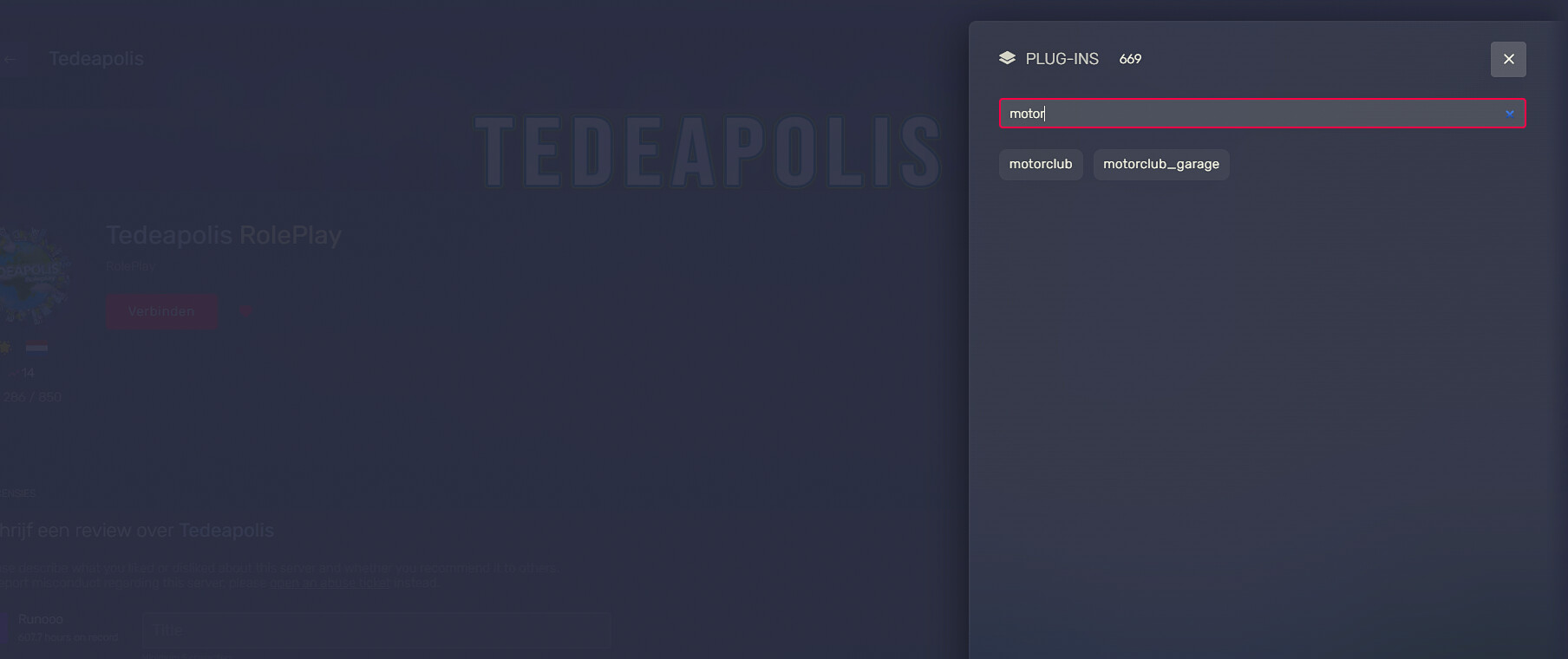
I found a resource on the fivem page and it says motorclub ( the same as shown in the error ). I can’t delete it through here and I don’t know how to delete it.
I hope this will fix the problem because I spoke to someone on the server and he said he also has the Rockstar Editor error on this server, he said it has something to do with this specific server.
I tried editing a clip I recorded on another server and that one worked, so I have to do something in order to get it to work on Tedeapolis.