 Stoic-DMV

Stoic-DMV is a FiveM resource designed to simulate a Department of Motor Vehicles (DMV) experience within your FiveM server. It provides a series of questions and tests to assess players’ knowledge of traffic rules and regulations. Upon passing the test, players receive a valid driver’s license in the game.
Notes:
- This is currently FULLY setup for ND-Framework / QBCore(untested).
- Contribution’s are encouraged.
Requirements
To use the Stoic-DMV resource, you need to ensure the following dependencies are installed:
-
ox_lib: A Lua library for FiveM resources, providing various utility functions and tools. It enhances the functionality and simplifies the development process of FiveM resources.
-
Stoic-IDHandler: A resource that handles player identification within your FiveM server. It manages player data and provides essential functions for interacting with player profiles.
-
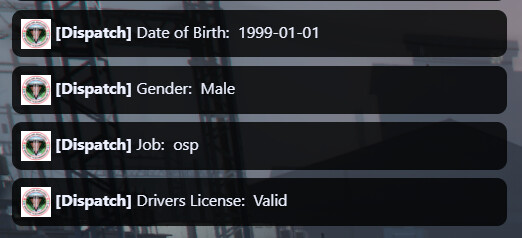
Stoic-ID: A resource that handlers a chat based ID Card within your FiveM server. It displays to you and other near you, the information it grabs from the Source player.
Installation
Follow these steps to install the Stoic-DMV resource:
-
Download the Resource: Obtain the Stoic-DMV resource from the appropriate source, such as a FiveM resource repository or a direct download link.
-
Ensure Dependencies: Make sure that both ox_lib and Stoic-IDHandler resources are installed and correctly configured in your FiveM server resources folder.
-
Copy Files: Extract the contents of the Stoic-DMV resource archive and copy them into your FiveM server’s resources folder.
-
Configure Resource: Open the configuration files of Stoic-DMV and adjust any settings according to your preferences, such as the number of questions in the test or debug mode options.
-
Start Resource: Start the Stoic-DMV resource in your FiveM server configuration file (
server.cfg). Ensure it loads after its dependencies (ox_lib and Stoic-IDHandler) to avoid any compatibility issues. -
Restart Server: Restart your FiveM server to apply the changes and load the Stoic-DMV resource successfully.
Verification
To verify that the Stoic-DMV resource is installed and functioning correctly, follow these steps:
-
Start Server: Launch your FiveM server.
-
Join Game: Connect to your server using a FiveM client.
-
Trigger Command: In the game, trigger the command associated with the Stoic-DMV resource, such as
dmvtest. -
Observe Behavior: Pay attention to any messages or prompts displayed in the game interface. If the resource is working correctly, it should initiate the DMV test process and provide feedback based on the player’s performance.
-
Check Logs: Review server logs or console output for any errors or messages related to the Stoic-DMV resource. This helps identify any potential issues or misconfigurations.
By following these steps, you can install, configure, and verify the Stoic-DMV resource in your FiveM server environment.
DMV Knowledge Test 35 question must get 25 right.

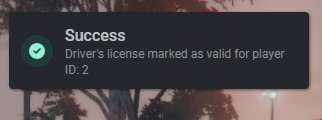
DMV Knowledge Test Pass
Stoic-ID Integration
Github Download
| Code is accessible | Yes |
| Subscription-based | Yes |
| Lines (approximately) | 500 |
| Requirements | ox_lib / Stoic-IDHandler |
| Support | Yes |