did you ever fix this?
Yep. All i did was install it again. 
maybe you can assist me then, i have the add_ace resource.uptime command.sets allow and it gives me the same error you have, in my resources i have a resource called uptime with the code he specified what am i doing wrong
does the uptime resource have to be in the root of resources such as ?
Resources>uptime
or can it be a tier down such as
resources>serverbasics>uptime
@Dootar
Please see above posts
It NEED to be named uptime in resource file
No it doesn’t have to be named ‘uptime’, and why would you ever put this 20 line of code in a seperate resource???
The add_ace command takes the same name you’d use for the restart command
Stop with the word ‘fixing’. You have failed to read the installation manual
1 Like
I put it in a separate resource because as you stated in there “resource” otherwise your instructions to me are unclear I have read the multiple times, so please if you could elaborate as to what needs to be done or what I am doing wrong, because I can’t seem to get it to work and would love to use this resource.
@Dootar could you assist me ?
ok so I set the amin line, made a resource put a resource.lua and uptime.lua in it with the code, ran that resource and nothing, maybe Im doing this way wrong but it doesn’t give any errors on my end just doesn’t show up in the server display.
any help on this would be much appreciated
u forgot ( in local uptimeDay = math.floor(tick-starttick)/86400000)
local uptimeHour = math.floor(tick-starttick)/3600000) % 24
Citizen.CreateThread(function()
	local starttick = GetGameTimer()
	while true do
		Citizen.Wait(15000) -- check all 15 seconds
		local tick = GetGameTimer()
		-- if you want days then use this:
		-- local uptimeDay = math.floor((tick-starttick)/86400000)
		-- if you use day then change the hour to this:
		-- local uptimeHour = math.floor((tick-starttick)/3600000) % 24
		local uptimeHour = math.floor((tick-starttick)/3600000)
		local uptimeMinute = math.floor((tick-starttick)/60000) % 60
		--if you want seconds then use this:
		--local uptimeSecond = math.floor((tick-starttick)/1000) % 60
		ExecuteCommand(string.format("sets Uptime \"%02dh %02dm\"", uptimeHour, uptimeMinute))
	end
end)

Installation
1. Copy the suptime folder to the resources folder
2. Add in server.cfg
    start suptime
	add_ace resource.suptime command.sets allow
11 Likes
i download this and i have a question
why did you change the %02d to %2d?
local num = 6
local num2 = 300
print(string.format("%02d", num)) -> 06
print(string.format("%02d", num2)) -> 300
print(string.format("%08d", num)) -> 00000006
print(string.format("%08d", num2)) -> 00000300
print(string.format("%2d", num)) ->  6
print(string.format("%2d", num2)) -> 300
print(string.format("%8d", num)) ->        6
print(string.format("%8d", num2)) ->      300
print(string.format("%d", num)) -> 6
print(string.format("%d", num2)) -> 300
%02d means a decimal number ( d´), with at least two digits and zero padding; the directive %2d` , without the zero, would use blanks for padding.
if you want like this: 05 days 08 hours 20 minutes 25 seconds then do this:
ExecuteCommand(string.format("sets Uptime \"%02d Days %02d Hours %02d Minutes %02d Seconds\"", uptimeDay, uptimeHour, uptimeMinute, uptimeSecond))
but if you want like this: 5 days 8 hours 20 minutes 25 seconds then do this:
ExecuteCommand("sets Uptime \""..uptimeDay.." Days "..uptimeHour.." Hours "..uptimeMinute.." Minutes "..uptimeSecond.." Seconds\"")
Access denied for commands sets.
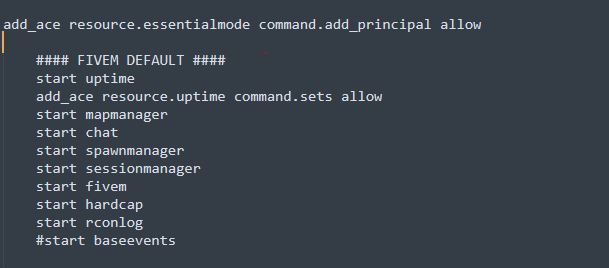
i tried to switch positions of start and add_ace ofc.
folder “uptime” is in folder “resources”
with code from 1st post.
delete this
Doesn’t work. I tried putting this into a resource by itself & still doesn’t work.
Error resuming coroutine: uptime.lua:17: attempt to perform arithmetic on a string value
stack traceback:
        uptime.lua:17: in function <uptime.lua:2>
The problem is TriggerClientEvent(‘uptime:tick’ -1, uptime)
TriggerClientEvent (‘uptime: tick’, -1, uptime)
miss ,
why??