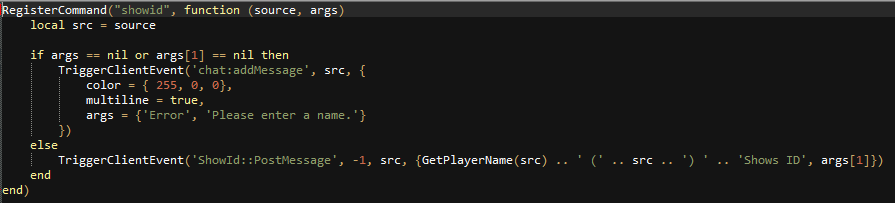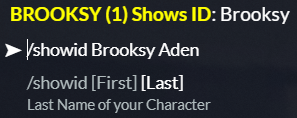
My showid script works on first name: example: /showid Brooksy Aden: but the Aden part does not show the last name can someone help me please.
My showid script works on first name: example: /showid Brooksy Aden: but the Aden part does not show the last name can someone help me please.
every word after the command name is stored in the args part of the command. “Brooksy” should be args[1], “Aden” would be args[2], etc…
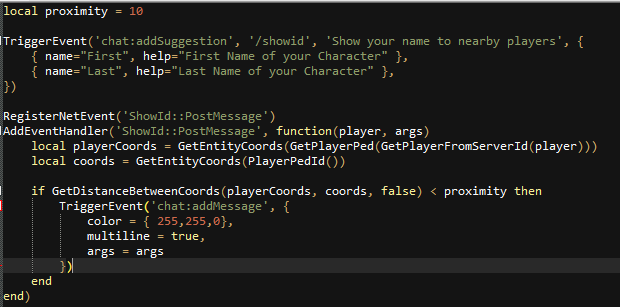
Where do I put args[1] and [2]??
In the command.
Can you show where the /showid command is created?
Yup. That’s the one. You’re only checking for the first command argument there (which is the first name, in your case).
You will need to also look for the args[2], to make sure that it’s not nil, and then pass it in the PostMessage event as args[1].." "..args[2], instead of just args[1]
If I post the code in chat would you be able to put it in the right place like the [args2] because im dumb and I’ll end up being here ages lol
if args ~= nil and args[2] ~= nil then
TriggerClientEvent('ShowId::PostMessage', -1, src, {GetPlayerName(src)..'('..src..')'..' shows ID', args[1].." "..args[2]})
else
TriggerClientEvent('chat:addMessage')--blah blah, just copy it from your command.
end
Yes, but watch out, because you copied “})” near args[1], and it will give you an error, if you try to use it like that.
RegisterCommand(“showid”, function (source, args)
local src = source
if args == nil or args[2] == nil then
    TriggerClientEvent('chat:addMessage', src, {
        color = { 255, 0, 0},
        multiline = true,
        args = {'Error', 'Please enter a name.'}
    })
else
    TriggerClientEvent('ShowId::PostMessage', -1, src, {GetPlayerName(src) .. ' (' .. src .. ') ' .. 'Shows ID', args[1].." "..args[2]})
end
end)
– So like this
OP request