Well well well that is looking amazing, you are a wizard!
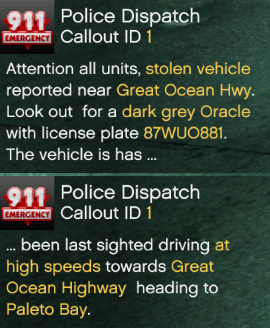
Soon…
Prerelease is up in the widp-branch of the github. Please note that this version is completely untested. I do NOT recommend putting this version on your public server 
For those wondering: Untested means that there hasn’t even been a test to check if the code executes for multiple people. That’s happening tomorrow.
Release date? As usual no comment from me there 
But if I had to take a guess I’d not be talking about weeks, probably days. Might be a good update for 1 month since the initial release … ?
1 Like
how do you install??? just resource or what
Yes, it’s a standalone resource.
Download the latest master-release and move it to your resource folder.
Make sure to read the readme in the github which explains this in more detail.
im having an issue where i press x and the menu stays on
Is the resource written all lowercase, i.e. pd5m instead of whatever name it could have?
Testing out the callouts. Is there a way to accept the callout or is it just spawned in and you go to the area? Also is there a way to enable blips for those who would like them? great script so far! keep it up!
1 Like
If you are notified about a callout then the callout has already been spawned and might have been going on for quite a while.
There is currently no way to enable blips apart from changing the source code. Sadly while testing the callout in a controlled environment it seems that it does not run reliably, i.e. the fleeing car may get stuck whereever, drive in circles, not drive at all, …
Seeing as it is a ~1300 line-callout which I need to rewrite now I’m not THAT happy about it ^^
Now as soon as the single currently existing callout is active, blips would really defeat the purpose of the callout since you got a fleeing vehicle that is (most of the time) driving a defined way over one highway to the city that’s mentionend in the dispatch notification. If that vehicle was blipped there was no need to search so blips for this callout will most likely not be enabled.
Did you get any error messages while testing? I already cleared out some bugs and might put out a new version only with enabled ambient events since these work correctly afaik (see a definition of ambient events below). So atleast some aspects of the mission system work.
What doesn’t work is getting peds far away from any player to act properly. The Tasks just don’t execute reliably, I’ll need to find a way to check if they do execute. Another option would be to code it so they only execute if a player is inside a certain radius (there are natives for me to check that easily). Outside of said radius I’d use teleporting and math.random() to determine the results (already implemented in the current version and works 99% of the time).
- Mission System: The complete system that handles the execution of any event coded for the system (Callouts and Ambient Events).
- Ambient Events:
- Examples:
- Vehicle driving over red lights over and over
- Speeding vehicle
- Traffic impeding vehicle (driving 5 mph)
- starting close to the player (approx. in the radius where peds would normally spawn)
- using pre-spawned peds (these already walk around and do the job they are supposed to do; skin-replacement or spawning own peds might be possible later on)
- code only gets executed once (no complicated long scripts with many nested while loops or options)
- always enabled and no blips, keep your eye open for any infringements!
- Examples:
- Callouts:
- Examples:
- Carjacking, person fleeing on a highway
- Shoprob (not implemented)
- Longer, more complicated code that allows for peds to seemingly act on their own accord
- Allows spawning of own peds and vehicles all over the map who act on a callout before you even get notified of it
- Using math.random() you can code the callouts to have multiple different types, incidents thus greatly improving the replayability
- In the currently sole callout
carjackingI (as the creator) have no idea where the callout is going to take place, whether the jacking attempt is gonna be successful, where the perp is going to flee, whether they are armed, how fast they are driving, … until it gets called out by dispatch
- In the currently sole callout
- the part with peds and vehicles acting properly longrange is completely bugged as soon as multiple players are online (on my local machine the callout works like a charm). It’s bugged so much that I’ll need to completely rewrite the script. My next try will be executing every task on every client at once. I’m not sure what is going to happen but that will be a part of internal testing.
- Examples:
1 Like
I don’t know whether to take this to a private conversation because it is lengthy and convoluted. But in case it leads to some kind of illumination finally from the elements or a really experienced developer, I will spew out some things relating to netcode that many, many people have asked about in these forums over and over again.
I don’t know if you happened to read the 2+ threads for the ‘Crackdown’ Mission System by @ddraigcymraeg but I believe he had to work through many of the same problems you are encountering. AFAIK there was no perfect solution to unreliable distant ped handling, probably because GTA automatically despawns/destroys entities at a distance, but you could check his code and the thread discussions. He seems like a nice guy and would probably strike up a conversation about these issues if he had the time. And as I say, his framework of missions starting around the map and syncing ped behavior had to overcome the same challenges relating to netcode and unstable entities.
I am not certain but this also sounds like it could relate to syncing network entities which are not consistently stable and global across clients. When I peeked at your code earlier I saw that you were making extensive use of networkIDs. I suspect if you insert some debug code you will find that non-host clients are not successfully identifying peds/vehicle netIDs that are passed to them using the NetworkId functions. Why this is the case is still a bit of a mystery to me, but I suspect it is a major reason why FiveM does not have a healthy number of elaborate scripts using AI peds!
When I tinkered with scripting synced peds and entities, I found this all pretty frustrating and AFAIK the netcode is still not well documented anywhere (and may have changed some with onesync). Essentially it seemed to me that even with resource manifest 05cfa83c-a124-4cfa-a768-c24a5811d8f9, which I understoood was supposed to make netIDs global across clients for a session, I still could not consistently convert entity to netID and back again between clients. Even when supplementing with natives like SetNetworkIdExistsOnAllMachines and NetworkGetNetworkIdFromEntity. The problem may have been related to script hosting and the fact that the network host client can change within a session even with no restarting of the script.
While I personally gave up on this method, others may have got it working with the above manifest, although I suspect they had to solve issues around script hosting. @IllidanS4 once wrote to me: “What I found out to be the most useful method to use these functions is to create a separate resource (the “pool” resource) and set only this resource as networked, then set up exports or events in the resource for other scripts to use.” Unfortunately this was not enought info, for me at least, to create a workable framework for consistently passing networkIDs.
If you don’t figure out a reliable way to use netIDs, then you could again look at @ddraigcymraeg’s script which I tihnk avoided them in favor of using decorators to identify entities across clients. However, even decorators have some peculiarities to do with the netcode. You will see some comments in his code to the effect that “setting decor values on NPCs on non-host clients do not seem to propogate like when on the host, so when non-host changes a value on an NPC make sure everyone does it, most importantly the host as well.” I encountered something similar with decorators but, if I recall, non-host clients might be able to manipulate decor values more consistently if they first obtain network control of the entity using a function with (repeated) NetworkRequestControlOfEntity requests. In any event, you will probably need to manage the script host issue one way or another, and the Crackdown script offers one way to do it.
I am having a issue where when you hold down x and it bring up the menu and hover over the selected action nothing happens and the menu gets stuck on my screen. Does anyone have any ideas what would be causing this issue?
Hi,
@Loque basically explained it. You need to design/code with the assumption that any entity will not be available to all clients all the time. The host peer that spawned the entity will always have a handle on it though, so I also designed for that, using decorators. The reason I chose decorators instead of networkids was because networkid was more complicated for me when I was learning to code in FiveM and I didnt find any cohesive code example of using AI/entities thoroughly this way, so decorators were a less complicated way for me.
Saying that a combination of those methods (NetworkRequestControlOfEntity like Loquee mentions) with decorators may simplify non-host peers to take control of entities.
To see what I did though, which works, check my post on this tutorial thread: [How To]An actual video about Decors!(Decorators)
Good luck, it would be great to see more AI scripts, especially PvE.
1 Like
Make sure, that your resource is named pd5m in all lowercase. It must not be named PD5M, PD5M-masteror any other way.
Please change this, if the error persists send me a private message please.
@Loque @ddraigcymraeg
Thanks for the elaborate answers! I’ll look into Crackdown later this day. Have heard of it and skipped over the first post but didn’t read these long threads ^^
So as far as NetworkIDs go the interaction-part of this script works reliably as far as I’m concerned. Never got mentions about peds having different names or w/e between different client (only exception is a bug with RunPlate that I need to check but that seems unrelated to a GTA V / FiveM - sync issue and more related to an oversight with overwriting custom data).
Now the difference for the interaction script is that you need to be close to the ped to be able to interact with it, so that might help FiveM sync the NetworkIDs before you start talking to the peds. Also when interacting with entities the first thing my script does is to sync the data (and by that also using natives to SetEntityAsNetworked() etc if it needs to happen).
Just to mention it, RunID() does work for far-away peds but that’s because that native never has to handle the actual peds and just checks for the custom data.
The part with the non-host issue is something I will certainly look into more closely. While trying to bugfix the current version I tried starting a client-side loop that executes NetworkRequestControlOfEntity() every 0.5 seconds for every mission-required entity. Sadly that didn’t work out, and would have been strange since the client executing the script should be the host-client since he executed the Spawning…
Thanks again for the great feedback and suggestions. I’ll try these out! Was pretty disappointed by the version not working (after finally getting it to work nearly every time for one player…) but not yet going to give up.
1 Like
Hi @Silverman I was wondering if there was anyway we could use just the garage/armory parts of the script without the full PD5M?
You should be able to take out the respective files to create a new resource or deactivate any part of the script you don’t want.
Please don’t publish such a resource if you just use the files ^^
I wouldn’t publish them, so no problem there. Can you tell me what files I would need? I tried just taking out the garage and armory files and the warmenu folder, but pushing E didn’t do anythig and the notification to push E to open the menu didn’t come up.
@R.Killinger you’ll need the appropriate config files in Config/ (at the very least config_cl.lua, the stations and the armory / garage folders), HUD/marker_cl.lua as well as warmenu. I think that should be enough, if not please restart the resource with the files and send the error message that displays in the console as a private message.
you could also just move the markers you dont need under the world, that way if you changed your mind you can bring them back to the surface. I did that for a few of the help question mark things. did not need them by pillbox
Sounds good, I’ll give that a try.
Also I am assuming I will need warmenu as a separate resource since it’s built into the full PD5M script, am I right?
You can use either the integrated or the separate warmenu-resource as they are identical. The files only need access to the functions of warmenu, which can be achieved by integration or by using @Warmenu/warmenu.lua (or something very similar) for the separate resource.