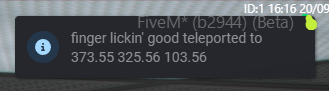
Features:
You can teleport at any place to the map using the coordinates
No menu needed to open to use
Notification of the coordinates that the player teleported along with the username in-game

Usage: Type in the chat the command: /teleport and the the coordinates you want to go to

Example: /teleport 200.0 100.0 50.0

Installation: Put the resource to your resources folder and add “ensure/start teleport” to your server.cfg file. Also put this in your server.cfg: add_ace group.user command.teleport allow
(IMPORTANT NOTE: THE GROUP PERMISSION GROUP MAY VARY ON EACH USER. FOR EXAMPLE MAYBE YOU NEED TO WRITE INSTEAD OF group.user, THE group.admin. YOU CAN CHECK YOUR PERMISSION GROUP IN THE DATABASE)

Download: You can buy it from my Tebex: https://carfangr-tebex-store.tebex.io/

Please note that the script is under development and if you see a bug please report it to me as soon as you see it

Code is accessible Yes
Subscription-based No
Lines (approximately) 80
Requirements v1.6.0 of Es_Extended
Support Yes
3 Likes

Whats the difference between your paid script with 80 lines of code and another script that does the same thing if not more for free? Why paid for such a small and easy resource

2 Likes

Same thing as 26 lines of code lol

Usage: /tp 0.0 0.0 0.0 → Teleports to Coords vec3(0.0, 0.0, 0.0)

-- Config
Config = {}

Config.Command = {
    command = 'tp'
    allowedGroups = {'admin', 'mod'}
}

-- Serverside
ESX = exports["es_extended"]:getSharedObject()

ESX.RegisterCommand(Config.Command.command, Config.Command.allowedGroups, function(xPlayer, args, showError)
    if not args.x or not args.y or not args.z then return end
    xPlayer.triggerEvent('example:teleport', {args.x, args.y, args.z})
  end, false, {help = 'Teleport to specific coords', arguments = {
    {name = 'x', help = 'X Coordinate', type = 'string'},
    {name = 'y', help = 'Y Coordinate', type = 'string'},
    {name = 'z', help = 'Z Coordinate', type = 'string'},
}})

-- Clientside
ESX = exports["es_extended"]:getSharedObject()

RegisterNetEvent('example:teleport', function(coords)
    ESX.Game.Teleport(PlayerPedId(), coords, function() end)
end)

Or without clientside event:

-- Config
Config = {}

Config.Command = {
    command = 'tp'
    allowedGroups = {'admin', 'mod'}
}

-- Serverside
ESX = exports["es_extended"]:getSharedObject()

ESX.RegisterCommand(Config.Command.command, Config.Command.allowedGroups, function(xPlayer, args, showError)
    if not args.x or not args.y or not args.z then return end
    SetEntityCoords(GetPlayerPed(xPlayer.source), args.x, args.y, args.z, false, false, false, false)
  end, false, {help = 'Teleport to specific coords', arguments = {
    {name = 'x', help = 'X Coordinate', type = 'string'},
    {name = 'y', help = 'Y Coordinate', type = 'string'},
    {name = 'z', help = 'Z Coordinate', type = 'string'},
}})

Sorry for misunderstanding. My script has 80 lines of code because it is under development. If you see a bug please report it here

It’s not the same. My script has notifications when the player teleports to the coordinates you entered and much more features. If its not displaying these features i mentioned above, then it mean it has a bug. Please give me some time to take a look at it and fix it. And i know i have released it with 26 lines of code but i added more featured to it.

Did you buy the script from my tebex to test it? If you dont you should test it first and then tell me if it has bugs or not

It is not a small resource. It is just under development. Just wait for new updates to come and then see if it is small or not.

image

-- server side
RegisterCommand('teleport', function(source, args, rawCommand)
  if args[1] and args[2] and args[3] then
    local x = tonumber((args[1]:gsub(",", ""))) + .0
    local y = tonumber((args[2]:gsub(",", ""))) + .0
    local z = tonumber((args[3]:gsub(",", ""))) + .0
    TriggerClientEvent('ox_lib:notify', -1, {
      type = 'inform',
      description = ('%s teleported to %s %s %s'):format(GetPlayerName(source), x, y, z)
    })
    SetEntityCoords(GetPlayerPed(source), x, y, z)
  else
    TriggerClientEvent('ox_lib:notify', source, {
      type = 'error',
      description = 'missing coords'
    })
  end
end, true)

17 lines btw

1 Like

so your selling a teleport resource, that is under development?

I mean it is a complete resource but i will add more features to it

Where did you find this?

what features can you add to a command that sets the entity coords

i just made it

I can add a feature that you can open a menu and have multiple choices. But it will take time to do this.

Mine is 80 not 24

but one of the features is

And i didn’t write it like this

ok? i made the same thing with alot less code then

didnt say you did, im saying the same exact thing can be made in literally minutes with less code

more lines doesnt equal better

I know for now there is no menu needed to open. I will add that in future updates