That is warmenu not NativeUI and all that is doing is triggering ESX events.
Hey there,
I’m wondering is it possible to remove the cursor and allow movement of the camera while the menu is open?
i can remove the cursor but the camera is locked.
Thanks in advance.
Pool:MouseControlsEnabled(false)
Pool:ControlDisablingEnabled(false)
2 Likes
Thanks man, it was in my face all the time…
Loving this menu so far, great work 
Hi, i’m trying for the first time to use your natives… so far the best!!!
I need help on one thing… i’m trying to recreate the Quick GPS from GTA Online… the problem is that i don’t know how to choose the options in NativeUI…
function AddMenuGPSMenu(menu)
    local gps = {
		"Nessuno",
        "Centro per l'Impiego",
		"Stazione di polizia",
        "Ospedale",
		"Banca",
		"Negozio d'armi",
        "Negozio di animali",
        "Concessionario",
        "Parcheggio",
		"Negozio di Abbigliamento",
		"Barbiere"
		}
	local newitem = NativeUI.CreateListItem("GPS Veloce", gps, 1, "Imposta la tua destinazione")
	menu:AddItem(newitem)
	menu.OnListChange = function(sender, item, index)
	if item == newitem then
	if newitem == "Nessuno" then
		ClearGpsPlayerWaypoint()
	elseif newitem == "Centro per l'impiego" then
		local centro = GetFirstBlipInfoId(407)
		local blipX = 0.0
		local blipY = 0.0
		if (centro ~= 0) then
			local coord = GetBlipCoords(centro)
			blipX = coord.x
			blipY = coord.y
			SetNewWaypoint(blipX, blipY)
		end

	elseif newitem == "Stazione di polizia" then
		local centro = GetFirstBlipInfoId(60)
		local blipX = 0.0
		local blipY = 0.0
		if (centro ~= 0) then
			local coord = GetBlipCoords(centro)
			blipX = coord.x
			blipY = coord.y
			SetNewWaypoint(blipX, blipY)
		end
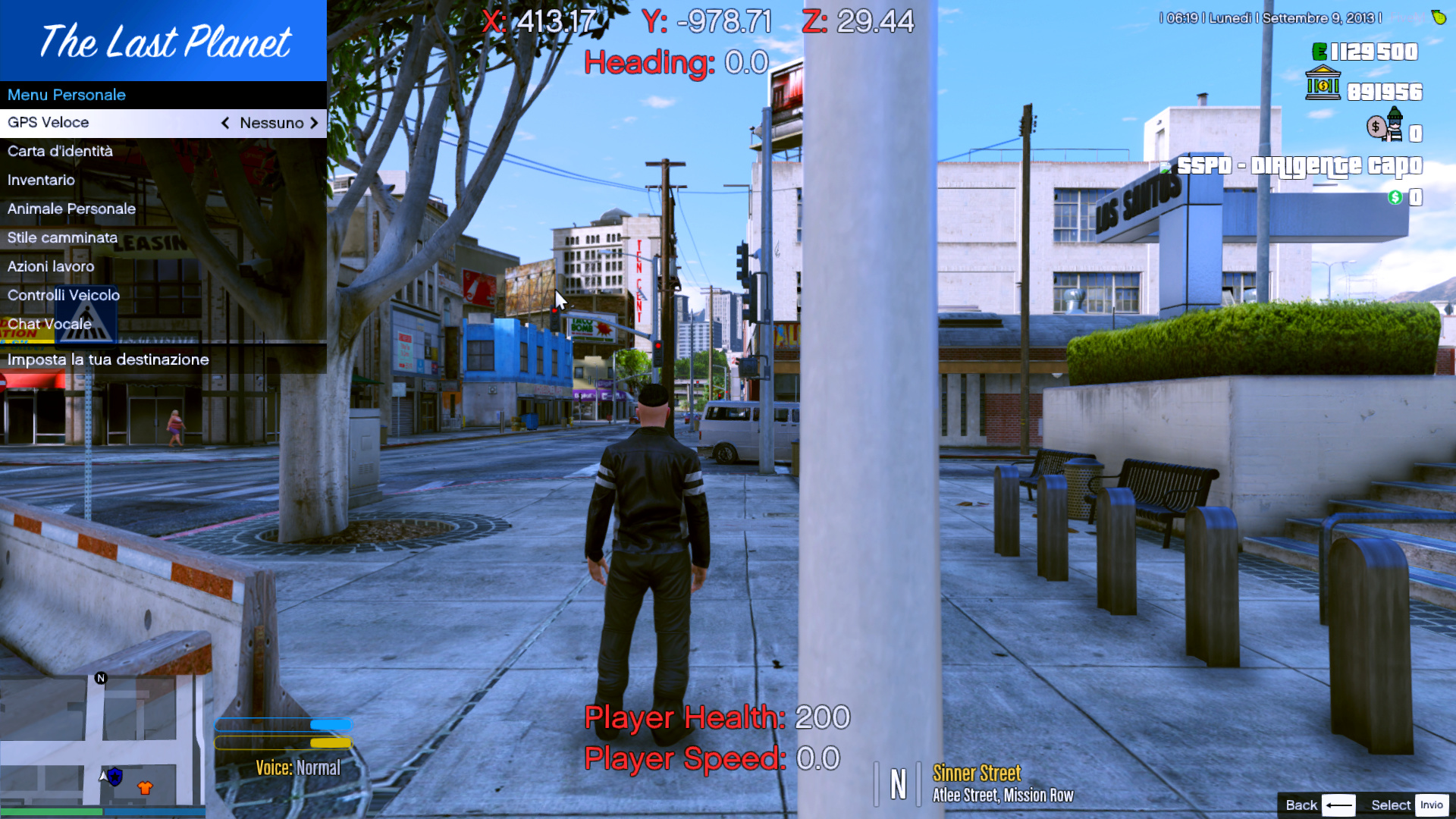
what i’m trying to do is that for any choice the gps changes waypoint… but nothing happens if press enter
can you help me? 
function AddMenuGPSMenu(menu)
    local gps = {
		"Nessuno",
        "Centro per l'Impiego",
		"Stazione di polizia",
        "Ospedale",
		"Banca",
		"Negozio d'armi",
        "Negozio di animali",
        "Concessionario",
        "Parcheggio",
		"Negozio di Abbigliamento",
		"Barbiere"
	}
	local newitem = NativeUI.CreateListItem("GPS Veloce", gps, 1, "Imposta la tua destinazione")
	newitem.OnListChanged = function(ParentMenu, SelectedItem, Index)
		local Item = SelectedItem:IndexToItem(Index)
		if Item == "Nessuno" then
			ClearGpsPlayerWaypoint()
		elseif Item == "Centro per l'impiego" then
			local centro = GetFirstBlipInfoId(407)
			local blipX = 0.0
			local blipY = 0.0
			if (centro ~= 0) then
				local coord = GetBlipCoords(centro)
				blipX = coord.x
				blipY = coord.y
				SetNewWaypoint(blipX, blipY)
			end
		elseif Item == "Stazione di polizia" then
			local centro = GetFirstBlipInfoId(60)
			local blipX = 0.0
			local blipY = 0.0
			if (centro ~= 0) then
				local coord = GetBlipCoords(centro)
				blipX = coord.x
				blipY = coord.y
				SetNewWaypoint(blipX, blipY)
			end
		end
	end
	menu:AddItem(newitem)
end
1 Like
O.O… now i understand my stupidity… thank you very much
if i should need some more help can i ask you?
I was wondering if I could do that on NativeUILua
Hey @Frazzle, is it possible to open a submenu from an OnListSelect function? I want to open a confirmation submenu with 2 buttons “Yes” and “No”.
menu.OnListSelect = function(sender, item, index)
    if item == newitem then
        value= item:IndexToItem(index)
        **<_OPEN CONFIRMATION SUBMENU_>**
    end
end
Thanks in advance 
Something likes this?
local Pool = MenuPool.New()
local MainMenu = UIMenu.New("This", "That", 1300, 600)
local ConfirmationMenu = UIMenu.New(MainMenu.Title:Text(), Text, MainMenu.Position.X, MainMenu.Position.Y)
Pool:Add(MainMenu); Pool:Add(ConfirmationMenu)

local listvalue = nil

function SetupConfirmationMenu()
	local AcceptItem = UIMenuItem.New("Yes", "")
	local DeclineItem = UIMenuItem.New("No", "")
	AcceptItem.Activated = function(menu, item)
		TriggerServerEvent("ListActivated", listvalue)
	end
	DeclineItem.Activated = function(menu, item)
		menu:Visible(false)
		MainMenu:Visible(true)
	end

	ConfirmationMenu:AddItem(AcceptItem)
	ConfirmationMenu:AddItem(DeclineItem)
end

function SetupMainMenu()
	local list = NativeUI.CreateListItem("List:", {1,2,3,4,5,6,7,8,9,10}, 1, "Some list")
	list.OnListSelected = function(menu, item, newindex)
		listvalue = item:IndexToItem(index)
		menu:Visible(false)
		ConfirmationMenu:Visible(true)
	end
	MainMenu:AddItem(list)
end

SetupMainMenu()
SetupConfirmationMenu()
1 Like
Perfect, thats exactly what i was looking for. Thanks man, your the best! 
Once you create a new list item, is there any way to update or modify the list item options?
Figured out a way to dynamically change the ListItem content. Not sure if this is ideal or not. I suspect not since it creates a new menu each time it’s opened.
Instead of creating a menu at runtime and adding all of the elements then, create a new function that will be used when you open the menu and add all the elements to that new menu and then open it. A rough example is like this:
_menuPool = NativeUI.CreatePool()
_menuPool:RefreshIndex()
newMenu = nil
local tableThatChangesOften = {"Value1","Value2"}
local tableThatChangesOftenIndex = 1
local tableThatChangesOftenSelection = tableThatChangesOften[tableThatChangesOftenIndex]

function AddDynamicList()
	local newitem = NativeUI.CreateListItem("Dynamic", tableThatChangesOften, tableThatChangesOftenIndex)
	menu:AddItem(newitem)
	menu.OnListChange = function(sender, item, index)
		if item == newitem then
			tableThatChangesOftenIndex = index
			tableThatChangesOftenSelection = item:IndexToItem(index)
		end
	end
end

function openDynamicMenu()
	newMenu = NativeUI.CreateMenu("Yay", "~b~Dynamic List")
	_menuPool:Add(newMenu )
	AddDynamicList(newMenu )
	_menuPool:RefreshIndex()
	newMenu:Visible(true)
end

Citizen.CreateThread(function()
    while true do
        Citizen.Wait(0)
        _menuPool:ProcessMenus()
        if IsControlJustPressed(1, 56) then
            openDynamicMenu()
        end
    end
end)
I feel like there has to be a better way, but perhaps that is just a limitation of the NativeUI. Looking through the functions in the NativeUILua source code, I couldn’t find a way to delete a menu that has been instantiated once you are complete with it. That would/could free up the used memory.
Please correct me if there is a better way.
EDIT:
Made a slightly more optimized version in my script by keeping track of the number of values that are in the table that changes. I keep track of it when the menu opens for the first time, and if it is different the next time you open the menu it will re-create the menu, otherwise it just reuses the previously made menu. Still not convinced that it’s the most elegant or ideal solution, but it works.
You tried listitem.Items = {} ?
1 Like
Well I’m an idiot. I’ll try that today.
1 Like
Released version 2.0.0
1 Like
Seems like resolutions above 1920x1080 have bad sizing calculations.
Example at 2560x1440:
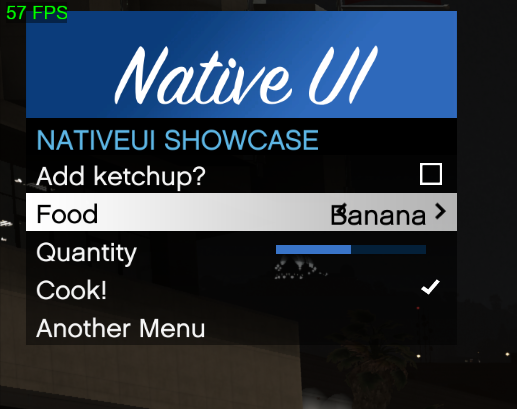
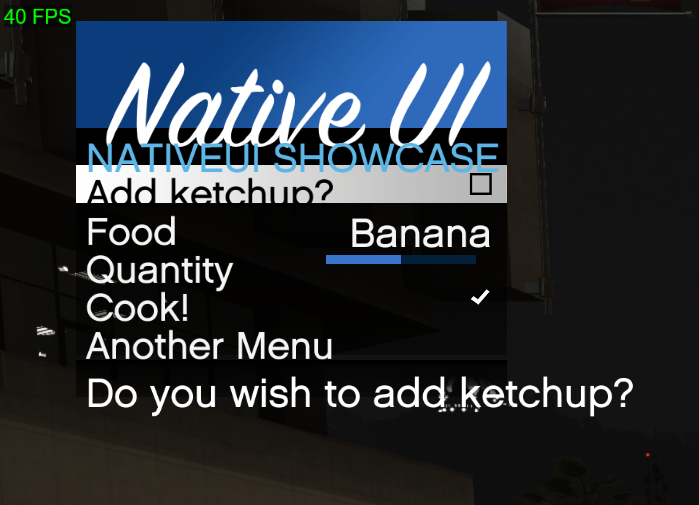
Is this a known issue? Happy to test any known fixes.
it was, i thought i fixed it…god dammit.
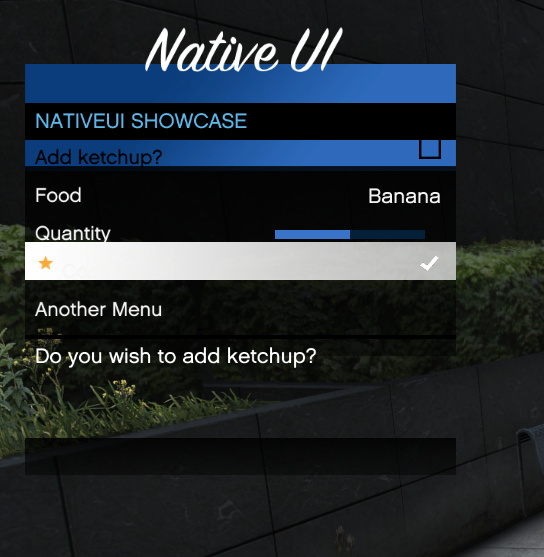
I attempted to fix it myself, and it works to a certain degree, as it seems to scale in size, however as you can see from the screenshot I posted below, its not all aligned properly.
I’ve basically used the exact positioning code used in the original NativeUI instead of the FormatXWYH function.
Here is a pastebin of my NativeUI.lua I modified, in case you are curious as to what I changed: NativeUI.lua - Pastebin.com
i keep getting
Could not find dependency NativeUI for resource EasyAdmin.
^3Couldn’t start resource EasyAdmin.^7
could anyone please tell me what im doing wrong? thanks
1 Like