FiveM Queue
A Queue system for FiveM FX Servers
05/17/2019 - Release Updated to resolve an issue with deferred players passing through playerDropped unexpectedly. This is a recommended update for any server using the resource. Thanks to Tapsu_Z and Deluix for discovering and reporting that players were using this exploit.
This resource intends to solve some problems experienced with other queue resources that are available, as well as add additional features that have been requested for queue resources. Compatibility with various frameworks such as vrp, esx, and others have not been tested so please do let me know if you run into any of these so I can document what needs to change in what resource for proper integration.
Installation Instructions
- Download the latest release here
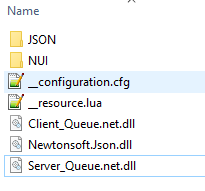
- Unzip and copy the fivemqueue folder into your FX Server resources folder
- edit the configuration.cfg to add identifier(s) for your Queue Admin(s) and change other config options that are hopefully explained clearly enough in file above each option
- start fivemqueue in your server.cfg like any other resource
- View source code and readme for more info on github here
- Enjoy and please report any bugs here
Features
- Add or remove queue priority to players while they are online or offline.
( 1 - 100 where 1 has the most priority and 100 the least ) - Add or remove one of three reserved slot types to players while they are online or offline
- Configurable number of reserved slots by type
- Add or remove Permanent Banning
- Kick active players from session
- Optional white list only mode
- Configurable reconnect grace period and loading screen time limit
- Queue admin commands (In-Game, RCON, or console)
- Queue admin UI panel in game to configure queue and session players
- Queue admins are permissioned in configuration.cfg by steam or license
- Customization options and permissions included in configuration.cfg (Defaults included)
Requirements
- Steam and License are required for features and persistence
- Non Steam version is planned for later release due to frequent requests
Screenshots







Commands
Steam and License in examples below were randomly generated, any association with real accounts was
coincidental and not intended.
Command List
| Command | Paramaters | Explanation |
| /q_session | None | Opens the queue admin panel displaying all players in session and providing options to configure reserved slot types, priority, and kick or ban. If run from RCON or console will display the session information in console |
| /exitgame | None | Gives players a way to give up their reconnect grace time and exit the game when finished playing |
| /q_addpriority | Steam or License or Handle | Adds priority to a player Also available via in game UI Example: /q_addpriority 11000050888sg23 Example: /q_addpriority 833g50qqa4e620arq2a937312rt9b5g050d2ew54 Example: /q_addpriority 66536 Example: /q_addpriority 1 |
| /q_removepriority | Steam or License or Handle | Removes priority from a player Also available via in game UI Example: /q_removepriority 11000050888sg23 Example: /q_removepriority 833g50qqa4e620arq2a937312rt9b5g050d2ew54 Example: /q_removepriority 66536 Example: /q_removepriority 1 |
| /q_addreserve | Steam or License or Handle and 1 or 2 or 3 | Add or change reserved slot type Also available via in game UI Example: /q_addreserve 11000050888sg23 1 Example: /q_addreserve 833g50qqa4e620arq2a937312rt9b5g050d2ew54 3 Example: /q_addreserve 66536 2 Example: /q_addreserve 1 1 |
| /q_removereserve | Steam or License or Handle | Removes any reserved slot type Also available via in game UI Example: /q_removereserve 11000050888sg23 Example: /q_removereserve 833g50qqa4e620arq2a937312rt9b5g050d2ew54 Example: /q_removereserve 66536 Example: /q_removereserve 1 |
| /q_offlinereserve | Steam or License and 1 or 2 or 3 | Assign an offline player to a reserve type. This is temporary until player joins at which time they are added to persistentance or until the server is restarted, whichever occurs first Example: /q_offlinereserve 11000050888sg23 1 Example: /q_offlinereserve 833g50qqa4e620arq2a937312rt9b5g050d2ew54 3 |
| /q_addban | Steam or License or Handle | Bans a player permanently until unbanned Also available via in game UI Example: /q_addban 11000050888sg23 Example: /q_addban 833g50qqa4e620arq2a937312rt9b5g050d2ew54 Example: /q_addban 66536 Example: /q_addban 1 |
| /q_removeban | Steam or License | Unbans a player Example: /q_removeban 11000050888sg23 Example: /q_removeban 833g50qqa4e620arq2a937312rt9b5g050d2ew54 |
| /q_restart | None | Restarts the queue processing if needed but not recommended Check for errors in your console before using this as they are included to help with debugging |
Huge thanks to @gEE, @Skrubby, and @Smish, for your testing and feedback that helped me fine tune the queue
02/27/2019 - Release Updated to resolve issues and requests from GitHub
Existing users can copy and paste the JSON folder into the new release folder to retain reserve, priority, and ban user configurations
Update Notes - 02/27/209
- Remove 32 player limit for onesync_enabled servers
- Remove q_restart command, no longer necessary since deferral freezing is no longer an issue
- Tweak logic to no longer require players to cancel and rejoin queue if their reserved or priority setting is changed while they are in queue
- Provide ability to change the resource name and folder path allowing it to be placed in a [foldername] type folder
- Start hardcap resource if queue resource is stopped
- Change message for ‘Timed Out’ to ‘Exceeded server owners maximum loading time threshold’
- Added optional feature to restrict symbols in steam/user names if server owner wants to use it
- Only update host name if host name is already set, should resolve ‘default FXServer’ though setting hostname in server.cfg before starting this resource also resolved that issue
- Optional configuration to remove queue state change messages in console, now disabled by default
- Added /q_count command from console or in game
- Added /q_changemax command to dynamically adjust the q_max_session_slots while server is running
- Added /q_steamhexfromprofile command which accepts a steam community profile id number and will return the steam hex that can be used with other commands such as /q_addpriority
- Added /q_reloadconfig command allowing changes to __configuration.cfg file without restarting server
- Changed default loading time to 4 minutes to reduce instances of time out on servers with hefty asset download times (owner configurable)
- Some other misc tweaks for both user and server performance improvements