[RELEASE] B2_Dogtags System for FiveM

Introduction
We are excited to release the Dogtag System for FiveM servers! This resource enhances role-playing experiences by adding immersive dogtags for players. Compatible with QBCore and QBox frameworks, it supports both qb-inventory and ox-inventory systems.
Features
- Player’s Name on Label: Displays the player’s name prominently on each dogtag.
- Gang Rank in Description: Includes the player’s gang rank in the dogtag description.
- Gang-Specific Dog Tags: Drops the correct gang-specific tag upon a player’s death.
- Drop Mechanism on Death: Dogtags drop at the player’s death location.
- Pick-Up Availability: Dogtags are available for other players to pick up after the deceased player respawns.
- Inventory Compatibility: Supports both qb-inventory and ox-inventory systems.
- Optional Police and Civilian Dogtags: Configurable options for police and civilian dogtags.
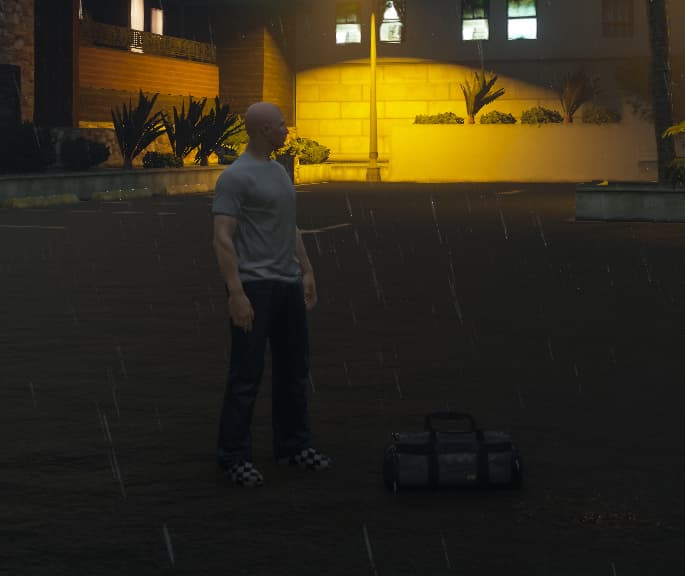
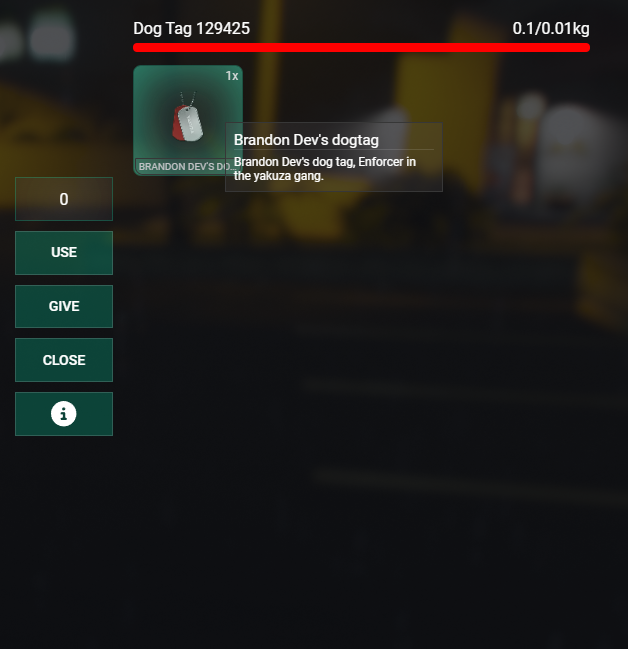
Item in Bag Inventory only available for Ox. QB-Inventory does not seem to support custom drops like this. QB-Inventory works by pressing E on the bag, and it gives you the item.
Installation
-
Purchase, Download and Extract the Resource
Purchase & download the dogtag system resource and extract it into your
resourcesdirectory. Ensure the folder is namedb2_dogtags. -
Add the Resource to Your Server
Open your
server.cfgand add the following line to ensure the resource starts with your server:ensure b2_dogtags -
Configure the Resource
Open the
config.luafile in theb2_dogtagsdirectory and configure it according to your server’s needs. -
Configure Item Images
Place custom item images in the appropriate inventory’s images directory.
- For
ox_inventory, place images inox_inventory/web/images. - For
qb-inventory, place images inqb-inventory/html/images.
- For
-
Add Items to Inventory
Ensure dogtag items are defined in your inventory script.
- For
ox_inventory, add item definitions todata/items.lua. - For
qb-inventory, add item definitions toshared/items.lua.
- For
-
Database Configuration
Ensure your database is configured correctly with the
playerstable structure. -
Testing
- Restart your server.
- Ensure the resource starts correctly without errors.
- Test the dogtag drop and pick-up functionalities in-game.
-
Troubleshooting
- Check server and client console logs for errors.
- Ensure configurations and item definitions are correctly set up.
- Enable debugging in
config.luafor detailed logs.
For detailed installation steps, refer to the Installation Guide or the GitBook Docs
Configuration
Configure the script by editing the config.lua file:
Config = {}

Config.Framework = 'qb' -- 'qb' or 'qbx'
Config.Inventory = 'qb-inventory' -- 'qb-inventory' or 'ox_inventory'
Config.NotifyScript = 'b2_notify' -- 'b2_notify' or 'ox' or 'qb_notify' or 'qbx_notify'

Config.GangTags = {
    ['gang1'] = 'tag_gang1',
    ['gang2'] = 'tag_gang2',
    -- Add more gangs and their corresponding tags - these should be the same as in the gangs.lua file
}

Config.DropOnDeath = true -- Enable or disable the drop mechanism on death
Config.PickUpAvailability = true -- Enable or disable the pick-up availability
Config.Debugging = true -- Enable or disable debugging

Config.CivPlayersDropTags = false  -- Enable or disable the drop of tags when a civilian player dies - false means only gang members will drop tags
Config.PoliceDropTags = true -- Enable or disable the drop of tags when a police officer dies - done via Job
Config.PoliceJob = 'police' -- Define the police job name
Usage
Once installed and configured, the Dogtag System works as follows:
- Player Death: When a player dies, their dogtag drops at the death location.
- Dogtag Pick-Up: Another player can pick up the dogtag by pressing E when near it.
- Inventory Management: The dogtag is added to the player’s inventory with metadata showing the deceased player’s name and gang rank.
Extending the Dogtag System
Adding New Gangs
To add new gangs to the Dogtag System, update the Config.GangTags table in the config.lua file:
Config.GangTags = {
    ['gang1'] = 'tag_gang1',
    ['gang2'] = 'tag_gang2',
    ['newgang'] = 'tag_newgang', -- Add your new gang here
    -- Add more gangs and their corresponding tags
}
Customizing Notifications
To customize the notification system, set the Config.NotifyScript variable in the config.lua file:
Config.NotifyScript = 'b2_notify' -- 'b2_notify' or 'ox' or 'qb_notify' or 'qbx_notify'
Ensure the chosen notification script is installed and configured on your server.
Support
For installation help and support, refer to the included documentation or reach out to us directly.
Availability
The Dogtag System is available on Tebex in both asset protected and open source formats. Choose the option that best suits your needs!
 Tebex Store: B2 Scripts
Upgrade your FiveM server with our immersive Dogtag System and make every player’s death a memorable one!
| Code is accessible | Open Source Available |
| Subscription-based | No |
| Lines (approximately) | 250-300 |
| Requirements | QBCore or QBox & QB-Inventory or Ox_inventory |
| Support | Yes |