What is the issue you’re having?
RedM crashes during startup with Failed to allocate memory for Vulkan. VkResult: VK_ERROR_OUT_OF_DEVICE_MEMORY.
What have you tried already to fix the issue?
Troubleshooting Already Attempted
Cleared the RedM cache.
Completely uninstalled and reinstalled RedM.
Tried changing the graphics API configuration to DirectX 12; the same Vulkan error persisted.
Forced RedM to use the high-performance NVIDIA GPU.
Updated the NVIDIA driver, then downgraded to the previous driver.
Disabled the Steam in-game overlay.
Tested launching RedM with Steam open and closed. With Steam closed, RedM requested Rockstar Games authentication.
Inspected the Vulkan implicit-layer registry entries under:
HKEY_LOCAL_MACHINE\SOFTWARE\Khronos\Vulkan\ImplicitLayers
HKEY_LOCAL_MACHINE\SOFTWARE\WOW6432Node\Khronos\Vulkan\ImplicitLayers
The listed Rockstar, Steam, OBS, and Epic Games Vulkan layers were already set to 0.
Tried limiting RedM to 90 FPS through NVIDIA Control Panel; this did not resolve the issue.
Tried the experimental graphics-improvements update channel; the Vulkan error persisted.
My CPU does not have integrated graphics, so the RTX 4080 is my only graphics adapter.
What server did you get this issue on?
RedM Startup
Error screenshot(s)
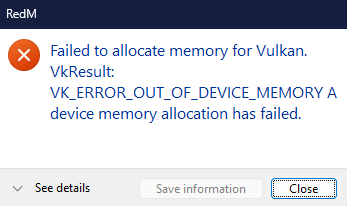
Windows version
Windows 11 26H2
System specifications
System Specifications
GPU: NVIDIA GeForce RTX 4080
RAM: 64 GB
Graphics driver: NVIDIA 617.42, according to the latest crash report
Operating system: Windows 11 26H2
CPU: Ryzen 7 5800X
Game: Red Dead Redemption 2
Other clients tested: FiveM works normally
Antivirus software
Windows Defender
CitizenFX crash zip file (‘Save information’ on a crash)
CfxCrashDump_2026_10_24_08_41_43.zip (2.03 MB)
Log files
launcher.log (19.3 KB)socialclub.log (6.65 KB)socialclub_launcher.log (7.33 KB)CitizenFX_log_2026-10-24T084111.log (57.3 KB)
Additional comments
Description of the Issue
RedM was working normally a few days ago but suddenly started crashing during startup.
Initially, RedM would open but crash before reaching the main menu. At one point, it remained open for approximately one minute before crashing. After reinstalling RedM, it now crashes before I can reliably reach the main menu.
The error consistently reports:
Failed to allocate memory for Vulkan. VkResult: VK_ERROR_OUT_OF_DEVICE_MEMORY
One of the crash reports showed the fingerprint four-alanine-item and glue.dll+93802. A later crash report showed a different fingerprint, connecticut-blue-stairway, with redm.exe+1FB9.
What Works Normally
Red Dead Redemption 2 launches normally.
FiveM launches and works normally.
My RTX 4080 is detected successfully.
The reported dedicated GPU memory usage was approximately 1.6 GB and did not spike before the crash.
Questions
Why would RedM fail to allocate Vulkan memory when RDR2 itself launches normally and GPU memory usage is low?
Could this be a RedM-specific Vulkan initialization bug or a recent client regression?
Is there a known fix for the glue.dll+93802 crash fingerprint?
Are there additional logs or diagnostics I should collect to identify the root cause?
I can provide crash dumps from October 24, 2026, including the initial and subsequent failures.
Any help would be appreciated. I’ve exhausted the usual cache, reinstall, graphics API, driver, and overlay troubleshooting steps, and I’d prefer to identify the actual cause rather than continue changing settings blindly.
