For about two weeks, or a little more, I’ve been seeing the error as shown in the attached image.
I want to point out that I’m having no problems with FiveM.
I’ve already performed the following steps:
Clean boot
Antivirus exclusions
SDK check
Boot without antivirus
Activation of Rocstar and Redm services on both public and private networks.
Drivers
I also formatted “SOB” on the PC.
Nothing, the problem persists and I can’t figure it out.
Does anyone know how to fix it?
Thanks in advance everyone
Hello, this is a friendly reminder because this is your first time creating a topic (or it has been a while since your last topic) in this category.
Please note that most of the support is provided by the Cfx.re community on a voluntary basis. We ask you to be patient; there is no guarantee we have a solution to your problem(s). To avoid unnecessary/duplicate topics, please browse the forums before creating a topic.
To improve your chances of your issue(s) being solved, please provide as much information as possible about the issue(s) you are having. Also —whenever possible— please use the template given to you when creating a topic.
I don’t know if this can happen with RedM but I’ve seen it happen with FiveM, so we can give it a try.
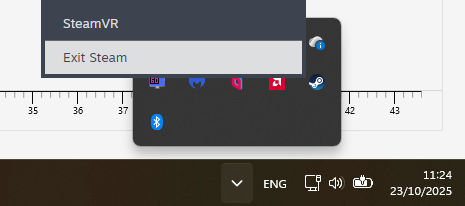
Sometimes the Launcher can get confused that you own the game on Steam when you actually don’t. It tries to initialize a “Steam minlaunch mode” and gives that error. The solution is to make sure Steam is fully closed from the system tray, near the clock.
If this doesn’t fix the issue for you, can you send me this file in DMs or on Discord (@gogsi123) C:\Users\[Your Username]\Documents\Rockstar Games\Launcher\launcher.log
i have the game on steam.
The problem is the launcher, which only gives that error on RDR2. The launcher gives that error immediately!
After almost a month of emails with Rockstar Support, they said they didn’t know how to fix it. I should contact a local technician.