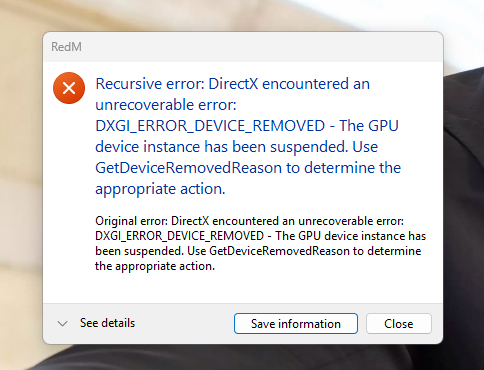
RedM crashing with DXGI_ERROR_DEVICE_REMOVED (only in RedM)

What is the issue you’re having?

RedM crashes every time with the error:

DXGI_ERROR_DEVICE_REMOVED

This only happens in RedM.

Other games work perfectly fine:

  • RDR2 story mode runs without any issues
  • CS2 runs without crashes

I have already tested my GPU with FurMark for over 10 minutes with no crashes, so hardware is stable.

Things I already tried:

  • Clean GPU driver reinstall (DDU)
  • Cleared RedM cache
  • Reinstalled RedM
  • Tried different settings
  • Lowered GPU clocks for stability

The issue only happens in RedM.

Please help.

What have you tried already to fix the issue?

DDU driver reinstall, cache clear, RedM reinstall, GPU stress test (FurMark stable), changed settings, underclock test.

What server did you get this issue on?

Royal 1899

Error screenshot(s)

Windows version

Windows 11 25H2 (OS Build 26200.8037)

System specifications

CPU: Intel(R) Core™ i5-14400F
GPU: NVIDIA GeForce RTX 5060 Ti
RAM: 32GB
Storage: SSD M2 1TB
OS: Windows 11 25H2 (OS Build 26200.8037)
Drivers: NVIDIA 595.79

Antivirus software

Windows Defender (built-in)

CitizenFX crash zip file (‘Save information’ on a crash)

CfxCrashDump_2026_03_24_16_12_38.zip (2.22 MB)

Log files

CitizenFX_log_2026-03-24T124159.log (48.9 KB)

Additional comments

This issue only happens in RedM. My system is stable and passes stress tests. I have attached crash dumps and logs.

If needed, I can provide additional information or test fixes.

1 Like

Hello, this is a friendly reminder because this is your first time creating a topic (or it has been a while since your last topic) in this category.

Please note that most of the support is provided by the Cfx.re community on a voluntary basis. We ask you to be patient; there is no guarantee we have a solution to your problem(s). To avoid unnecessary/duplicate topics, please browse the forums before creating a topic.

To improve your chances of your issue(s) being solved, please provide as much information as possible about the issue(s) you are having. Also —whenever possible— please use the template given to you when creating a topic.

Thanks for keeping these forums tidy!
:mascot:

I’m having the same problem. Nearly 50% of our server’s players are affected by this. What helped was changing this in the system.xml file:

kSettingLevel_Ultra , ändern zu kSettingLevel_Low

ut this is only a temporary solution, so I’d like to ask the CFX team to take another look and determine the actual cause of the error.

1 Like

**We have the same problem. Everything was fine all the time, and suddenly yesterday it started happening.
We tried everything with players on our server.
We tried change Graphics API vulkan/direct, default settings, downgrade graphic driver but its same.

This problem is also accompanied by the fact that RedM sometimes crashes immediately in the menu upon startup**

1 Like

RTX new 50 series is the problem

Maybe
We think its drivers for 50 series but we downgrade driver and still same problem

I found the solution

I found the solution.

Hi. Would you please tell us your solution? that would be nice. :slight_smile:

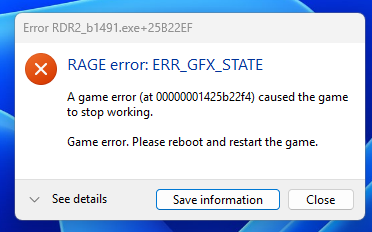
I fixed ERR_GFX_STATE solution, if u wanna fix that, send your discord so I can help.

This problem now lol

try installing the 572.83 STUDIO driver and make sure to choose custom in the installer and remove the previous driver option and try that. I was having the same issue but now i can play Redm on ultra and not have it crash on me just the usual random crashes Fivem/Redm gives sometimes.