Device name Apache
Processor AMD Ryzen 7 7700 8-Core Processor (3.80 GHz)
Installed RAM 32.0 GB (31.1 GB usable)
Device ID 41651614-55F9-4B71-904E-0952A6D8B128
Product ID 00342-21368-29868-AAOEM
System type 64-bit operating system, x64-based processor
Pen and touch No pen or touch input is available for this display
Antivirus software
Bitdefender
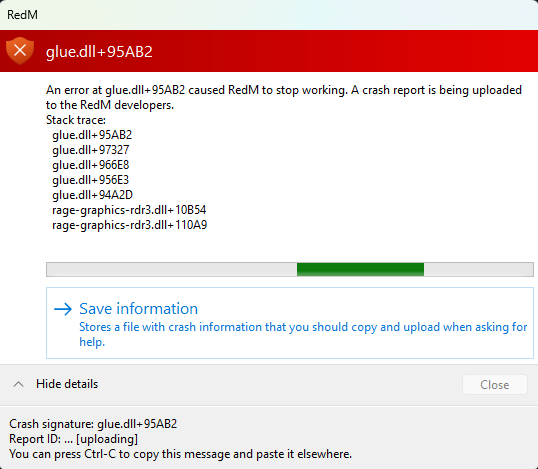
CitizenFX crash zip file (‘Save information’ on a crash)
Hello, this is a friendly reminder because this is your first time creating a topic (or it has been a while since your last topic) in this category.
Please note that most of the support is provided by the Cfx.re community on a voluntary basis. We ask you to be patient; there is no guarantee we have a solution to your problem(s). To avoid unnecessary/duplicate topics, please browse the forums before creating a topic.
To improve your chances of your issue(s) being solved, please provide as much information as possible about the issue(s) you are having. Also —whenever possible— please use the template given to you when creating a topic.
Then uninstalled both RDR2, GTA5 as well as RedM and FiveM. Then reinstalled them and in settings changed RedM to RADEON and it didn’t work. Unless I misunderstood what you meant…
New crash folders below.
And for what it’s worth, there are zero issues with FiveM this is only an issue for RedM for some reason.
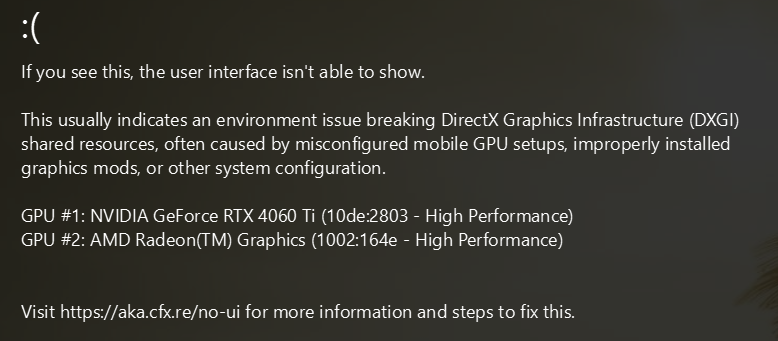
I have two monitors, one plugged into the motherboard one into the GPU. If i disable the motherboard graphics card, in my case AMD Ryzen, then whilst I only have one working monitor, RedM loads up properly and with zero issues.
No idea why this became an issue literally overnight, but this is so far the only solution i’ve found.
I do not have 2 monitors and got the same issue, i tried everything from clearing cahe, changing settings, reinstalling everything. decided to call in chagpt, took me 7hours and at 1 point i had it running in safemode with these commands added: -safemode -dx12 -ignorepipelinecache
when i too kthe safemode away it kept crashing again…i’m at a loss…plz help
Hardware
CPU: AMD Ryzen 5 7600X
GPU: NVIDIA GeForce RTX 4070 (12 GB VRAM)
RAM: 32 GB
Opslag: SSD (Steam installatie)
OS: Windows 10/11 (laatste versie)
Issue description
RedM consistently crashes during startup with glue.dll related errors (sometimes accompanied by graphics initialization failures).
RedM only works in Safe Mode
In normal mode, it crashes during initialization (before gameplay)
Red Dead Redemption 2 Story Mode runs completely stable
Troubleshooting already performed
Fully reinstalled Red Dead Redemption 2 (Steam version)
I was getting lost doing a bunch of changes similar to the ones you’ve listed. I also could get RDR2 running stable but never even get RedM to start (I didn’t bother trying safe mode).
I saw one comment from like 12 days ago on a low-view YouTube video saying to press Win+Ctrl+Shift+B when you can’t get RedM started and it has worked every single time since.
I hope this could help you since you mentioned graphics initialization failures!

 Hardware
 Issue description
 Troubleshooting already performed