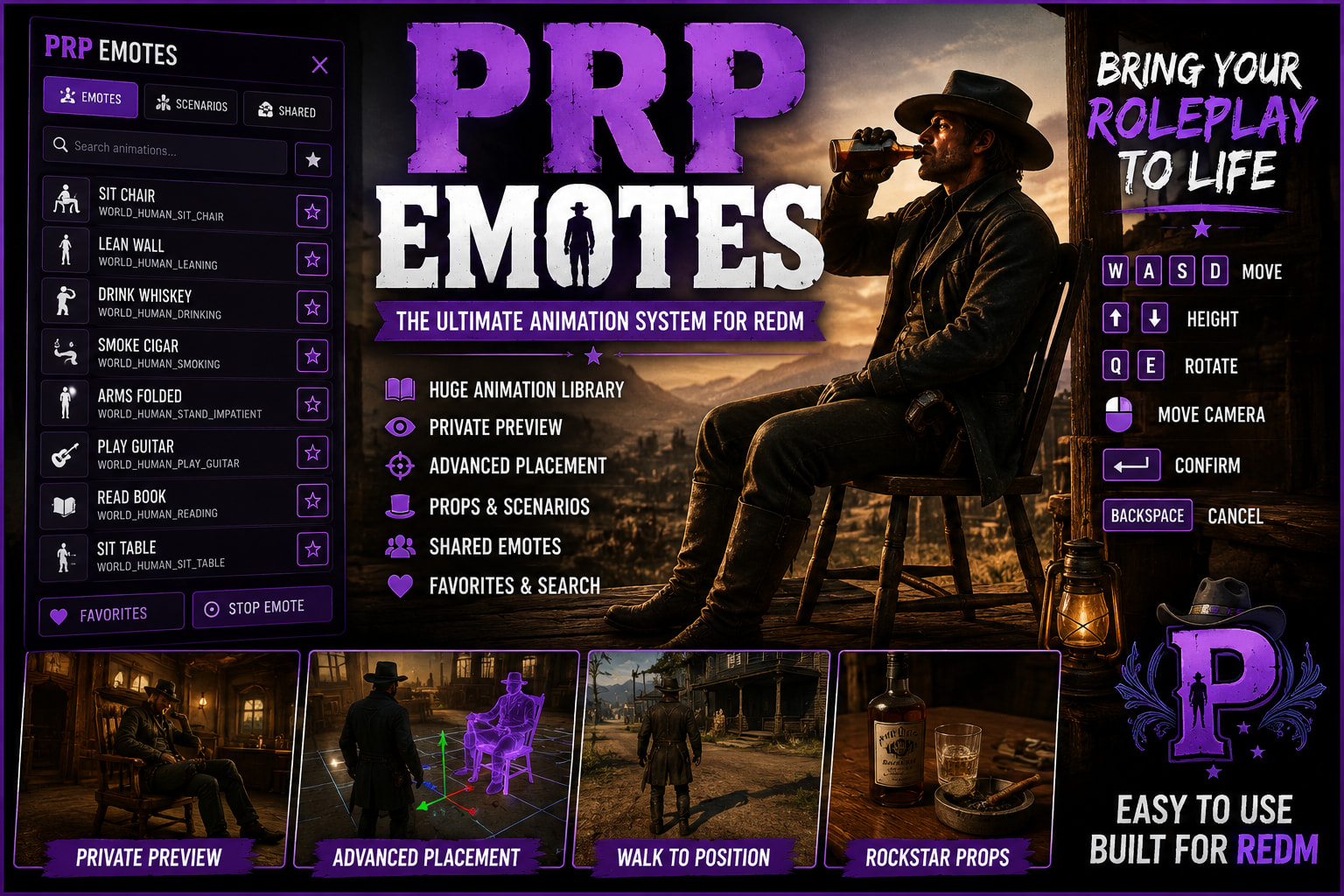
Bring your RedM roleplay to life with PRP Emotes, a feature-packed animation system designed for immersive RP, easy animation discovery, accurate placement, and seamless interaction with the world.
With a huge library (400+) of animations, emotes and scenarios including all of them being shareable**, players can preview animations privately, position them exactly where they want, use their intended props, and create far more natural scenes throughout your server.
VIDEO - PRP-EMOTES
TEBEX - ProjectLS Scripts
 Key Features
 Huge Emote & Animation Library
Access a large collection of emotes, animations and scenarios through one clean, easy-to-use interface.
 Private Live Animation Preview
Simply hover over an animation in the menu to preview it instantly on your own character.
The preview is local to you, meaning other players won’t see you performing animations while you’re browsing.
 Interactive Preview Camera
Animations can be inspected before use with a dedicated preview camera, making it much easier to find exactly what you’re looking for.
 Advanced Emote Placement System
Want to sit perfectly on a chair? Lean against a specific wall? Lay on a bed? Stand on a balcony? Position an animation exactly where the scene requires it.
Select Place and use the placement system to position your animation before committing to it.
Placement Controls
W / A / S / D — Move placement
Up / Down — Adjust height
Q / E — Rotate character
Mouse — Camera control
Enter — Confirm placement
Backspace — Cancel
The character maintains the rotation you choose while repositioning, allowing for precise alignment with furniture, props and the environment.
 Intelligent Walk-to-Placement
Once a placement is confirmed, your real character doesn’t simply teleport into position.
The system intelligently navigates toward the selected location, allowing the ped to find sensible routes around the environment — including navigating toward stairs when the selected animation is on another level.
Once close enough, the player transitions into the exact position and rotation you selected and begins the chosen animation.
 Furniture & Scenario Support
Designed for animations involving:
-
Chairs and benches
-
Tables
-
Beds
-
Counters
-
Walls
-
Floors
-
Elevated surfaces
-
Environmental props
Placement allows these animations to be lined up far more accurately than traditional /e systems.
 Prop Support
Animations that are designed to use props can use their intended props.
Props are automatically managed by the system and cleaned up when the animation ends, helping prevent abandoned objects from accumulating around the server.
 Instant Search
Quickly search through the animation library instead of scrolling endlessly through hundreds of entries.
 Favorites
Players can favorite commonly used animations for fast access during RP.
 Shared Emotes
A dedicated Shared Emotes section provides the foundation for synchronized player interactions.
Send another player an invitation and allow both players to participate in synchronized animations together — perfect for more involved character interactions and RP scenes.
 Multiple Ways to Stop
Players aren’t trapped inside animations.
Cancel using:
/e c
/e cancel
Backspace
or the dedicated (DOUBLE TAP X) Stop Emote Function.
The system handles animation, task and prop cleanup when cancelling.
 Built for Immersive Roleplay
PRP Emotes isn’t just another /e animation menu.
The placement and preview systems are designed around letting players actually build a scene before committing to it.
Preview an animation privately → position it in the world → adjust its height and rotation → confirm → watch your character naturally move into position → begin the animation.
This makes everything from sitting around a saloon to cinematic screenshots and large RP scenes significantly easier to set up.
 UI Features
The interface includes a clean Purple RP / ProjectLS-style design with:
-
Categorized animations
-
Search
-
Favorites
-
Shared Emotes
-
Private hover previews
-
Placement controls
-
Stop Emote controls
-
Easy animation browsing
 Optimized for RedM
Built specifically around RedM / RDR2 animation behavior, scenarios, props and native ped behavior.
The system is designed to keep preview activity local until an animation is actually committed, preventing unnecessary animation spam for nearby players.
PRP Emotes
Preview it. Position it. Play it.
A complete animation system built for servers that want players to do more than simply type /e sit.
Perfect for serious roleplay servers, cinematic RP, screenshots, social interactions, saloons, businesses, housing, events and everyday character immersion.
Checklist
- [Y ] I have reviewed the latest version of the Releases rules.
- [Y ] I have included a detailed description of my work as described in the rules.
- [Y ] I have included a download link or a store link.
- [Y ] I have filled out the required information at the end of the topic
| Code is accessible | Partial |
| Subscription-based | No |
| Lines (approximately) | 3000+ |
| Requirements | VORP |
| Support | Yes |