50% OFF FOR LIMITED TIME NOW ! =$4.99
DEMO VIDEO - https://youtu.be/MkGSnZGjwFA
PURCHASE ON TEBEX - https://projectls.tebex.io/category/redm-scripts
Advanced In-Game Prop Placement System for RedM (VORP)
Create, edit, and manage world props directly in-game with a powerful and easy-to-use building system designed specifically for RedM roleplay servers.
ProjectLS Builder allows players or admins to place objects anywhere in the world using an intuitive placement interface with live previews, editing tools, and database persistence.
Perfect for building camps, towns, decorations, roleplay scenes, and server custom environments without restarting your server.
 Features
 In-Game Prop Builder
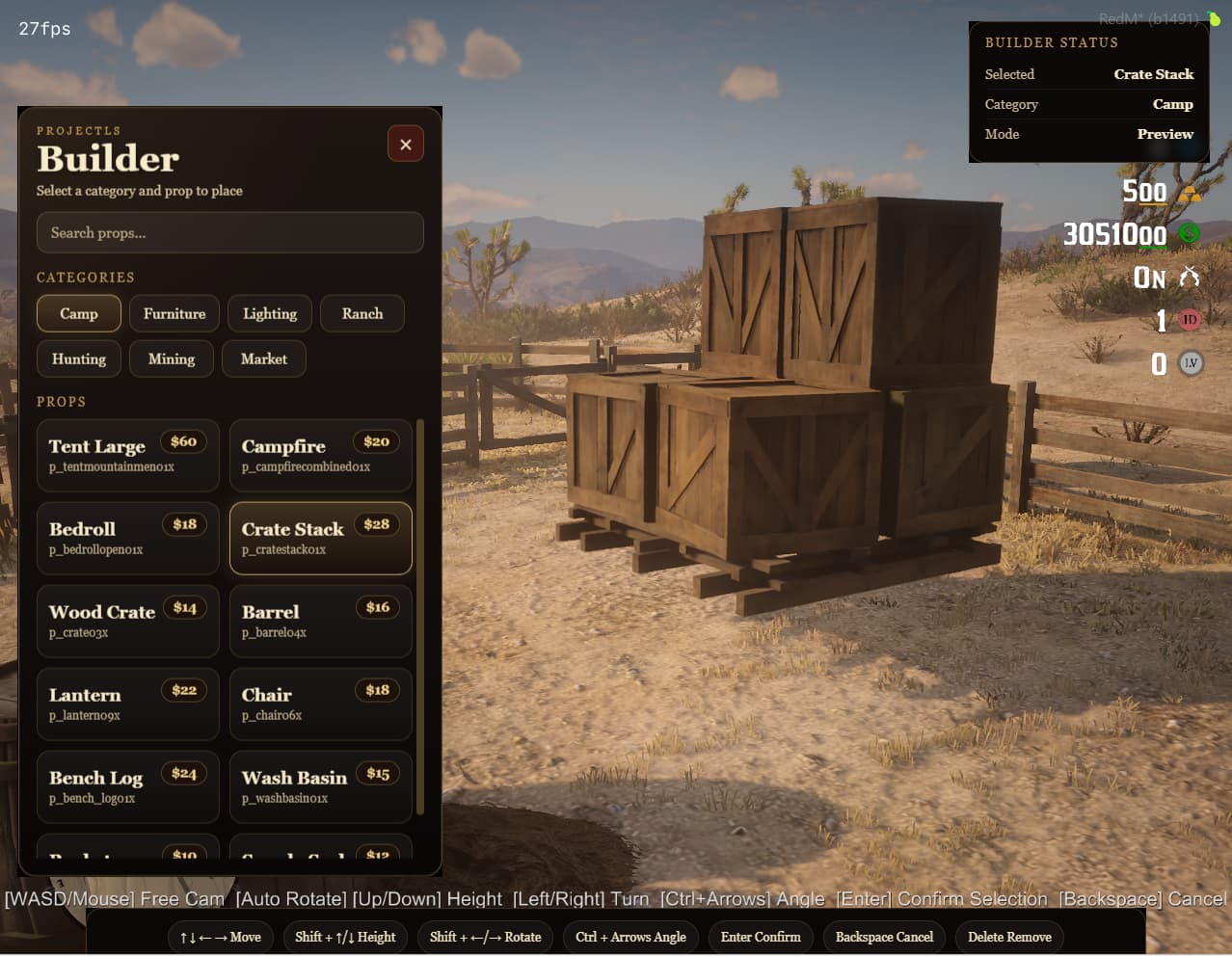
Place props anywhere in the world using a smooth in-game builder system with full camera control.
 Live Prop Preview
Preview props before placing them with rotation, height adjustment, and movement controls.
 Purchase System
Props can be configured with prices so players must purchase props using in-game currency.
 Edit Existing Props
Edit props after placing them:
- Move
- Rotate
- Adjust height
- Save new positions
 Delete System
Safely remove placed props using edit mode
 Database Persistence
All props are saved to the database and automatically reload when:
- the resource restarts
- the server restarts
- players reconnect
 Prop Streaming System
To maintain performance, props only spawn when players are nearby.
This keeps the system optimized even with large numbers of props placed across the map.
 Free Camera Placement
Builder mode allows smooth placement with free camera movement while your character is hidden.
When builder mode ends, your character returns to the exact position where building started.
 Category System
Organize props into configurable categories for easy browsing.
 Prop Search
Quickly search through available props using the built-in search function.
 Fully Configurable
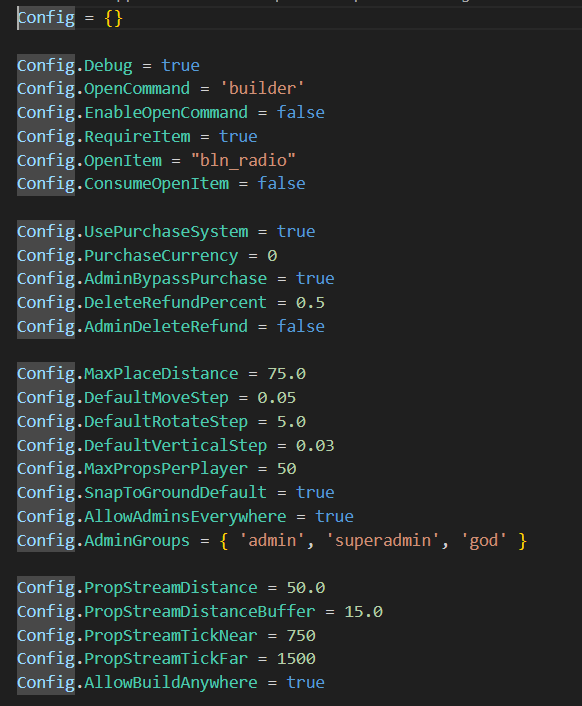
Easily customize:
- prop categories
- prop models
- prop prices
- placement controls
- builder permissions
- streaming distance
- UI settings
Placement Controls
Key
Action
WASD / Mouse
Free camera movement
Arrow Keys
Move prop
Shift + Arrows
Height / rotation
Ctrl + Arrows
Fine rotation
Enter
Confirm placement
Delete
Delete prop
Backspace
Cancel build mode
 Database Support
Props are saved in a MySQL database table and automatically load when the resource starts.
Included SQL file for easy installation.
Dependencies
Required:
- VORP Core
- vorp_inventory
- oxmysql
- ox_lib
Installation
- Place the resource in your server’s
resourcesfolder. - Import the included SQL file.
- Add the resource to your
server.cfg:
ensure projectls_builder
- Configure props and settings inside:
config.lua
- Restart your server.
Compatibility
Tested with:
- RedM
- VORP Framework
- oxmysql
- ox_lib
 Perfect For
- RP town building
- camp creation
- event setups
- custom environments
- admin map editing
- player housing decoration
- roleplay scene building
 Support
Support is provided for installation and configuration issues.
 Why Choose ProjectLS Builder?
Unlike basic prop scripts, ProjectLS Builder provides a complete in-game construction system with:
- live preview placement
- editing tools
- prop persistence
- performance streaming
- configurable categories
- purchase system
Build your world live while your server is running.
- [Y ] I have reviewed the latest version of the Releases rules.
- [Y] I have included a detailed description of my work as described in the rules.
- [Y ] I have included a download link or a store link.
- [Y ] I have filled out the required information at the end of the topic
| | |
|-------------------------------------|----------------------------|
| Code is accessible | Partial |
| Subscription-based | No |
| Lines (approximately) | 2000+ |
| Requirements |
- RedM
- VORP Framework
- oxmysql
- ox_lib
| Support | Yes: Discord: ProjectLS |