No such command server.cfg error in cmd
**GTA V version?**Latest
**Up to date?**Yup
**Legit or Pirate copy?**Legal
**Steam/CD/Social Club?**Social CLub
**Windows version?**Windows 10 Pro
Did you try to delete caches.xml and try again?
Error screenshot (if any)
System specifications8gb Ram, Acer e5-755
**What did you do to get this issue?**Trying to start server
**What server did you get this issue on?**My own
CitizenFX.log fileN/A
.dmp files/report IDsN/A
If an issue with starting:
GTA V folder screenshotNo Need
GTA V/update/x64/dlcpacks screenshotNo Need
Filepath to FiveM folderNo Need
FiveM client folder screenshotNo Need
**Did you try to disable/uninstall your Anti-virus?**Dont have one
Also add what you already tried so far.
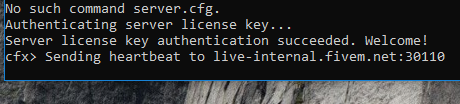
As you can see this is what I am getting and when I type the command normally instead of using thes fx.bat file it comes up with invalid license…Which is odd because the screen shot says its authenticated!