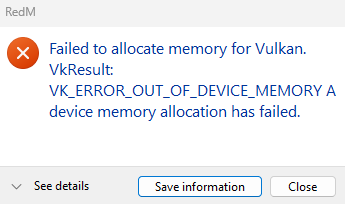
i don’t know i am having this issue i tried everything re installed rdr2, re installed RedM 3 times, wiped the caches done everything, please if you can help me out thanks
Hello, this is a friendly reminder because this is your first time creating a topic (or it has been a while since your last topic) in this category.
Please note that most of the support is provided by the Cfx.re community on a voluntary basis. We ask you to be patient; there is no guarantee we have a solution to your problem(s). To avoid unnecessary/duplicate topics, please browse the forums before creating a topic.
To improve your chances of your issue(s) being solved, please provide as much information as possible about the issue(s) you are having. Also —whenever possible— please use the template given to you when creating a topic.
Hey! That error at RedM startup is almost always a driver/Vulkan issue, not the game files — that’s why reinstalling didn’t help. A few things to try:
Clean reinstall your NVIDIA driver — uninstall with DDU in Safe Mode, then install the latest Game Ready driver from nvidia.com (Windows Update drivers often cause exactly this).
Close/uninstall apps with Vulkan overlays — MSI Afterburner/RivaTuner, OBS, Epic overlay etc. can break Vulkan at startup.
Check your pagefile isn’t disabled — set virtual memory to “System managed”.