Supernatural flight for your RedM characters
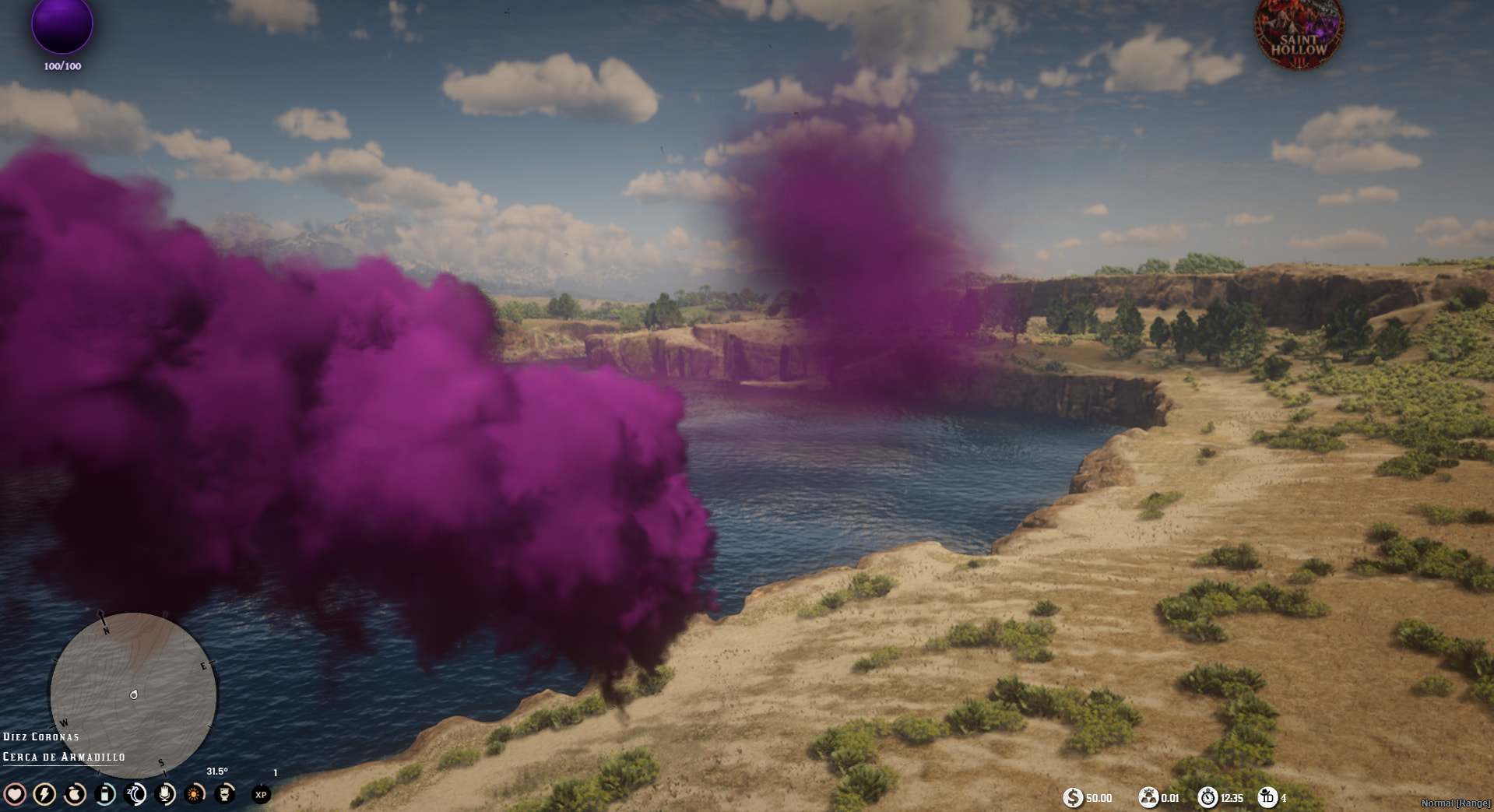
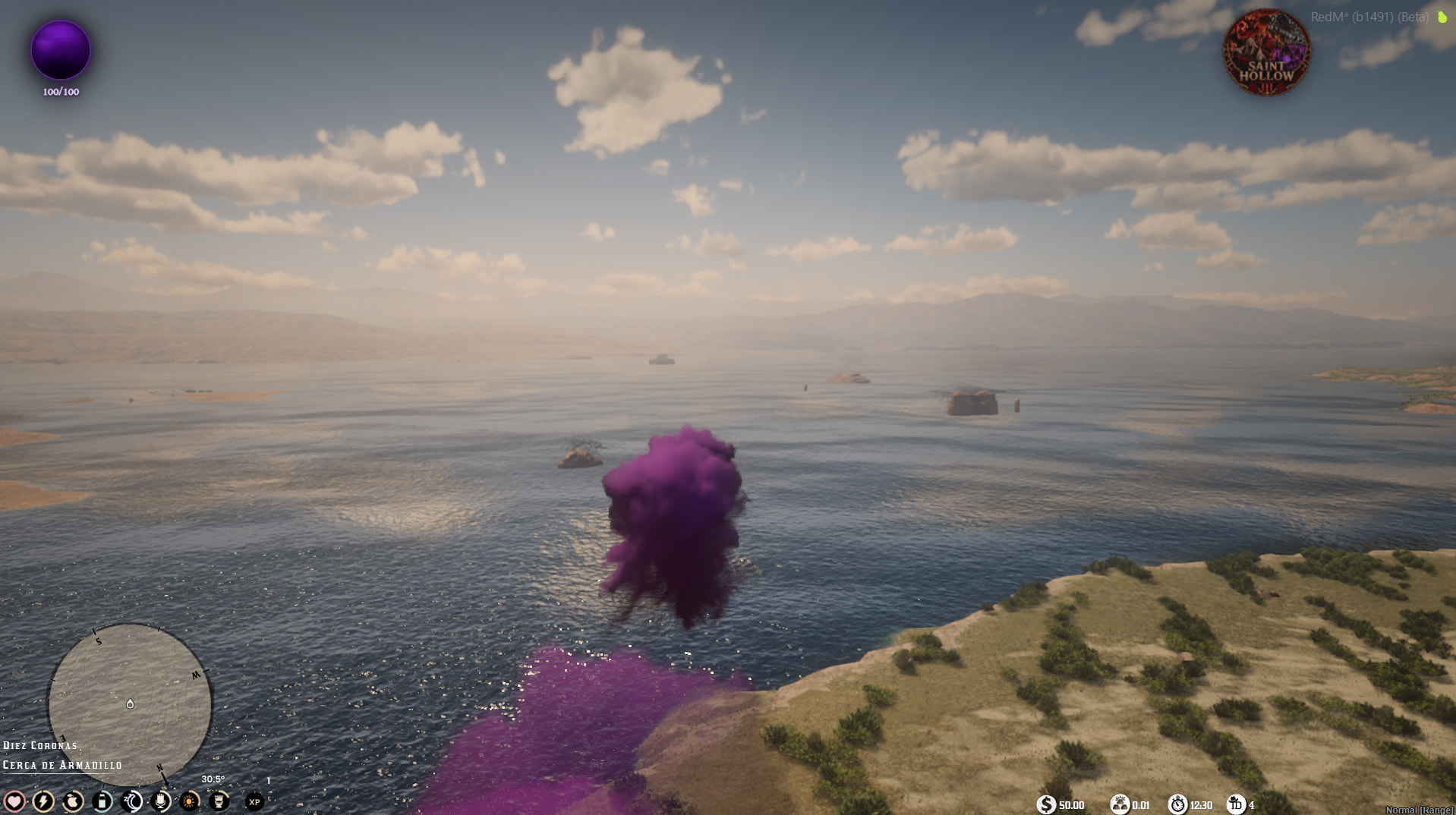
Paulcript Flying — Smoke Edition brings supernatural flight to RedM, with synchronized colored smoke trails, selectable landing animations and the Hell Down diving ability.
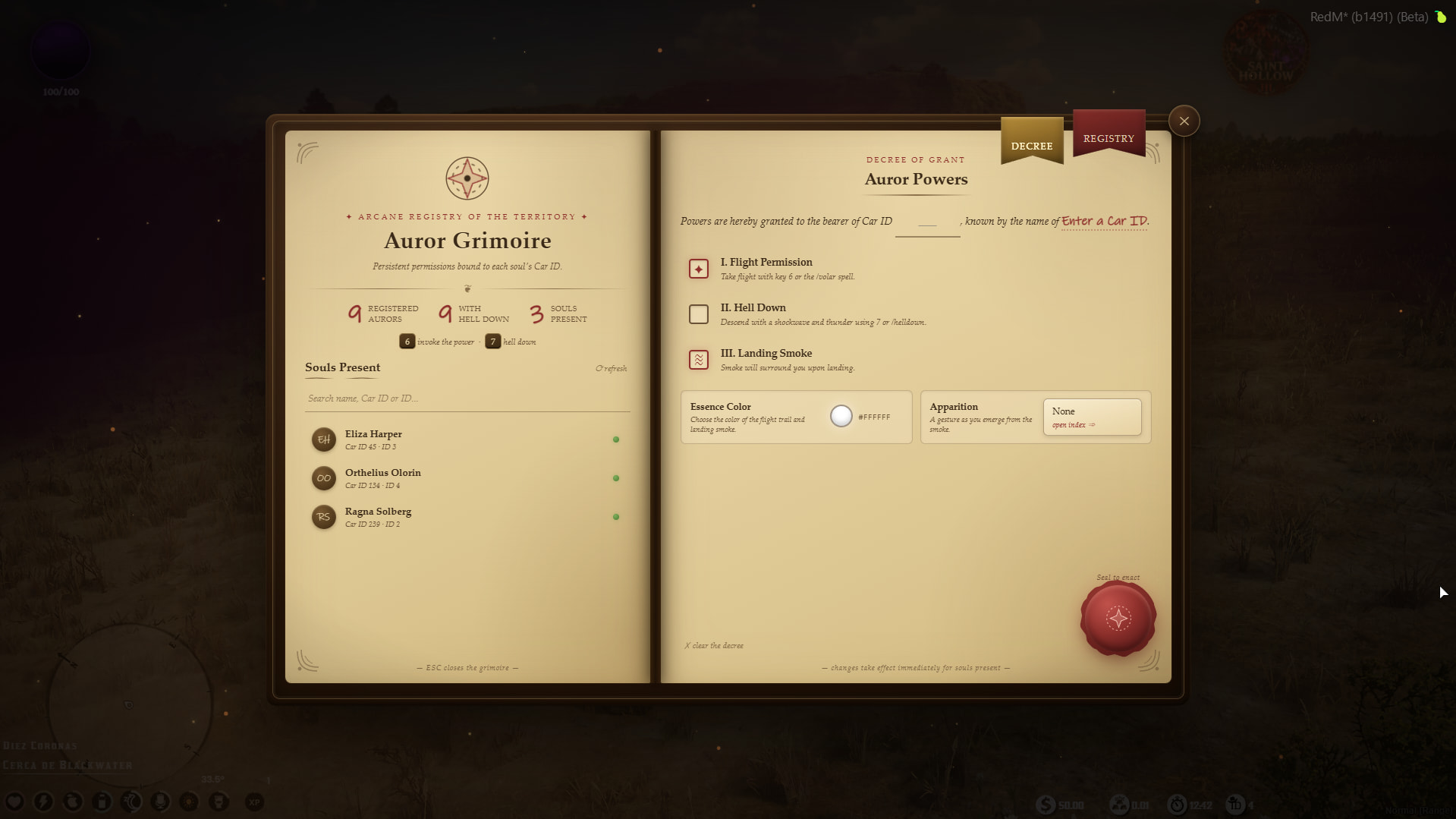
Manage access through a grimoire-style administration panel. Permissions, smoke colors and landing animations are saved separately for each persistent VORP Character ID.
Resource: paulcript_flying
Version: 1.0.2
Framework: VORP
 Demonstration
 Watch the gameplay demonstration on YouTube
 Get Paulcript Flying through the Tebex Scripts catalogue
 Features
- Camera-relative flight controls.
- Configurable acceleration, movement speed, ascent and descent.
- Configurable minimum ground clearance.
- Synchronized colored smoke trails visible to nearby players.
- Optional brief smoke cloud when landing.
- Selectable landing animations.
- Hell Down dive with its own character permission.
- Synchronized impact shockwave and expanding visual dome.
- Bundled positional impact sound.
- Configurable shockwave force, ragdoll behavior and targeting.
- Separate options for affecting players and NPCs.
- Grimoire-style administration panel.
- Persistent permissions assigned by VORP Character ID.
- Searchable animation catalogue with filters and favorites.
- English interface, messages, built-in animation labels and documentation.
- Server-side permission checks.
- Integration exports for other resources.
- Editable configuration.
By default, the character model is hidden during flight and represented by the smoke trail. Server owners can change this behavior in config.lua.
 Hell Down
 allows an authorized character to perform a downward dive while flying.
The impact can produce:
- An expanding visual dome.
- A synchronized shockwave.
- Positional impact audio.
- Configurable horizontal and vertical force.
- Ragdoll effects on nearby players and NPCs.
- Optional smoke impact particles.
The caster is excluded from their own shockwave. Player characters apply the impulse locally, while NPCs are handled by their owning client.
Hell Down requires Flight permission. It works independently of the Landing Smoke permission, and a normal landing does not trigger the shockwave.
The default minimum altitude for a dive is 2.5 metres.
 Character permissions and administration
Authorized administrators open:
/adminflying
The panel lets staff select an online character or enter a persistent VORP Character ID.
| Permission | Function |
|---|---|
| Flight | Enables flight and normal landing. |
| Hell Down | Enables the special dive and impact effects. Requires Flight. |
| Landing Smoke | Enables the brief landing smoke cloud. Requires Flight. |
Administrators can also:
- Choose a smoke color.
- Select a landing animation.
- Review existing grants in the Registry.
- Edit or revoke character permissions.
Permissions use characters.charidentifier, rather than the temporary server ID.
Changes apply immediately to online characters. Revoking Flight ends active flight and restores character visibility.
Panel access is available through configured VORP character groups or the ACE permission:
paulcript_flying.admin
The default administrator groups are:
adminsuperadmin
Example ACE configuration:
add_ace group.admin paulcript_flying.admin allow
Administrator-panel access does not automatically grant flight powers to that administrator’s character.
 Default commands and controls
| Command or control | Action |
|---|---|
/fly or 6 |
Start flight or begin a normal landing. |
/land |
Begin a normal landing. |
/helldown or 7 |
Perform Hell Down while flying, when authorized. |
/adminflying |
Open the administration panel. |
W, A, S, D |
Move relative to the horizontal camera direction. |
Space |
Ascend. |
Left Ctrl |
Descend. |
Shift |
Increase flight speed progressively. |
Backspace |
Cancel a persistent landing animation or scenario. |
Esc |
Close the animation selector or administration panel. |
Commands and controls are configurable.
Players must leave their horse or vehicle before taking off.
 Landing animations
The included English catalogue supports:
- Emotes.
- Animation dictionary and clip combinations.
- RedM scenarios.
- Finite animations.
- Persistent animations.
The selector includes search, filters and favorites. Finite animations finish automatically; persistent animations can be cancelled with Backspace or interrupted by other character actions.
Optional imports from gum_animmenu are disabled by default. The built-in catalogue works without that resource.
Imported entries retain their original labels unless translation overrides are configured. Imported animations require the corresponding external catalogue to remain available.
 What you receive
The complete paulcript_flying v1.0.2 resource, including:
- Client flight controller.
- Server permission system.
- Hell Down shockwave implementation.
- Grimoire NUI administration panel.
- Editable
config.lua. - Bundled
helldown.wavimpact sound. - Built-in English animation catalogue.
sql/install.sqlfor optional manual database setup.- Integration exports.
- English installation and configuration guide.
Custom peds, external dependencies, server hosting and custom installation are not included.
 Requirements
- RedM.
- VORP Core —
vorp_core. - OneSync.
oxmysql.xsound.- A configured VORP database.
- A server artifact compatible with Cfx.re Asset Escrow.
The VORP database must contain the standard characters table with these columns:
charidentifierfirstnamelastname
Required dependencies are installed separately.
gum_animmenu is optional and only needed when its animation imports are enabled.
xsound remains a required resource dependency even when the impact sound is disabled.
 Download and installation
- Purchase through Tebex using the Cfx.re account that owns your RedM server.
- Sign in with that account and download the associated resource from Cfx.re Portal → Granted Assets.
- Extract the complete
paulcript_flyingfolder into your server’sresourcesdirectory. - Keep the resource folder name unchanged. The bundled sound URL and integrations use this name.
- Retain all files supplied in the processed Cfx download, including its manifest and
.fxap. - Start the resources in this order:
ensure oxmysql
ensure vorp_core
ensure xsound
ensure paulcript_flying
- Restart the resource or server.
- Open
/adminflyingwith an authorized administrator. - Grant Flight to the intended persistent VORP Character ID.
- Configure Hell Down, Landing Smoke, smoke color and landing animation as required.
- On the authorized character, dismount and use
/fly.
The resource creates its permissions table automatically. sql/install.sql is also supplied for manual setup.
The database user must have permission to read the VORP character table and create and maintain the resource’s permissions table.
 Configuration and updates
config.lua exposes settings for:
- Commands and administrator access.
- Player messages.
- Movement speed, acceleration and vertical controls.
- Ground clearance and dive behavior.
- Character visibility during flight.
- Smoke color, emitters and landing effects.
- Synchronization settings and effect draw distance.
- Landing animations and optional catalogue imports.
- Hell Down sound, radius, force, ragdoll and targeting.
When remapping controls, update both the RedM control hashes and their displayed labels.
Restart the resource after configuration changes.
When updating an existing installation, stop the resource, replace its folder and transfer your desired settings into the new config.lua. Existing character grants remain usable.
Keep only one copy of paulcript_flying active.
 Integration exports
Server-side permission check:
local allowed = exports['paulcript_flying']:HasFlightPermission(playerSource)
Client-side flight controls:
local started = exports['paulcript_flying']:StartFlight()
local isFlying = exports['paulcript_flying']:IsFlying()
StartFlight respects the normal character-permission, mount and vehicle checks. Calling the export does not grant flight permission.
 Compatibility and product scope
Permissions, smoke colors and landing-animation selections persist in the database. Active flights, particles and Hell Down impacts do not persist across server or resource restarts.
This edition uses smoke as its flight manifestation. Fire trails, mixed smoke/fire styles, mist circles and mist prisons are not included.
Particle appearance and impact behavior depend on RedM rendering, entity ownership, physics and other active resources.
The purchase includes the flight system, administration interface, effects and bundled sound described above. It does not include custom character models, additional supernatural powers, external dependencies, custom animation assets or server installation.
 Protection and editable files
In the Cfx.re Asset Escrow distribution, the main client, server and shockwave Lua scripts are protected.
config.lua is excluded from encryption so server owners can edit its settings.
The NUI files, SQL installation file, documentation and bundled impact sound are supplied with the resource.
 Support
Join the Paulcript Support Discord
For installation or compatibility assistance, include:
- Your resource version.
- A description of the issue.
- Steps to reproduce it.
- Relevant F8 or server-console errors.
Checklist
- I have reviewed the latest version of the Releases rules.
- I have included a detailed description of my work as described in the rules.
- I have included a download link or a store link.
- I have filled out the required information at the end of the topic.
Release information
| Code is accessible | No — core Lua scripts are protected in the Cfx.re Asset Escrow distribution. config.lua and the supplied NUI files remain accessible. |
| Subscription-based | No — one-time purchase. |
| Lines approximately | Approximately 1,750 Lua lines, including configuration. Manifest and NUI HTML/CSS/JavaScript are separate. |
| Requirements & dependencies | RedM, VORP Core, OneSync, oxmysql, xsound, a configured VORP database and an Asset Escrow-compatible server artifact. Optional gum_animmenu integration. |
| Support | Yes — Paulcript Discord. |