Are you tired of losing vehicles after a server reset? Save & Respawn is here to enhance the gameplay experience on your FiveM server by ensuring players’ vehicles are automatically saved in the database and respawned seamlessly after a reset. No more hassle, just smooth and immersive gameplay!
Key Features
- Automatic Vehicle Saving: Vehicles are saved directly to the database without any player input, ensuring every vehicle is secure.
- Instant Vehicle Respawn: After a server reset, all saved vehicles automatically respawn, so players can jump right back into action.
- Broad Compatibility: Works with both QB-Core and ESX frameworks for easy integration.
Configuration Options
Our script includes various settings to customize how vehicle saving and respawning work on your server. Key options include:
- Automatic Saving: Choose between automatic or manual vehicle saving.
- Save Intervals: Set the time interval for automatic vehicle data saving.
- Database Choices: Opt for MySQL or JSON file storage.
- Spawn Delay and Distance: Configure delay time and distance for vehicle respawn.
- RoutingBucket Integration: Enable RoutingBucket system for streamlined vehicle and player management.
- Vehicle Key Management: Compatible with QB-Core vehicle key systems to automate key distribution when vehicles respawn.
Save & Respawn is the perfect solution for RP servers that want to ensure vehicles are saved and respawned automatically, making the experience hassle-free and immersive!
 Purchase and Support


Sample Configuration File
Here’s a preview of the customizable options available in the configuration file:
Config = {}

Config.SaveAll = true -- If set to true, it will save all vehicles automatically.
                      -- If set to false, you'll need to manually add vehicles to the save system using TriggerEvent(w_savenrespawn:AddToSaveSystem, netId)

Config.SaveInterval = 3 * 1000 -- Time interval to save vehicle data, in milliseconds (60s in this case)

Config.UseMysqlDb = true -- Set this to true if you want to use MySQL for saving vehicle data.
                          -- If set to false, the script will use a JSON file to save data.

Config.SpawnDelay = 3000 -- Delay before respawning vehicles (3 seconds),
                         -- allowing the server to check player's coordinates before spawning their last vehicle

Config.SpawnDist = 50 -- Recommended value is 50. Vehicles will respawn when the player is within this distance from the vehicle's last known location

Config.SaveRoutingBucket = true -- Set to true if you are using a RoutingBucket system for players or vehicles

Config.SendInterval = 2000 -- Time interval (in milliseconds) to sync and save vehicle properties (2 seconds in this case)

Config.UseCore = true -- Set this to true if you want to use ESX or QB-Core functions for
                       -- SetVehicleProperties and GetVehicleProperties.
                       -- If false, the script will handle vehicle properties independently.

Config.UseQbVehicleKeys = true -- Set this to true if you are using the QB-Core Vehicle Keys system.
                                -- When enabled, the script will automatically give the vehicle keys to the owner
                                -- after the vehicle is spawned.

function Config.GiveQbVehicleKey(vehicle)
    local plate = GetVehicleNumberPlateText(vehicle)
    TriggerEvent("qb-vehiclekeys:client:AddKeys", plate)
    -- exports.wasabi_carlock:GiveKey(plate)
    -- exports.MrNewbVehicleKeys:GiveKeys(vehicle)
    -- exports['qs-vehiclekeys']:GiveKeys(plate, vehicle, true)
end
Client Usage(Idle)

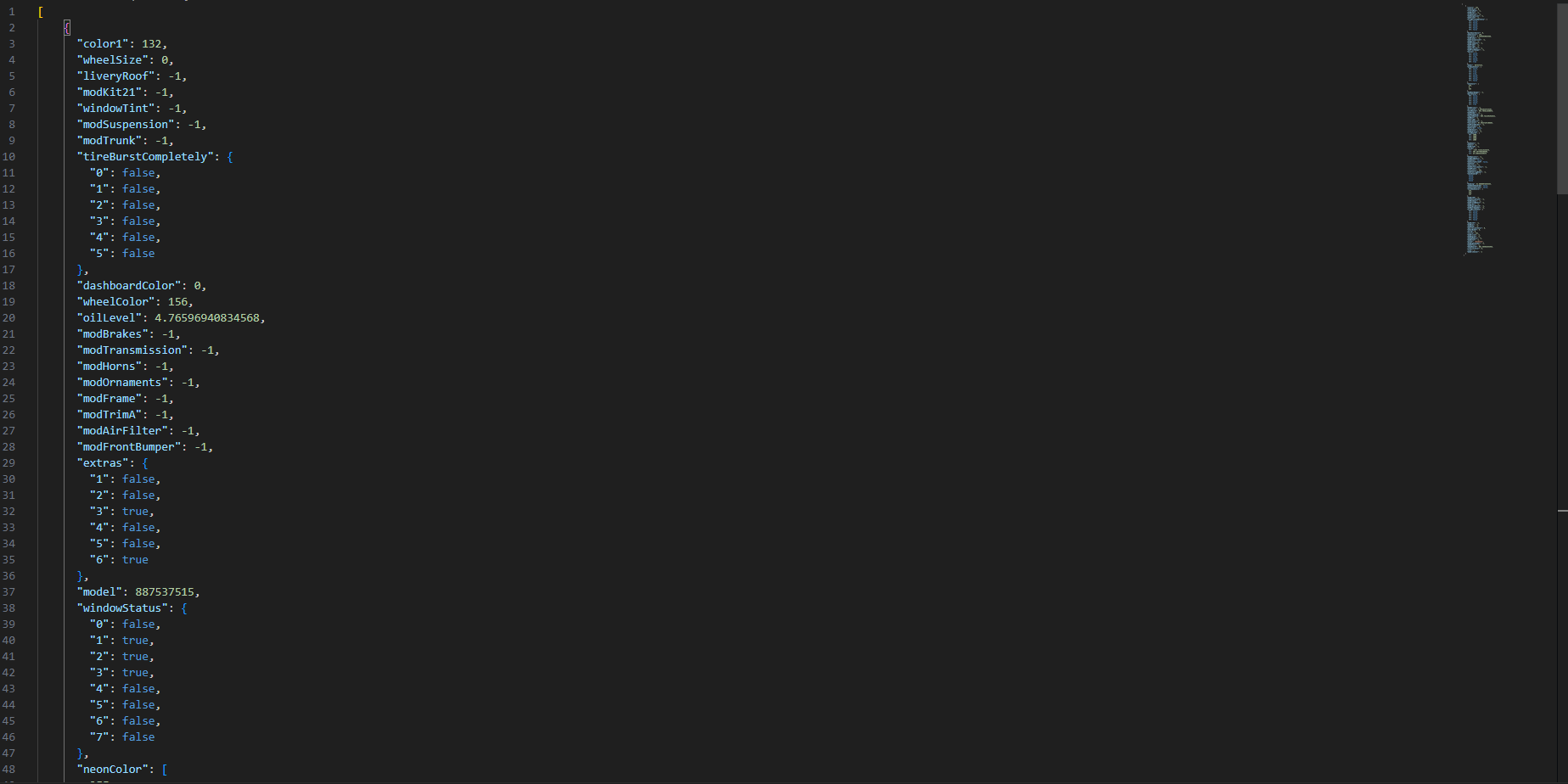
Database Example
Here’s what a sample database entry for a saved vehicle might look like:
Get the ultimate vehicle saving and respawning experience for your FiveM server with Save & Respawn!
| Code is accessible | No |
| Subscription-based | No |
| Lines (approximately) | ~800 |
| Requirements | None |
| Support | Yes |