 RCO Chat — Next-Gen Roleplay Chat System
TEBEX: 4.99EUR - Link Here
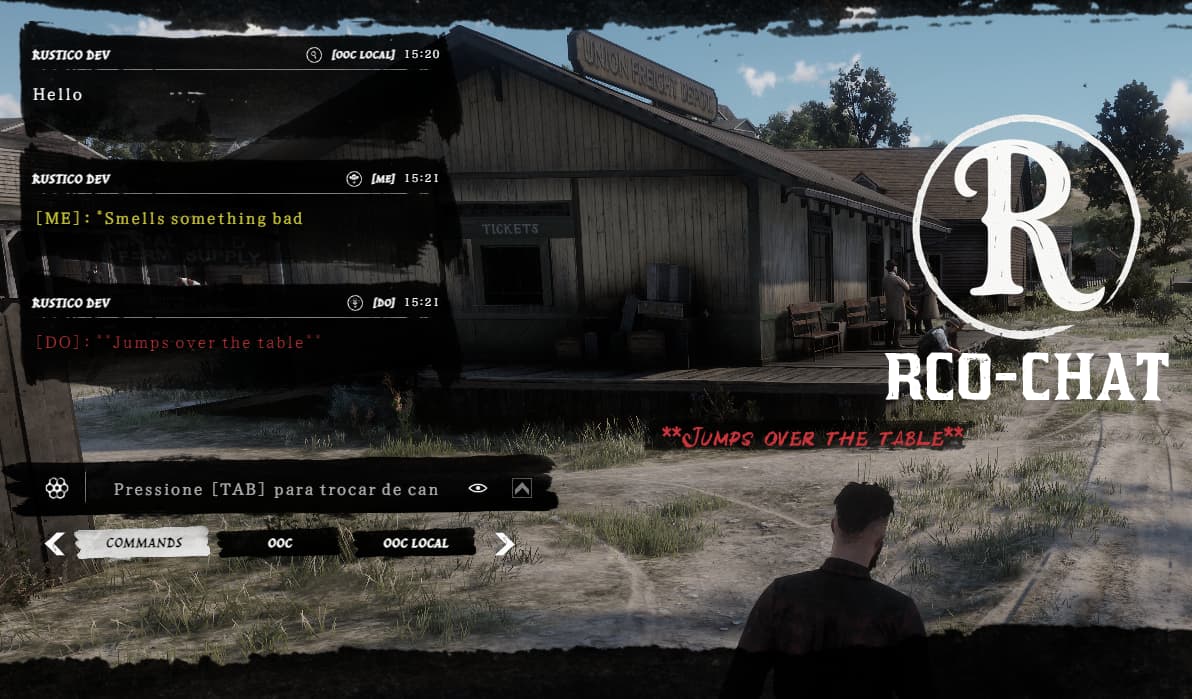
A complete and modern chat system for RedM, featuring multiple channels, smooth animations, customizable history, and framework integration.
Built with React + TypeScript (NUI).
 Key Features
 Modern Interface
- UI built with React + TypeScript
- Inspired by RDR2 HUD design
- Smooth open/close animations
- Custom input box with themed background
- Chat history with fading effect & infinite scroll
 Communication Channels
- Commands → dedicated channel for
/commands - OOC → global out-of-character chat
- OOC Local → local OOC within a configurable radius (
Config.LocalRadius) - /me → character actions, yellow text + 3D text above head
- /do → environment descriptions, red text + 3D text above head
All channels can be enabled/disabled in
config.lua.
 Command Suggestions
- Auto-suggestions when typing
/ - Smart filtering while typing
- Custom icons for each suggestion
- Automatic updates for available commands
 Controls & Navigation
- Switch channels with [TAB]
- Chat history with auto-close option
- Infinite scroll for older messages
- Re-send recent messages with ↑↓ keys
- Close chat with ESC
 Localization
- Multi-language support (
Config.Locale) - JSON-based translations (pt-br, en, es , etc…)
- Channel-specific placeholders
 Security & Control
- Anti-spam protection (
SpamCooldown,SpamThreshold) - Message length limit (
MaxLength) - Permission system with AceAllowed
- Framework notifications: VORP, RedEM, QBR, RSG, QR, RPX
 Configuration (config.lua)
Config = {
  OOC = true,         -- Enable OOC channel
  OOCLocal = true,    -- Enable OOC Local channel
  ME = true,          -- Enable /me
  DO = true,          -- Enable /do
  LocalRadius = 10.0, -- Local chat radius in meters
  METext3DDuration = 6, -- /me 3D text duration (seconds)
  DOText3DDuration = 6, -- /do 3D text duration (seconds)
  Locale = 'en',
  Debug = false
}
 Dependencies
- jo_libs
- ox_lib
 Visual Features
- Stylish message backgrounds
- Animated slide-in/out for chat history and messages
- Minimal custom scrollbar
- Unique icons for command suggestions
 Why Choose RCO Chat?
 Modern, lightweight UI (React + animated CSS)
Fully configurable multi-channel system
Framework integrations (RSG, VORP, RedEM, etc.)
Smart chat history with auto-close
Immersive 3D text for /me and /do
Anti-spam protections & permission system
Have you seen our last releases?
 RCO - Multicharacter + Spawnselector

| Code is accessible | No (config.lua) |
| Subscription-based | No |
| Lines (approximately) | 1k+ |
| Requirements | ox_lib / jo_libs |
| Support | Yes |
 Added
Added CHANGELOG - RCO Chat System
 NEW FEATURES
 Configurable Color System
 Advanced Z-Positioning System
 Text3D Cleanup System
 TECHNICAL IMPROVEMENTS
 Color Consistency
 React Integration
 CONFIGURATION OPTIONS
 BUG FIXES