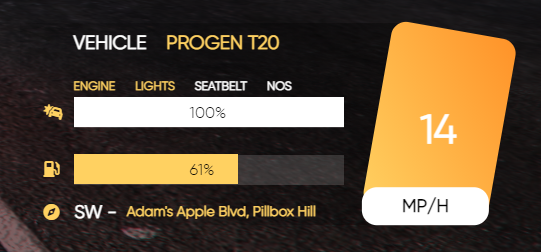
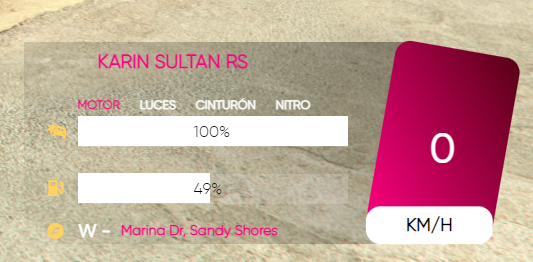
What you see in front of you is an exceptionally designed speedometer that does more than just measure speed, this speedometer shows:
• Speed
• Direction
• Fuel limit
• Car status
• Vehicle name
• Current street
• Engine on/off
• Lights on/off
• Seatbelt on/off
• Nos on/off
What’s Configurable?
Our team works fast, so don’t worry, we can change everything for you, at the moment there is no config file for you, but we’re working on it in config you can change:
• Language
• Colors
Why should you choose this speedometer?
The speedometer is of exclusive design and perfectly optimized (0.00-0.01ms) and we’re giving 24/7 support in our discord server.
Script is obfuscated with FIveM obfuscation tool.
For support you can use our discord server found in the tebex.
Hey! Just purchased this and it’s great, love it. I managed to change a few things easily to my liking. However I’d like to see if you have a way for me to change a few more things:
I cannot change the colour of the icons (they stay yellow and don’t change with any colour control I can see. Is is possible to change this? (screenshot showing this issue)
It’d be great if I could adjust the position of the HUD. I’d just like to put it a bit more to the right, just to be closer to the screen.
BONUS: If there was a way to adjust the opacity of the background to make the text easier to read that would be amazing!