IF YOU DO NOT FILL THIS OUT, YOUR TOPIC WILL BE UNLISTED AND CLOSED
To receive support, please fill out the following template, and remove this top text.
Environment questions
**GTA V version: 1.0.2372.2
**Up to date: Yes
**Legit or Pirate copy: Legit
**Purchased where - Steam/Rockstar Launcher/Epic: Rockstar Launcher
**Windows version: Win10 - 20H2
**Did you try to delete content_index.xml and try again? Yes, just did.. Nothing’s fixed.
**System specifications: Win 10, GTX 1070, Intel(R) Core™ i7-6700HQ CPU @ 2.60GHz 2.60 GHz
**CitizenFX crash zip file (‘Save information’ on a crash): [ 1828] [b2372_ROSLaunc] MainThrd/ VerifyRetailOwnershipInternal: Decrypting result.
[ 1828] [b2372_ROSLaunc] MainThrd/ VerifyRetailOwnershipInternal: Fetched and decrypted result from CPR.
[ 1843] [b2372_ROSLaunc] MainThrd/ VerifyRetailOwnershipInternal: Valid entitlement block.
[ 1843] [b2372_ROSLaunc] MainThrd/ VerifyRetailOwnershipInternal: Valid expiration date.
[ 1843] [b2372_ROSLaunc] MainThrd/ VerifyRetailOwnershipInternal: Valid account ID.
[ 1843] [b2372_ROSLaunc] MainThrd/ VerifyRetailOwnershipInternal: Found matching entitlement for Access to Grand Theft Auto V for PC - creating token.
[ 2109] [b2372_ROSLaunc] MainThrd/ Error: Error generating ROS entitlement token: 10 (OpenSSL SSL_connect: Connection was reset in connection to lambda.fivem.net:443 )
[ 3390] [b2372_DumpServ] 18068/ Process crash captured. Crash dialog content:
[ 3390] [b2372_DumpServ] 18068/ FiveM has encountered an error
[ 3390] [b2372_DumpServ] 18068/ Error generating ROS entitlement token: 10 (OpenSSL SSL_connect: Connection was reset in connection to lambda.fivem.net:443 )
Sorry, couldn’t upload the file because apparently it was huge and couldn’t find a website to upload it to, not free ones anyways.
**logs/CitizenFX_log files:
[ 2656] [b2372_ROSLaunc] MainThrd/ Error: Error generating ROS entitlement token: 10 (OpenSSL SSL_connect: Connection was reset in connection to lambda.fivem.net:443 )
[ 4047] [b2372_DumpServ] 18492/ Process crash captured. Crash dialog content:
[ 4047] [b2372_DumpServ] 18492/ FiveM has encountered an error
[ 4047] [b2372_DumpServ] 18492/ Error generating ROS entitlement token: 10 (OpenSSL SSL_connect: Connection was reset in connection to lambda.fivem.net:443 )
**.dmp files/report IDs: I couldn’t find that, sorry.
If you can’t start the game at all
**GTA V folder screenshot: Imgur: The magic of the Internet
**GTA V/update/x64/dlcpacks screenshot: Imgur: The magic of the Internet
**Filepath to FiveM folder: MyUser > AppData > Local > FiveM
**FiveM client folder screenshot: Imgur: The magic of the Internet
**Which antivirus/firewall software are you using? Avast, but I have disabled it during the installation/For now.
**Did you try to disable/uninstall your Anti-virus? Yes
Important parts
What is the issue you’re having?
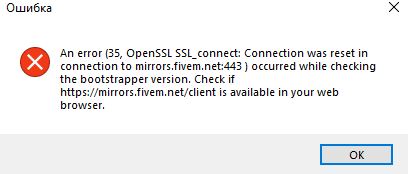
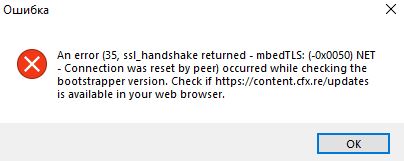
At first I couldn’t install FiveM at all due to the same/similar error. Somehow, I managed to install it (Ran it as administrator, got a message that I can not do it that way.. And voila, it was installed!). Now I can not run it.
**What are you trying to do? Starting FiveM
**What have you tried already to fix the issue? Almost every topic there is.. Deleting the cache, changing my wifi network, for instance.
**Error screenshot (if any): Imgur: The magic of the Internet
**What did you do to get this issue? Nothing, it started to trigger since the installation phase (I had FiveM installed back in 2018 and played it with no issues on this same laptop).
What server did you get this issue on? Be specific and name some, ‘all of them’ by itself isn’t useful!
No servers so far, can’t even get the client to start.
Additional comments
I have had it properly installed back in 2018.. Played it a lot during that year and uninstalled. Now the client itself is not even starting for some reason.
Here’s the message I get:
[Window Title]
FiveM
[Main Instruction]
FiveM has encountered an error
[Content]
Error generating ROS entitlement token: 10 (OpenSSL SSL_connect: Connection was reset in connection to lambda.fivem.net:443 )
[^] Hide details [Save information] [Close]
[Expanded Information]
Error uploading: HTTP 0
You can press Ctrl-C to copy this message and paste it elsewhere.