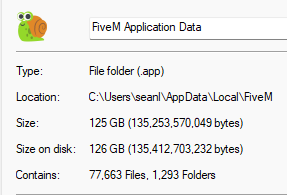
GTA V version: = 1.0.2944.0 Up to date: = I believe so Legit or Pirate copy: = Legit Purchased where - Steam/Rockstar Launcher/Epic: = Epic Games Windows version: = Windows 11 home 64 bit Did you try to delete content_index.xml and try again? Not related System specifications: Not related CitizenFX crash zip file (‘Save information’ on a crash): Not related logs/CitizenFX_log files: Not Related .dmp files/report IDs: Not related
Important parts
What is the issue you’re having? My Fivem application data folder is 125gb
What are you trying to do? Get it to not be that much
What have you tried already to fix the issue? Nothing i dont know what i should delete.
Hello, this is a friendly reminder because this is your first time creating a topic (or it has been a while since your last topic) in this category.
Please note that most of the support is provided by the Cfx.re community on a voluntary basis. We ask you to be patient; there is no guarantee we have a solution to your problem(s). To avoid unnecessary/duplicate topics, please browse the forums before creating a topic.
To improve your chances of your issue(s) being solved, please provide as much information as possible about the issue(s) you are having. Also —whenever possible— please use the template given to you when creating a topic.
You most likely play on various servers with questionable, unoptimized assets such as 600k poly cars from Grand Turismo/Forza and 4k textures.
Plus, if you joined 3 different RP servers and even though they use exactly same assets, you download them individually, per each server. It adds up on cache size of your client eventually.
Go to C:\Users\MoravianLion\AppData\Local\FiveM\FiveM.app\data and delete entire game-storage folder. You’ll redownload assets again, but only on servers you’ll play from now on.
Not entirely sure. Most likely yes. Mine has around 25Gb and I played only on very few servers.
The best thing you can do to test it is to simply renaming the folder and that will cause FiveM client to make a new one, since it “doesn’t exist” now. Worse case, you get an error, so you’d rename it back. But I doubt that would happen.