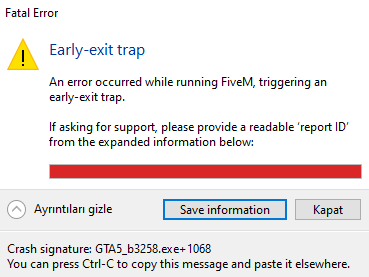
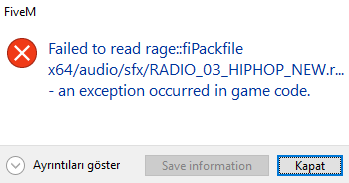
My game won’t launch. When I try to start it, I get an “early exit trap” error or other errors related to the game’s files. I’ve tried restarting, but the issue persists. Could you help me fix it?
What have you tried already to fix the issue?
I have updated my graphics card drivers.
I have updated my BIOS.
I completely uninstalled and reinstalled FiveM.
I completely uninstalled and reinstalled GTA V.
Hello, this is a friendly reminder because this is your first time creating a topic (or it has been a while since your last topic) in this category.
Please note that most of the support is provided by the Cfx.re community on a voluntary basis. We ask you to be patient; there is no guarantee we have a solution to your problem(s). To avoid unnecessary/duplicate topics, please browse the forums before creating a topic.
To improve your chances of your issue(s) being solved, please provide as much information as possible about the issue(s) you are having. Also —whenever possible— please use the template given to you when creating a topic.
Steam has been the root of my issues.
Closing steam fixed my issues. If in beta build, turn it off in interface settings through steam.
Might have to launch through rockstar and not steam for now.
Yes. If I open FiveM without Steam, everything works fine, but the server I play on is whitelisted via Steam. I have tried both the Client Beta and the No Beta, but it still crashes in both cases.
Steam is the cause right now. I have no clue how to fix it since its broken. same issue for me. since its a steam whitelist idk, contact your server and see if they can discord whitelist or whitelist off of your rockstar name
Hello! This issue is commonly caused by corrupted game files, missing dependencies, antivirus interference, or launcher/mod conflicts. Please try the following:
Restart your PC (not just the launcher).
Verify your GTA V game files through your launcher:
Steam: Library → GTA V → Properties → Installed Files → Verify integrity of game files.
Epic Games: Library → GTA V → Manage → Verify.
Rockstar Games Launcher: Settings → My Installed Games → GTA V → Verify Integrity.
Remove or disable any mods (including ASI loaders, ScriptHookV, ReShade, etc.) and try launching FiveM again.
Update your graphics drivers (NVIDIA, AMD, or Intel).
Make sure Windows is fully up to date.
Repair or reinstall the Microsoft Visual C++ Redistributables (2015–2022 x64 and x86).
Check your antivirus to ensure it hasn’t quarantined any GTA V or FiveM files. If it has, restore them and add your GTA V/FiveM folders as exclusions before verifying the game files again.
Temporarily disable overlays such as Discord, Steam, GeForce Experience, MSI Afterburner/RivaTuner, and Xbox Game Bar.
If none of the above resolves the issue, reinstall FiveM. If the problem persists, consider reinstalling GTA V as well.
If you’re still experiencing the issue, please provide the following information so we can investigate further:
The exact error message (a screenshot is preferred).
Whether you’re using Steam, Epic Games, or the Rockstar Games Launcher.
Whether GTA V launches normally without FiveM.
Whether this started after a FiveM update, GTA V update, or installing/removing mods.
Any FiveM crash logs or CitizenFX.log files, if available.
This information will help narrow down the cause of the “Early Exit Trap” error.