IF YOU DO NOT FILL THIS OUT, YOUR TOPIC WILL BE UNLISTED AND CLOSED
To receive support, please fill out the following template, and remove this top text.
Environment questions
GTA V version: Latest
Up to date: Yes
Legit or Pirate copy: Legit
Purchased where - Steam/Rockstar Launcher/Epic: Steam
Windows version: Windows 7 sp1 64 bit
Did you try to delete caches.xml (not cache/!) and try again? no
System specifications: quadro 4000,it 3470,8gb of ddr3 1600
CitizenFX crash zip file (‘Save information’ on a crash):
logs/CitizenFX_log files:
.dmp files/report IDs:
If you can’t start the game at all
GTA V folder screenshot:
GTA V/update/x64/dlcpacks screenshot:
Filepath to FiveM folder:
FiveM client folder screenshot:
Which antivirus/firewall software are you using?
Did you try to disable/uninstall your Anti-virus?
Important parts
What is the issue you’re having? I’m trying to start up fivem and this thing keeps on popping up
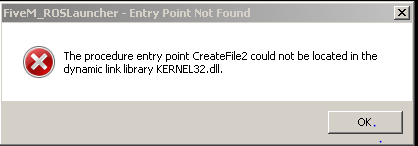
What are you trying to do? Play the game
What have you tried already to fix the issue? Deleting some v8.dll files from my whole system
Error screenshot (if any):
What did you do to get this issue? Nothing.
What server did you get this issue on? the whole game