ok, all that should not be necessary for my issue i run fivem on a high resolution and when i do this the mini map waypoint is off. its not in the correct location on the mini map is there a fix for this?
Hello, this is a friendly reminder because this is your first time creating a topic (or it has been a while since your last topic) in this category.
Please note that most of the support is provided by the Cfx.re community on a voluntary basis. We ask you to be patient; there is no guarantee we have a solution to your problem(s). To avoid unnecessary/duplicate topics, please browse the forums before creating a topic.
To improve your chances of your issue(s) being solved, please provide as much information as possible about the issue(s) you are having. Also —whenever possible— please use the template given to you when creating a topic.
Thanks for keeping these forums tidy!
1 Like
The owner of your server will have to correct it with scripts. 
ok thanks
if the owner fixes would it mess with lower resolutions waypoint or is there a way to only change high resolutions scripts.
Here’s a script I’m using to adjust the map location. You can adjust it for different aspect ratios, mine covers ultrawide, and default aspect ratios.
If you change the aspect ratio of the client after loading in, you can use the command reload-map to reposition it.  Aspect ratios I don’t explicitly cover can be added by anyone.
local hasMinimapChanged = false

function UpdateMinimapLocation()
  Citizen.CreateThread(function()
    -- Get screen aspect ratio
    local ratio = GetScreenAspectRatio()

    -- Default values for 16:9 monitors
    local posX = -0.0045
    local posY = 0.002

    if tonumber(string.format("%.2f", ratio)) >= 2.3 then
      -- Ultra wide 3440 x 1440 (2.39)
      -- Ultra wide 5120 x 2160 (2.37)
      posX = -0.185
      posY = 0.002
      print('Detected ultra-wide monitor, adjusted minimap')
    else
      posX = -0.0045
      posY = 0.002
    end

    SetMinimapComponentPosition('minimap', 'L', 'B', posX, posY, 0.150, 0.188888)
    SetMinimapComponentPosition('minimap_mask', 'L', 'B', posX + 0.0155, posY + 0.03, 0.111, 0.159)
    SetMinimapComponentPosition('minimap_blur', 'L', 'B', posX - 0.0255, posY + 0.02, 0.266, 0.237)

    DisplayRadar(false)
    SetRadarBigmapEnabled(true, false)
    Citizen.Wait(0)
    SetRadarBigmapEnabled(false, false)
    DisplayRadar(true)
  end)
end

RegisterCommand('reload-map', function(src, args)
  UpdateMinimapLocation()
end, false)

UpdateMinimapLocation()
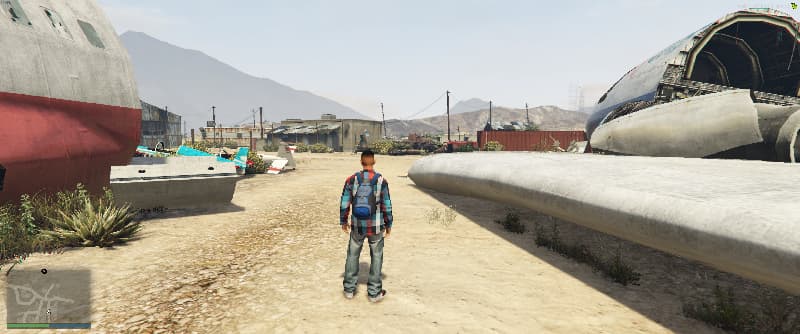
Example of the map location on ultrawide
4 Likes
sweet thanks for the help hopefully the owner helps me out it really annoying.
also the mini map mite be in the correct location but when i set a waypoint its like off so moving the mini map say to the right should make that offset look of the waypoint disappear? that’s what we are talking about right just wanted to make sure that there wasn’t a miss understanding. so when i bring this up to the owner tonight hes not like your don’t know what your talking about. Thanks again for helping me out.
Here are the two maps (unmodified is before the script is run on ultrawide, modified is after).
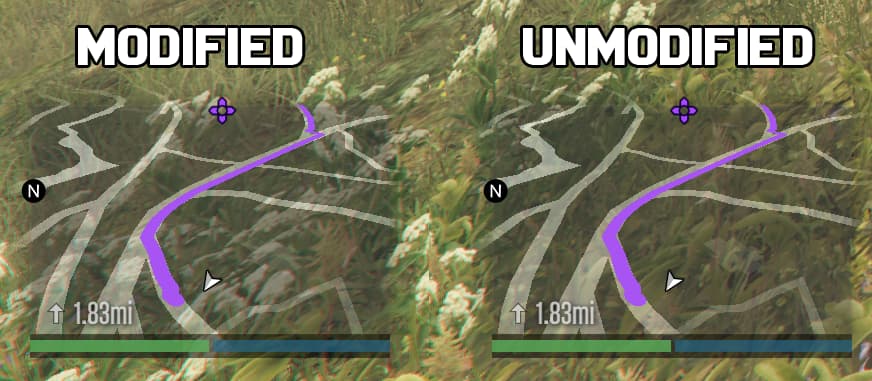
Is there something off about the waypoint I can’t see?
This topic was automatically closed 30 days after the last reply. New replies are no longer allowed.