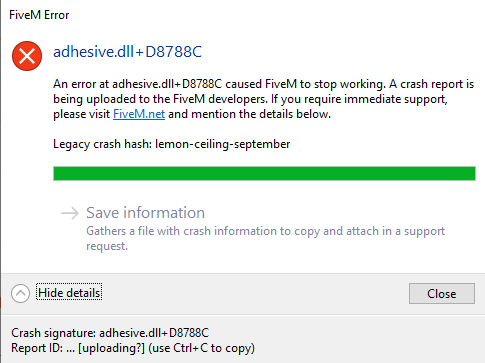
To receive support, please fill out the following template, and remove this top text.
GTA V version? newest Up to date? yes
*Legit or Pirate copy? legit Steam/CD/Social Club? SC Windows version? W10 v1909 Did you try to delete caches.xml and try again? yes Error screenshot (if any) System specifications i5 4570, R9 380 2gb 16gb ram What did you do to get this issue? restarted fivem What server did you get this issue on? my own[CfxCrashDump_2020_03_14_20_39_50.zip|attachment] CitizenFX.log file .dmp files/report IDsCfxCrashDump_2020_03_14_20_39_50.zip (1.3 MB)
If an issue with starting: GTA V folder screenshot GTA V/update/x64/dlcpacks screenshot Filepath to FiveM folder H:\Games\FiveM ModPacked\FiveM\FiveM.app FiveM client folder screenshot Which antivirus/firewall software are you using? Windows Did you try to disable/uninstall your Anti-virus? have it disabled
Also add what you already tried so far. cleared cache, checked for updates.
Hello, this is a friendly reminder because this is your first time creating a topic (or it has been a while since your last topic) in this category.
Please note that most of the support is provided by the Cfx.re community on a voluntary basis. We ask you to be patient; there is no guarantee we have a solution to your problem(s). To avoid unnecessary/duplicate topics, please browse the forums before creating a topic.
To improve your chances of your issue(s) being solved, please provide as much information as possible about the issue(s) you are having. Also —whenever possible— please use the template given to you when creating a topic.
I’m getting the same issue when joining any of my servers, I had a fresh new server setup but I still crash,
My System Specifications: i9-9900K 32gb ram, no gpu
Here is my dmp file and citizenFX CfxCrashDump_2020_03_14_20_49_58.zip (1.4 MB)
I’m using windows defender for antivirus, and also tried disabling it but no luck.
Yes Requesting authentication ticket and other entitlement/download issues DO NOT REINSTALL FIVEM - FiveM is slow/overloaded due to unexpected amount of players (corona effect). Be patient. AGAIN DO NOT REINSTALL FIVEM OR YOULL MAKE IT WORSE - BE PATIENT
It looks like it’s an issue with ScriptHook enabled servers, I know two servers that are affected by this, I also cannot join my local server unless I remove all of my plugins.
I had to update my windows and it fixed that but now I am getting a different problem after fixing that my plugins folder or mod menu crashes my game when ever I try to load into a server. Ive reinstalled trainerV redone all of it but nothing has fixed it