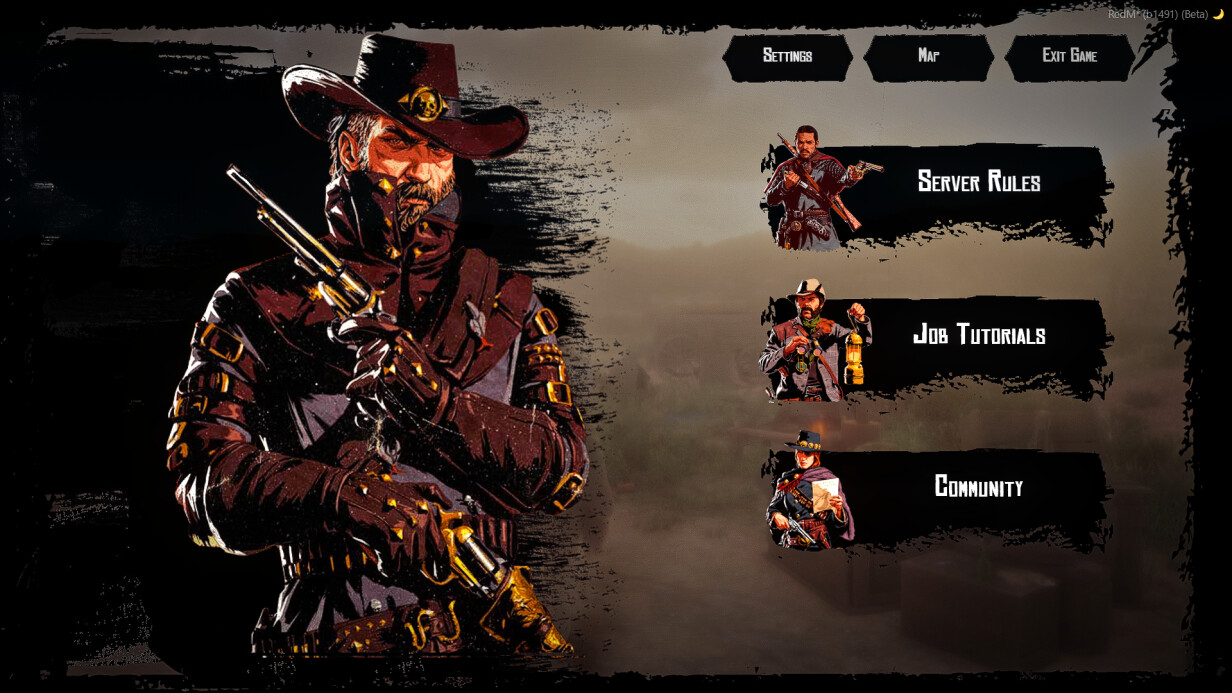
A fully custom, immersive pause menu that replaces the default Rockstar screen. Open it with ESC — your character pulls out a map, the world fades into a cinematic timecycle, and a hand-crafted book-style UI slides in. Three books, fully configurable content, no dependencies beyond your framework.
Press ESC in-game — the native pause screen is blocked and replaced with this one. The player holds a map prop with an idle animation. The menu slides in with three book buttons on the right side: each book opens a content viewer with optional filter tabs on the left. Every label, every button, every page is yours to configure.
The menu won’t open during death, in clothing stores, or while inventory is active
Features:
3 Books — Fully Configurable
- Each ”book” is a right-side button that opens a content reader
- Books are defined in
config.lua— add, remove, or rename them freely - Shipped with: Server Rules, Job Tutorials, Community — all placeholder content included, ready to overwrite.
Filter System (Tabs per Book)
- Each book can have one or multiple filters (tabs)
- Single filter → no tab bar shown, content loads directly
- Multiple filters → tab bar appears on the left side automatically
- Adding a new tab is one line in config:
{ label = 'My Page', content_file = 'content/mypage.html' }
Content Pages — Write Your Own
- Each page is a plain
.htmlfile inside thecontent/folder - Documented
_TEMPLATE.htmlincluded — you can create pages with zero HTML knowledge - Supported elements:
<p>paragraphs,<h2>headings,<ul>/<ol>lists<strong>bold,<div class="note">highlighted warning/tip box<img>single image,<figure>for two images side by side with optional caption
- Colored text — wrap any word in
<span class="y/r/g/b/gr/w">for yellow, red, green, blue, gray, or white - Images go in
content/content_images/and are referenced simply as../content_images/yourfile.png
Top Buttons
- Map, Settings, and Exit Game buttons — each toggleable individually via config
- Map button spawns the map prop and launches the native RDR2 map app seamlessly
- Settings button opens the native game settings
- Exit Game triggers a clean server kick with a configurable goodbye message
Framework Support
- RSG-Core and VORP — set
Config.Framework = 'rsg'or'vorp', done - Safety eligibility checks per-framework (login state, inventory state, death state)
All Labels Configurable
- Every button label and book title is a single string in
Config.Labels
Installation: Plug & Play
Dependencies: RSG-Core / VORP
Get this resource on Tebex $10
Use code summer1899 at checkout for 10% off all resources
Our resources are adaptable and can be tailored to your specifications!
| Code is accessible | Yes |
| Subscription-based | No |
| Requirements | RSG-Core or VORP |
| Support | Yes |
OTHER PRODUCTS
- LRC -Transporter Job
- LRC - Legendary Hunting [RSG-Core & VORP]
- LRC - Train Driver Job [RSG-Core & VORP]
- LRC - Gunsmith
- LRC - General Shops
- LRC - Construction Job
FREE