_ ** IF YOU DO NOT FILL THIS OUT, YOUR TOPIC WILL BE UNLISTED AND CLOSED ** _
To receive support, please fill out the following template, and remove this top text.
Environment questions
** GTA V version: Current
** Up to date: yes
** Legit or Pirate copy: Legit
** Purchased where - Steam / Rockstar Launcher / Epic: Steam
** Windows version: Windows 10 - 2004
** Did you try to delete caches.xml (not cache /!) And try again? Already tried
** System specifications: Xeon e5 2620v2 - 16gb ram 4x4 - GTX 1060 6GB Gigabyte - Game on SSD
** CitizenFX crash zip file (‘Save information’ on a crash): //
** logs / CitizenFX_log files: *OCitizenFX_log_2021-03-15T023633.log (193.6 KB) *
**. dmp files / report IDs: *4e997800-2562-44ef-a78e-838a4240cde1.dmp (18.2 MB) 73cf5256-167e-4c5e-9747-89098190e459.dmp (9.8 MB) 0561a407-11b0-416b-945c-2ace37aa14bd.dmp (9.5 MB) d9c41de5-3048-4e3b-b958-01d18afd677d.dmp (9.6 MB) f9dade52-28e7-4d95-9b31-f3b3c3a5f390.dmp (582.6 KB) *
If you can’t start the game at all
** GTA V folder screenshot: **
** GTA V / update / x64 / dlcpacks screenshot: **
** Filepath to FiveM folder: C:\Users\Nathan\Desktop\FiveM\FiveM.app
**
** Which antivirus / firewall software are you using? Windows Defender
** Did you try to disable / uninstall your Anti-virus? * I already deactivated
[image]*
Important parts
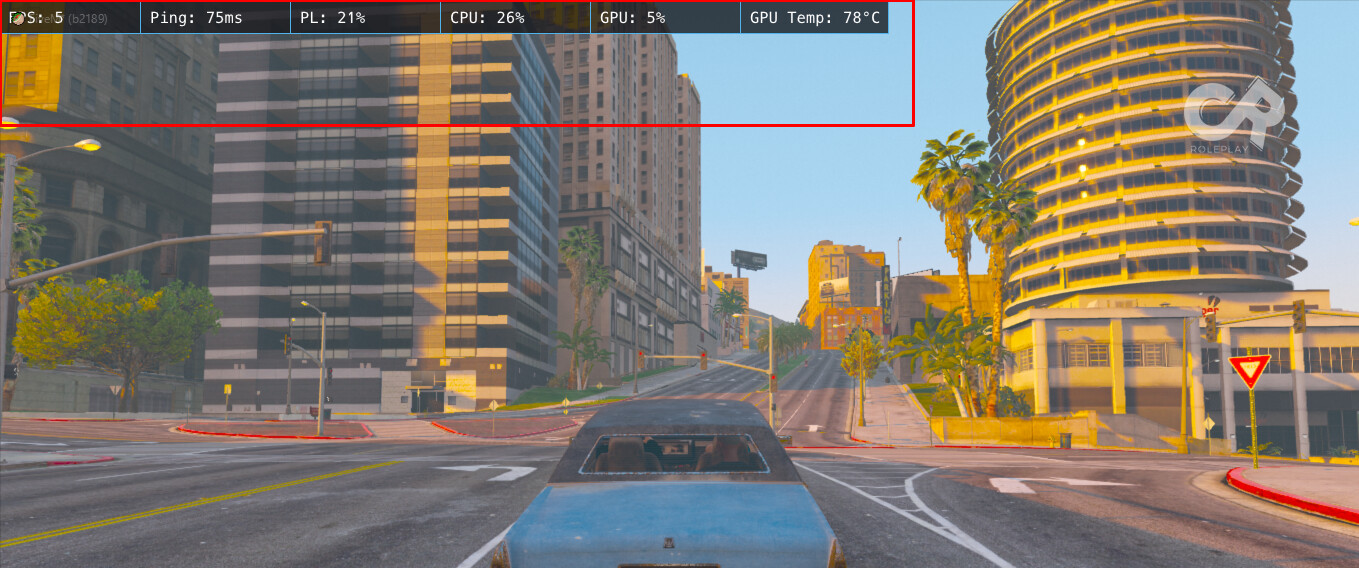
** What is the issue you’re having? Low GPU usage with ultra graphics and low frame time
** What are you trying to do? I am wanting to play without crashing the game because it does not use the gpu and has a low frame time
** What have you tried already to fix the issue? formatted the system already, cleared cache several times but nothing happens
** Error screenshot (if any): *
*
** What did you do to get this issue? //
** What server did you get this issue on? However, in all of them, creative roleplay happens more often
Additional comments## IF YOU DO NOT FILL THIS OUT, YOUR TOPIC WILL BE UNLISTED AND CLOSED
To receive support, please fill out the following template, and remove this top text.
Environment questions
GTA V version: current
[image]
Up to date:
Legit or Pirate copy:
Purchased where - Steam/Rockstar Launcher/Epic:
Windows version:
Did you try to delete caches.xml (not cache/!) and try again?
System specifications:
CitizenFX crash zip file (‘Save information’ on a crash):
logs/CitizenFX_log files:
.dmp files/report IDs:
If you can’t start the game at all
GTA V folder screenshot:
GTA V/update/x64/dlcpacks screenshot:
Filepath to FiveM folder:
FiveM client folder screenshot:
Which antivirus/firewall software are you using?
Did you try to disable/uninstall your Anti-virus?
Important parts
What is the issue you’re having?
What are you trying to do?
What have you tried already to fix the issue?
Error screenshot (if any):
What did you do to get this issue?
What server did you get this issue on?
