Custom Weapon Wheel Script
About
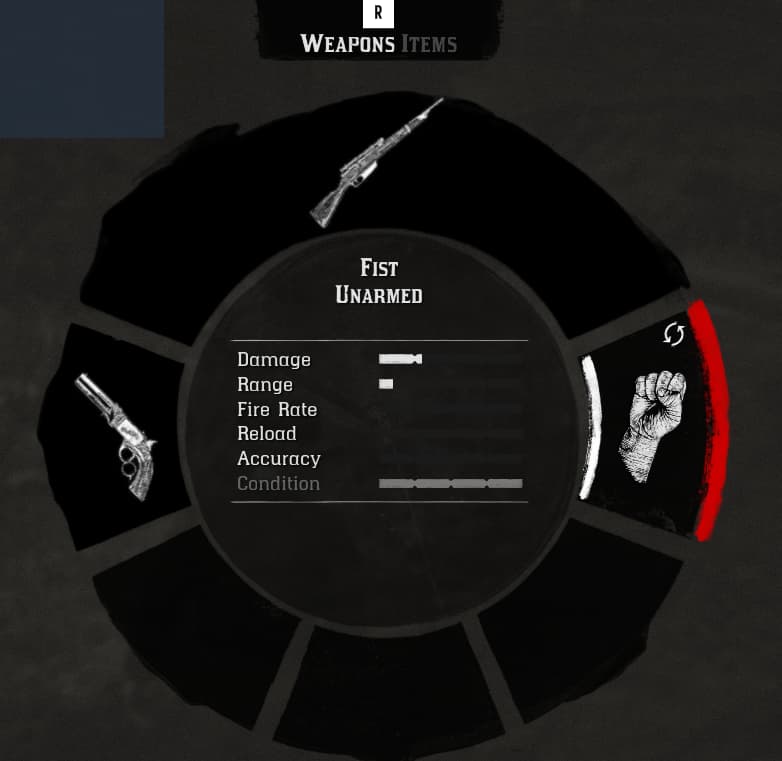
This script is designed to manage weapon icons in weapon wheel:
- Sidearms
- Longarm Shoulder
- Longarm Back
- Dual Wield
- Throwables
- Melee
- Fist
Work in progress: This is a part of research and development of custom weapons in RedM:
- Set weapon name
- Set weapon stats
Supported aspect ratios:
- 1920/1080 = 1.77
- 1760/990 = 1.77
- 1680/1050 = 1.6
- 1600/900 = 1.6
- 1280/1024 = 1.25
- 1366/768 = 1.77
- 1280/720 = 1.77
- 1024/768 = 1.33
| Original Icon | Custom Icon |
|---|---|
Usage Examples
Setting a Custom Weapon Icon
You can set a custom weapon icon for a specific slot using the setWeaponWheelIcon export.
Example
-- Set a custom weapon icon for the 'sidearms' slot (texture dict 'inventory_items', texture name 'weapon_sniperrifle_carcano')
exports['redm-weapon-wheel']:setWeaponWheelIcon('sidearms', {'inventory_items', 'weapon_sniperrifle_carcano'})

-- Set a custom weapon icon for the 'longarm_shoulder' slot
exports['redm-weapon-wheel']:setWeaponWheelIcon('longarm_shoulder', {'inventory_items', 'weapon_pistol_volcanic'})
| Result |
|---|
Download
Check out our paid releases as well:
Made with  by
by