What is the issue you’re having?
Symptoms:
The game freezes for a few seconds, then crashes with a FiveM error window.
This only happens under high entity density (many vehicles and players nearby).
It does not happen on empty or low-population servers.
GTA Story Mode and other games run stable.
Crash details:
GTA5_b3258.exe crash
Legacy crash hash: winner-august-kentucky
Crash path: GTA5_b3258.exe!sub_1416BEE88 (0x5e)
Freeze → timeout → crash (not an instant access violation)
Repro pattern:
Join a high-population server
Go to areas with many vehicles/player entities
After some time, the client freezes and crashes
Important notes:
Happens on different servers, not just one
Happens on very different hardware (Intel/AMD CPUs, different NVIDIA GPUs)
Crash logs show issues related to vehicle/world streaming and asset placement
Some logs show warnings like:
duplicate archetypes (YTYP)
badly processed assets (“processed by a bad tool”)
physics/collision validation warnings on other servers
This suggests a FiveM/GTA engine-level issue triggered by certain asset/entity combinations under high load, rather than a single server or client configuration problem.
Crash dumps and CitizenFX logs are available if needed.
What have you tried already to fix the issue?
Clean reinstall of FiveM and GTA V
Clean reinstall of Windows11 4x
Verified GTA V game files
Tested multiple NVIDIA driver versions (including rollback to older, stable drivers)
Used DDU for clean GPU driver reinstall
Fresh Windows 11 reinstall
Tested with no overlays (Discord, Medal, NVIDIA overlay disabled)
Tested without ReShade / dxgi / d3d11 hooks
Cleared FiveM cache completely
Reset NVIDIA Control Panel settings to default and tested multiple configs
Tested with HAGS on and off
Tested with G-SYNC on and off
Tested fullscreen, borderless, and windowed modes
Tested different FPS limits (driver-level and uncapped)
Updated BIOS, chipset drivers, and checked CPU stability
Tested with E-cores enabled and disabled
Verified system stability in other games (GTA Story Mode, Fortnite – no crashes)
Compared crash logs with other affected players
Issue reproduced on different servers and different hardware configurations
What server did you get this issue on?
LateNight V RolePlay
Error screenshot(s)
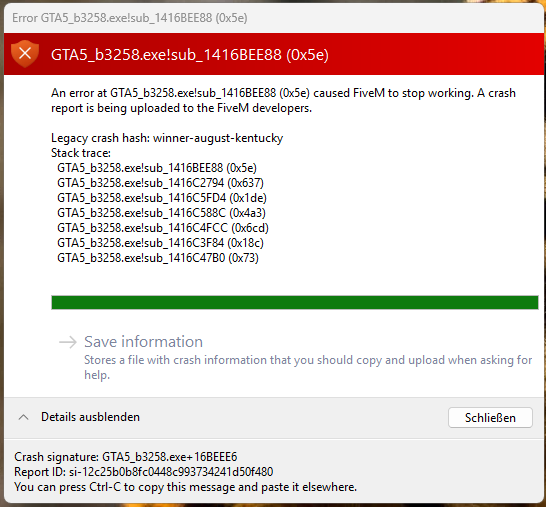
Windows version
Windows 11 25H2
System specifications
CPU: Intel Core i7-13700K
Mainboard: MSI B760 Gaming Olus Wifi DDR4
GPU: NVIDIA RTX 4070 Super
RAM: 32 GB DDR4 Corsair Vengence RGB Pro
Storage:
FiveM / GTA V installed on NVMe M.2 SSD
On the Same is Windows
GPU Driver: NVIDIA Game Ready Driver (tested multiple versions, incl. rollback)
Antivirus software
Only Windows Defender
CitizenFX crash zip file (‘Save information’ on a crash)
CfxCrashDump_2025_11_19_17_37_51.zip (2.09 MB)
Log files
CitizenFX_log_2025-11-19T151232.log (3.47 MB)
Additional comments
This Crashes i have over and over. Maybe 20 times per Day. I found another one that Crashes on a other Server with the Exact crashcode like me
The crash only occurs under high player and vehicle density.
When the server is empty or has low population, the issue does not occur.
Multiple players on different hardware experience the same crash type.
