 JamzVisualShelfs – Advanced Visual Shelf System for QB-Core
JamzVisualShelfs is a detailed shelf system made for QB-Core servers.
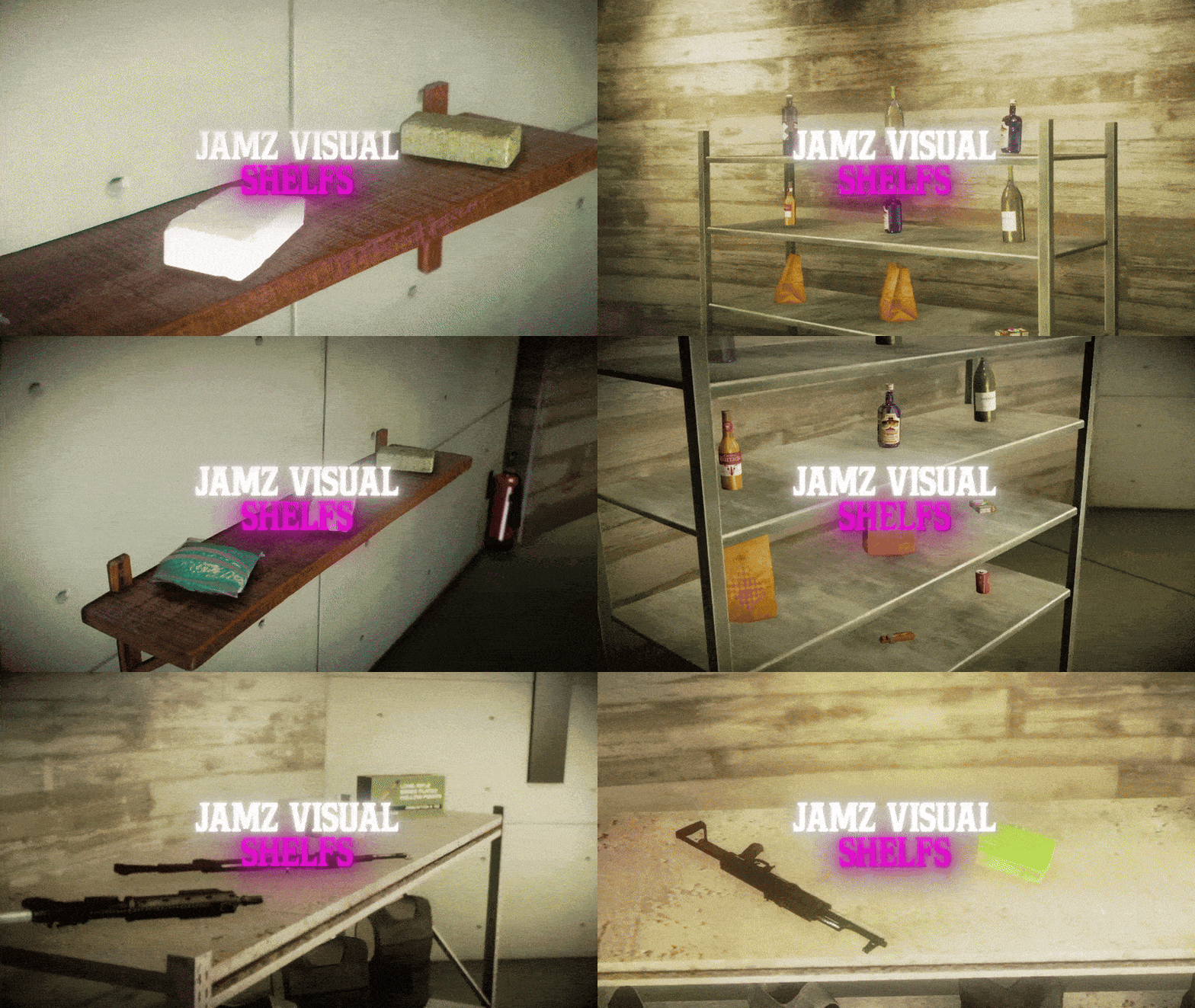
Players can place shelves anywhere and actually store items on them – everything shows up as 3D props on the shelf itself.
Perfect for RolePlay servers – whether it’s a job place, a storefront, or just making your spot look more lived-in.
——————————————————————————————————————————————————————
——————————————————————————————————————————————————————
Features
Placeable & Persistent Shelves
- Players can place shelves anywhere: small, medium, large, wall-mounted, wooden bookshelves, and more.
- All placements are saved using MySQL and remain after server restarts.
3D Item Display
- Items stored in a shelf show up as real 3D props. Ideal for shops, stash houses, or displaying items.
Multiple Shelf Types
- Supports a variety of shelf models, each with custom slot layouts to match the design.
Customizable Display Items
- Choose exactly which items show up visually and control their rotation.
- Add your own custom shelf models in the config.
Inventory Support
- Fully compatible with both old and new QB-Inventory systems.
Ownership & Security
- Only the player who placed a shelf can pick it back up.
Debug Mode
- Toggle developer logs for testing or troubleshooting.
Optimized Performance
- Runs efficiently with minimal resource usage.
Customization
Add New Shelf Types
Edit Config.PlaceableProps to add new shelf models:
Config.PlaceableProps = {
    ['small_storage_shelf'] = 'prop_shelves_02',
    ['medium_storage_shelf'] = 'prop_shelves_01',
    ['large_storage_shelf'] = 'prop_ff_shelves_01',
    ['wooden_bookshelf'] = 'wooden_bookshelf',
    ['wall_shelf'] = 'wall_shelf',
    ['wall_shelf2'] = 'wall_shelf2',
}
Control What Gets Displayed
Edit Config.DisplayableItems to define which items are rendered as props and customize their rotation:
Config.DisplayableItems = {
    ["weapon_dagger"] = {
        prop = "prop_w_me_dagger",
        displayName = "Weapon Dagger",
        rotation = vector3(90.0, 0.0, 0.0)
    },
}
Adjust Slot Positions
Fine-tune how items show up on each shelf for perfect alignment:
Config.ShelfSlots = {
    ["wall_shelf"] = {
        slots = {
            [1] = vector3(-0.7291706, -0.2537088, 0.4416461),
            [2] = vector3(0.0165632, -0.2537088, 0.4416461),
            [3] = vector3(0.7062251, -0.2537088, 0.4416461),
        },
    },
}
Randomized Spawning
Props spawn with subtle variations in position and rotation for natural placement:
Config.NaturalVariation = {
    positionOffset = {
        x = { min = -0.02, max = 0.02 },
        y = { min = -0.02, max = 0.02 },
        z = { min = -0.01, max = 0.01 },
    },
    rotationOffset = {
        x = { min = -5.0, max = 5.0 },
        y = { min = -5.0, max = 5.0 },
        z = { min = -10.0, max = 10.0 },
    },
    applyChance = 0.8,
    enabled = true
}
Dependencies
- QB-Core → Main framework. Must be installed and running.
- Oxmysql → Used for saving shelf data to your database.
- Inventory Systems → Supports both:
 QB-Inventory (old & new versions supported)
- OX-Inventory (fully supported)
- Target System → Must have either
ox_targetorqb-target. - Object_Gizmo → GitHub - DemiAutomatic/object_gizmo
- Ox_Lib → GitHub - overextended/ox_lib: A FiveM resource and script library for Lua and JS.
Pricing:
Price: $20
Store: https://jamzscripts.tebex.io/
Video Demo: https://youtu.be/UxYoKtfOW8M| | |
|-----------------------------|-----------------|
| Code is accessible | No |
| Subscription-based | No |
| Lines (approximately) | 2000 |
| Requirements & dependencies | qb-core, qb-Inventory or ox_inventory, Oxmysql, Object_Gizmo, Ox_Lib |
| Support | Yes |


 Added Configurable Locale Support (easily change all text in the script)
 Tweaked OneSync Animation Issue.
 Improved Prop Spawning Logic.
 Store:
  Demo Video: