What is the issue you’re having?
Every time I launch FiveM, the client crashes immediately before the server list even loads. The crash is consistent and happens on every startup.
Initially, FiveM worked perfectly fine. The problem started after I joined the FiveM Test Server, changed the in-game display language to English, exited the game, and then restarted FiveM.
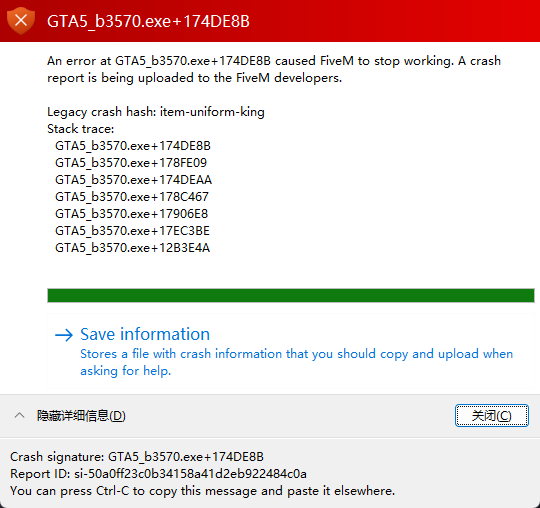
The crash error from the popup is:
An error at GTA5_b3570.exe+174DE8B caused FiveM to stop working.
Legacy crash hash: item-uniform-king
Crash signature: GTA5_b3570.exe+174DE8B
Report ID: si-50a0ff23c0b34158a41d2eb922484c0a
I have attached my crash logs and screenshots for more details.
What have you tried already to fix the issue?
1.Restarted my PC and the FiveM client multiple times
2.Verified the integrity of my GTA V game files via the Rockstar Games Launcher
3.Cleared the FiveM cache folder (%localappdata%\FiveM)
4.Temporarily disabled my antivirus software to check for conflicts
What server did you get this issue on?
The issue began after I joined the FiveM Test Server. It now happens even before I can connect to any server, during the initial FiveM startup.
Error screenshot(s)
Windows version
Windows 11 25H2 26200.7623
System specifications
CPU 13th Gen Intel(R) Core™ i5-13400F (2.50 GHz)
RAM 32.0 GB
GPU NVIDIA GeForce RTX 3060
Antivirus software
Windows Defender / HuoRong Antivirus
CitizenFX crash zip file (‘Save information’ on a crash)
CfxCrashDump_2026_02_06_07_16_36.zip (1.62 MB)
Additional comments
I would greatly appreciate any help or suggestions to resolve this crash issue. It was working perfectly until I changed the language on the test server, so I suspect it may be related to a language file conflict or cache corruption.
